 Tim Yarris
 John Sayre
 Shiyamdev Sritharan

Autodesk Civil 3D 2027 expands how teams design, analyze, and collaborate with the new Autodesk Assistant Tech Preview and Forma Data Management Essentials. These updates bring Autodesk AI-powered guidance and cloud-connected workflows directly into the Civil 3D experience, helping teams stay informed and aligned throughout project lifecycles.
This release also includes enhancements to drainage design and analysis, horizontal alignments, and grading workflows to help teams evaluate designs, iterate efficiently, and deliver infrastructure projects with greater confidence.
Autodesk Assistant Tech Preview
In Civil 3D 2027, Autodesk Assistant introduces a refreshed interface with an enhanced conversational experience and new tabs for managing a prompt library and chat history. These updates make it easier to review, save, and share prompts and responses to support project documentation.
A new Tech Preview also provides early access to additional Autodesk Assistant capabilities currently under development. When enabled, Autodesk Assistant can help with more complex questions and workflows using contextual drawing information. (1)
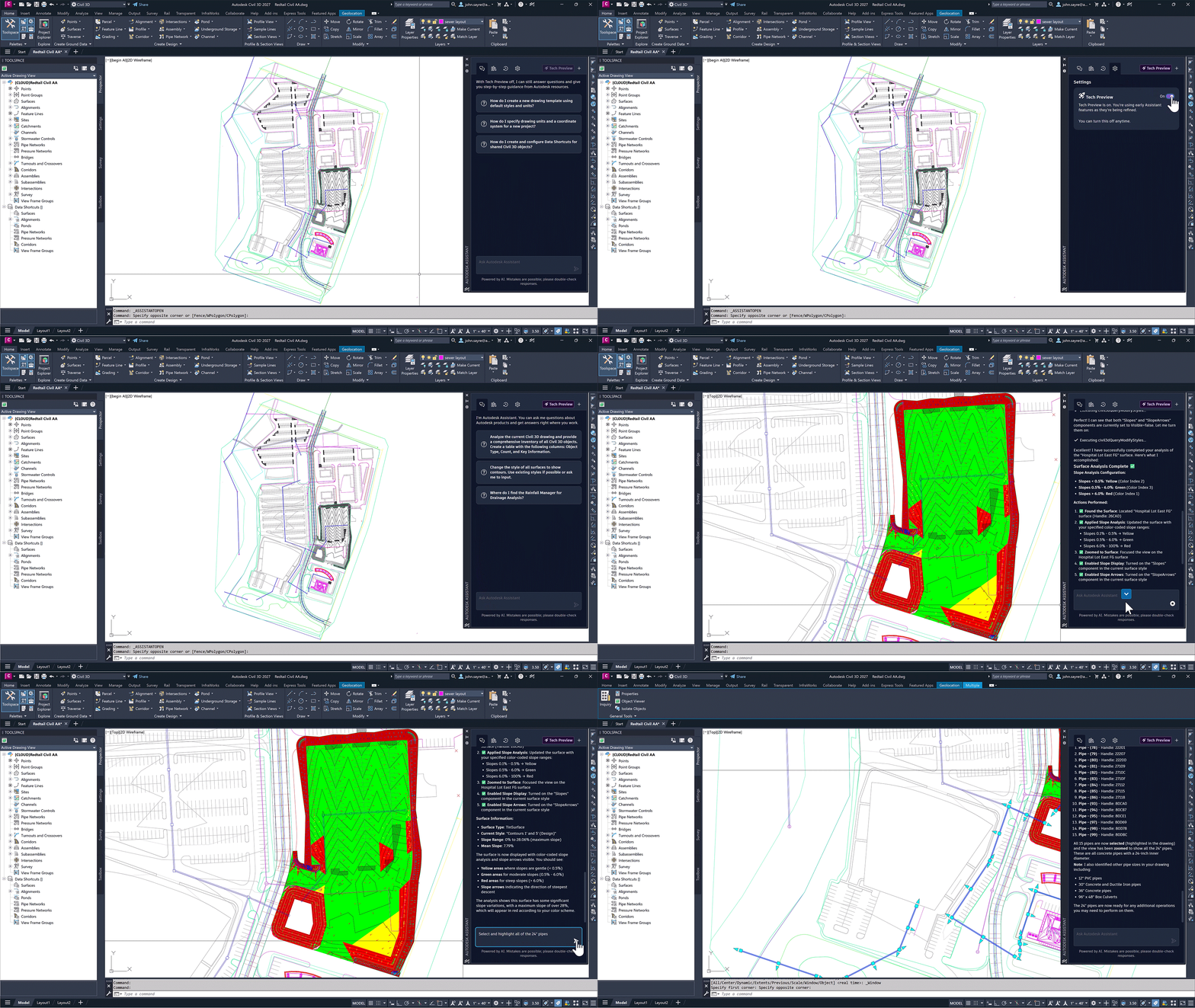
Current Tech Preview capabilities include:
- Selecting and navigating to drawing elements
- Querying drawing information to aggregate and summarize properties
- Analyzing objects and applying styles based on user-defined criteria
These capabilities are experimental and will continue to evolve. For more information, please see the Civil 3D 2027 help documentation.
(1) Powered by AI. Mistakes are possible; please double-check responses.
A connected design experience
Keep teams connected with a cloud-enabled design experience. Autodesk Forma extends Civil 3D workflows beyond the desktop, helping teams organize, share, and collaborate on project data in a centralized environment.
Forma Data Management Essentials
Included with standalone Civil 3D subscriptions, Forma Data Management Essentials provides a centralized, cloud-based environment to organize, view, and share project data. It supports 2D and 3D viewing and markups, search and filtering, folder-level permissions, basic issue tracking—helping teams stay aligned with shared project information.
Connected References
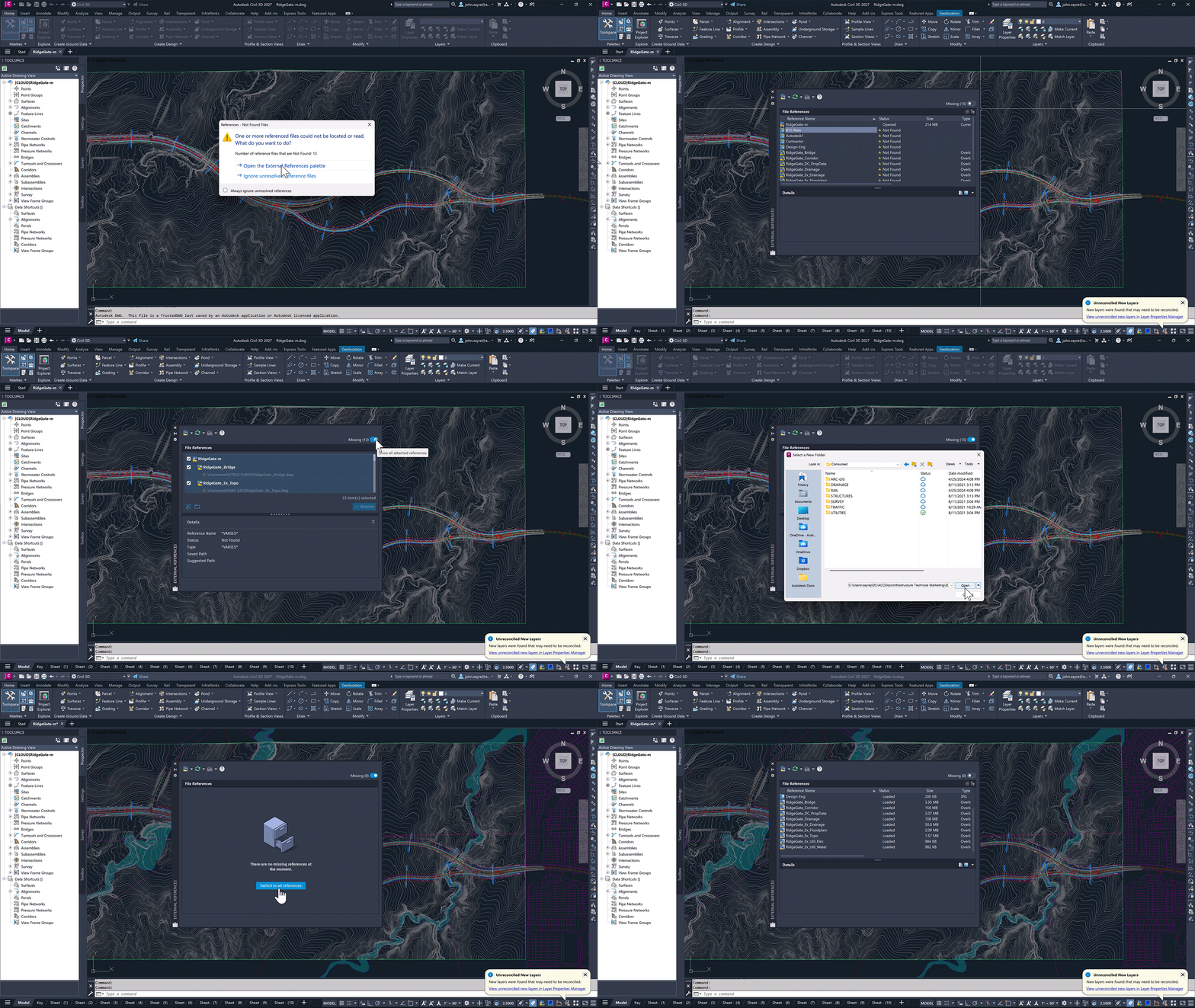
Quickly identify and resolve missing external drawing references (xrefs). When working in Forma Data Management, the External References palette automatically suggests updated file paths for renamed or moved references, reducing manual fixes and helping keep projects moving.
Connected Support Files
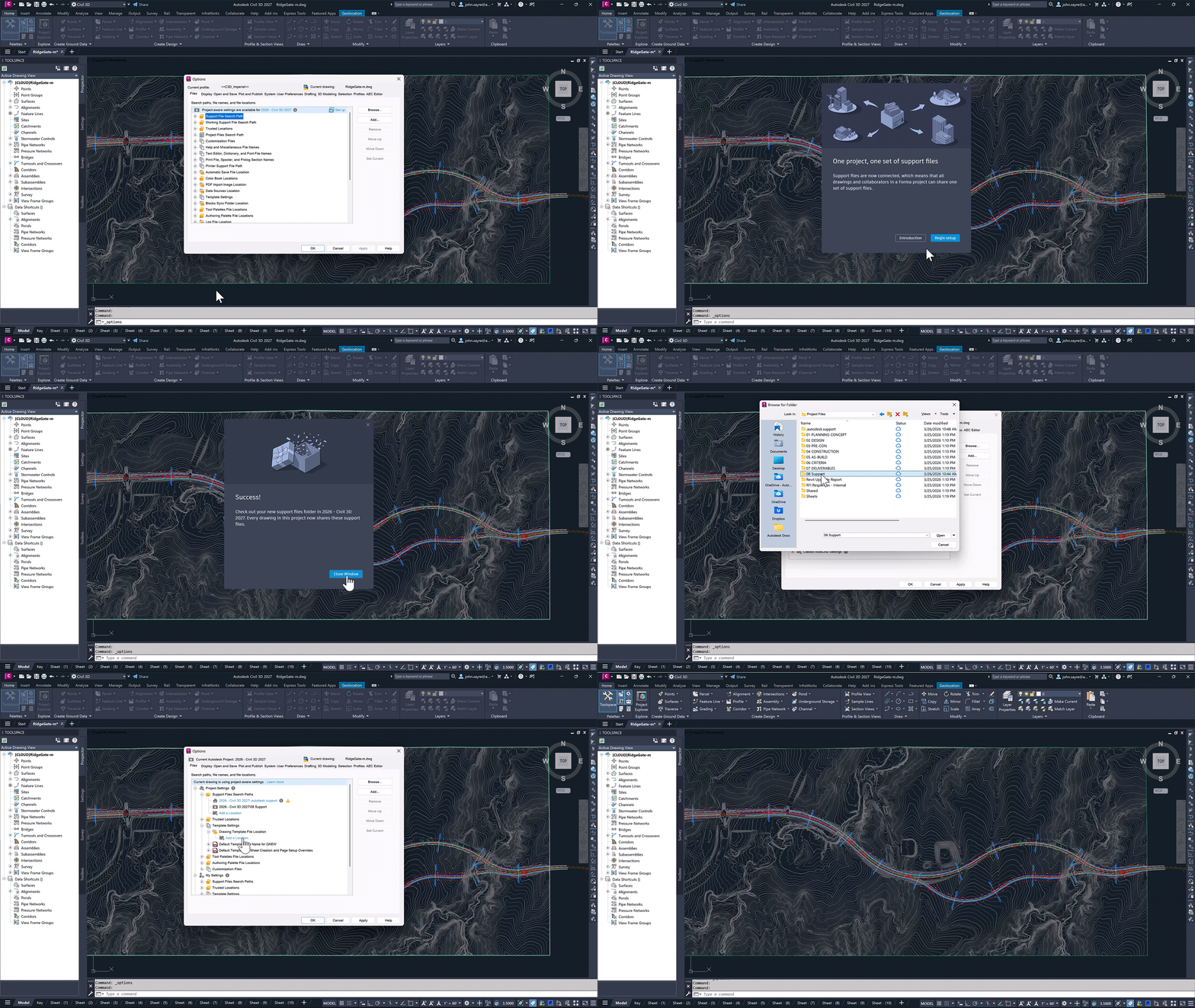
Maintain consistent project standards across teams. CAD managers can define one set of project-aware support files and settings for projects in Forma Data Management, allowing teams to view and edit drawings with the intended support files without additional setup.
Accelerated design and analysis
Enhancements in Civil 3D support faster, more informed design and analysis workflows. Updates to alignment design, drainage systems, and grading tools help you evaluate conditions, refine geometry, and iterate with greater efficiency.
Horizontal Regression Analysis
Civil 3D 2027 introduces several enhancements to Horizontal Regression Analysis to help you make more informed decisions about alignment geometry.
A refined, modeless interface allows you to edit and evaluate alignments directly in the drawing using Alignment Layout tools. A new Alignment Preview displays in real time and is linked to the Curvature Plots and Segment Table, enabling you to inspect and validate regression results as you refine the alignment.
An optional, pre-trained machine learning-powered detection method can also be used to generate more consistent regression results when analyzing complex survey data. Additional updates enhance stationing consistency and data accuracy.
Drainage Design and Analysis
Civil 3D 2027 continues to enhance integrated workflows for designing and analyzing storm drainage systems. With analysis capabilities powered by InfoDrainage, you can run basic site analysis for storm event simulations, evaluate system performance, and apply results directly to your model. For advanced design and analysis capabilities that connect to Civil 3D, designers can use Autodesk InfoDrainage.
Key updates include:
- Catchments: Support for FAA and Kirpich time of concentration methods.
- Channels: Streamlined support for multiple slopes within a single channel.
- Gravity Pipes: Enhanced labeling and added support for arch, elliptical, and egg-shaped pipes in analysis.
- Ponds: New porosity option to define available storage capacity.
- Underground Storage: Expanded connectivity and improved integration as a standardized Civil 3D object.
Additional improvements support working across versions of Civil 3D with Data Shortcuts. Updates to pipe and pressure pipe catalogs also support both local and cloud-based workflows through Autodesk Forma Data Management.
For more information, please visit the help page: Autodesk Drainage Tools for Civil 3D
Daylight Feature Line Tech Preview
In addition to improved stability and performance of Feature Lines, Civil 3D 2027 introduces a new Tech Preview to help automate the creation of daylight lines and streamline grading workflows.
Generate daylight feature lines from existing grading criteria without creating complex grading objects. You can refine results by selecting grading criteria, defining station ranges, specifying a side of the parent feature line, and assigning layers with names and styles. The resulting daylight lines behave like standard Feature Lines in Civil 3D and can be edited using familiar tools.
This Tech Preview is currently under development. For more information, please visit the help page: Feature Lines
Additional updates for Civil 3D
- Bridges: Display full bridge hierarchy in the prospector.
- Dynamo: Updated Dynamo Core with improved performance and upload experience.
- Spiral Tessellation: Improved spiral tessellation method now used by default.
Sign up for the webinar
See the new updates in action in our upcoming webinar to see firsthand how these new capabilities can be applied to your civil infrastructure projects:
What’s New in Civil 3D webinar – Tuesday, April 21, 2026 – 8 am PDT | 11 am EDT | 5 pm CEST
Get started
To learn more about the updates in Civil 3D 2027 and recent releases, visit:
To access the latest features, open Autodesk Access on your desktop or visit the Autodesk Account center. If you’re not yet a subscriber, you can explore Civil 3D with a free trial.