 Mahzad Fasih

We are excited to announce the latest add-on release for Content Catalog, Autodesk’s cloud-based digital asset management tool. This update includes performance improvements and a refined connection workflow for a more efficient and seamless user experience.
Automatic Account Connectivity for Revit Cloud Models
A significant feature of this new release is the elimination of manual account selection when opening Content Catalog from Revit for cloud models. The new workflow automatically connects users to the appropriate Autodesk Construction Cloud (ACC) account, making the process seamless. This enhancement saves valuable time and reduces the risk of selecting the wrong account, which can lead to delays or data inconsistencies.
How It Works
For Revit Cloud Models, the add-on intelligently identifies the correct ACC account associated with your project. This automated connection reduces the steps required, allowing you to get straight to work without worrying about manual account selection. Imagine starting a new design session and instantly accessing the right resources—no extra clicks, no confusion.
Manual Account Selection for Local Models
While automatic connectivity enhances the workflow for cloud models, we understand the importance of flexibility for local models. Users will still go through a manual account selection for local models, ensuring control over account connectivity. This balance between automation and flexibility means teams can adapt to different project requirements.
Outdated Version Notice
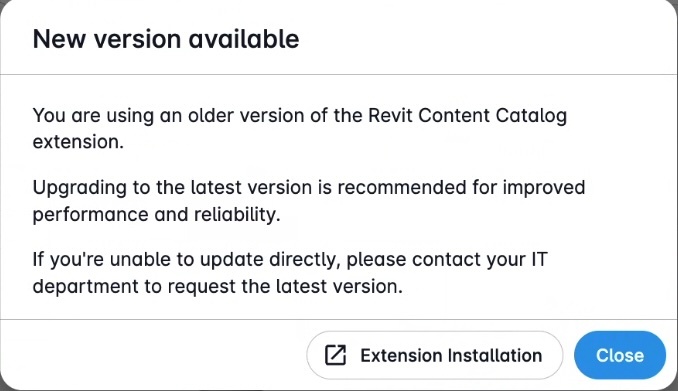
To ensure optimal performance and access to the latest features, Content Catalog will now alert users when their add-on version is out of date. Each release includes critical bug fixes, performance enhancements, and new functionality, so we strongly recommend keeping your add-on updated to the most recent version. This notification, displayed within Content Catalog, makes it easier for users to identify when an upgrade is required, helping maintain a seamless and efficient workflow.
Better Data Across Projects
Integrated with Revit, AutoCAD, and Civil 3D, Content Catalog enriches your common data environment (CDE) by ensuring firm standards and the latest content availability. By reducing rework and promoting standardization, this tool helps maintain better data management across all your projects. For BIM managers and project coordinators, this means fewer errors and more confidence in the data driving your designs. It also strengthens collaboration by ensuring everyone works from the same trusted source of information, minimizing miscommunication and costly mistakes.
Security and Future Outlook
Automated account connectivity not only improves efficiency but also supports compliance with organizational security standards. Looking ahead, Autodesk continues to invest in automation and interoperability, aiming to create even more connected workflows that empower design and construction teams worldwide.
Elevating Your Autodesk Revit Experience
The latest add-on release for Content Catalog introduces enhancements designed to optimize performance and improve workflow efficiency. With automatic account connectivity for cloud models and maintained flexibility for local models, this update is set to transform your Autodesk Revit experience. Autodesk remains dedicated to improving our tools and solutions to meet the evolving needs of the AEC industry. These enhancements will streamline your design processes and help you achieve better outcomes.
Explore the new features of the Content Catalog add-on by installing the newest release at manage.autodesk.com and experience the benefits firsthand.
Happy designing! Stay tuned for more updates as we continue to push the boundaries of what’s possible in design and construction.