 Gabby Winkey

Over the past several months, we’ve introduced a series of powerful updates designed to make it easier, faster, and far more reliable for civil teams to work in Autodesk Construction Cloud. From streamlined project migration to richer review tools and an improved sheet-production workflow, these enhancements are all about helping you move projects forward with greater clarity and confidence.
In this blog, we will highlight four key updates that make managing your Civil 3D projects in Autodesk Construction Cloud more impactful than ever. Here is what’s new.
1. Faster, More Reliable Project Migration to the Cloud
Bulk Upload + DWG Integrity and Migration Tools
Migrating Civil 3D and AutoCAD projects into Autodesk Docs has often required careful preparation to avoid slow uploads or broken file relationships. To make this process smoother, we’ve released two purpose-built tools, the Bulk Upload tool and the DWG Integrity and Migration tool for Docs, that work together to support large and complex civil projects.
Integrity Checking Before You Upload
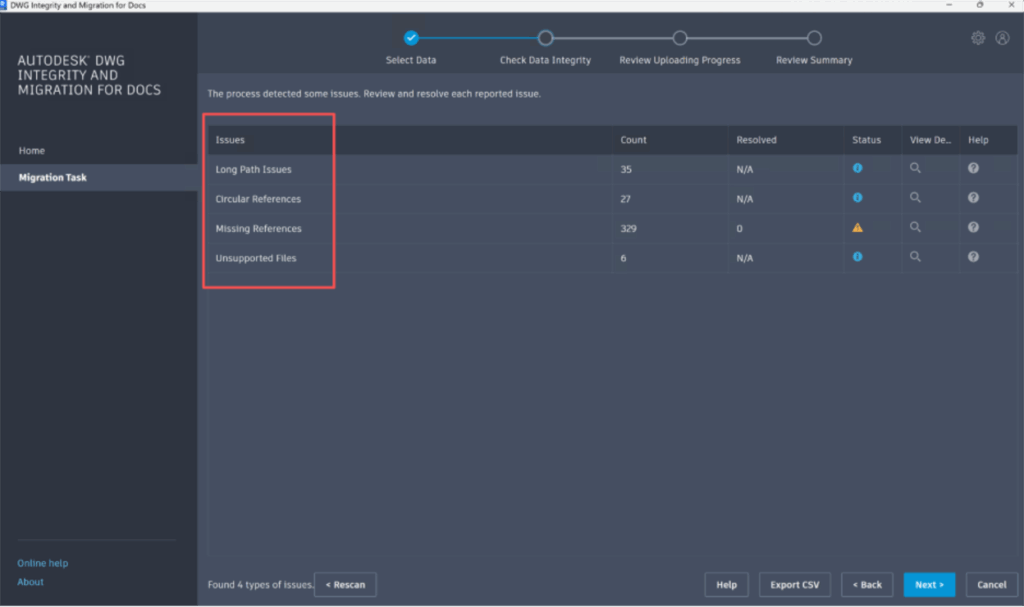
The DWG Integrity and Migration tool for Docs scans your project files before uploading and identifies anything that may cause problems later—such as missing references (Xref & Dref), absolute paths, duplicate files, and more. It also now supports upload for long file paths beyond 240 characters, a common challenge in deep civil project folders.
This helps ensure that your project is structured correctly and ready for a clean transition to the cloud. After the DWG integrity check is complete, users now have the option to upload directly from the Desktop Connector, or to export the reference relationship JSON file for Bulk upload.
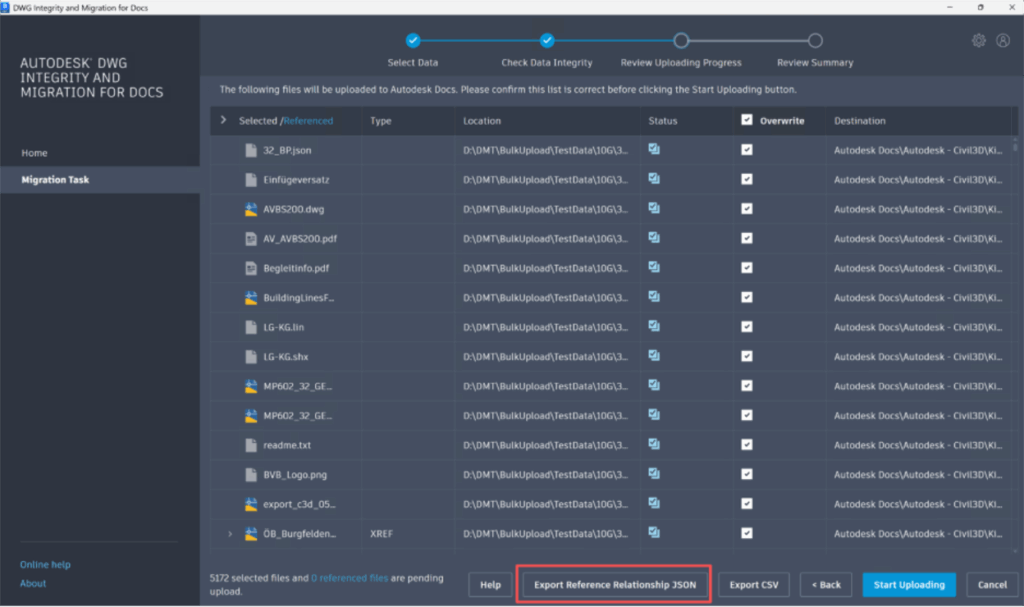
Faster Bulk Uploads for Large Civil Projects
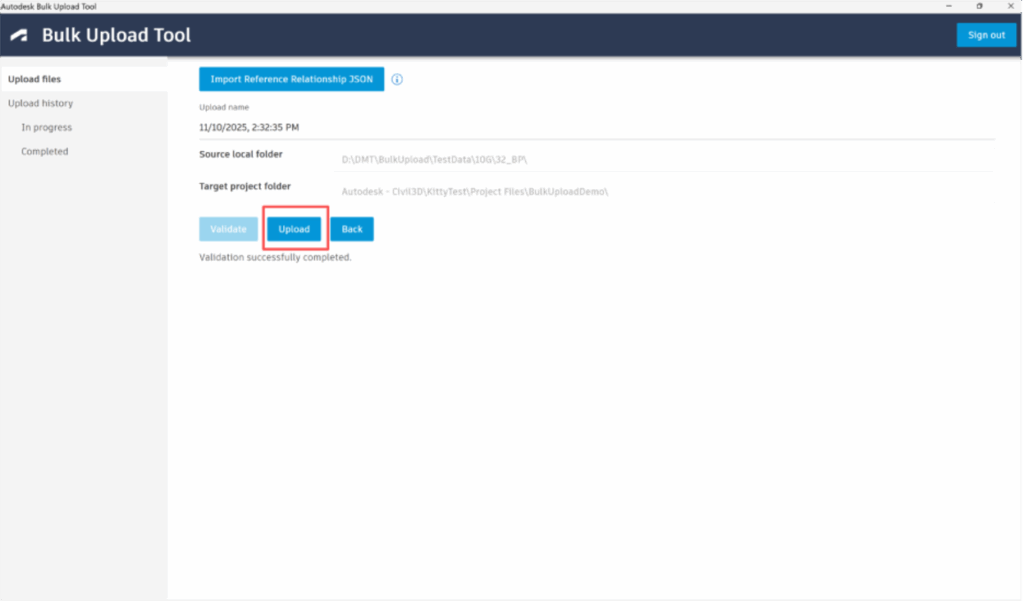
Once your project is validated, a new bulk-upload process allows you to upload large datasets much faster than traditional methods. This workflow uses parallel processing to significantly reduce upload time, while also giving you the option to preserve reference relationships during the upload with the JSON file exported from the DWG Integrity and Migration Tool.
Together, these tools make it easier and more predictable to bring Civil 3D projects into Autodesk Construction Cloud—whether you’re moving one project or migrating an entire portfolio.
To access and learn more about these tools visit the following pages:
- Detail migration instructions page
- Download the Bulk Upload Tool
2. Civil Tools: Enhanced Context for Issues & Reviews
Earlier this year, we introduced Civil Tools in Autodesk Docs Viewer to bring essential Civil 3D context—such as alignment navigation, stationing, station-offset distances and perpendicular views—directly into the cloud. Now we’re expanding these capabilities to make reviews even more intuitive.
Civil Context Captured Inside Issues
When you create an issue in Docs or Model Coordination, the system now automatically captures:
- The alignment/profile being reviewed
- The current station value
- The perpendicular cut-plane position
- Any Civil Tools visuals active during the review
Storing this information gives reviewers immediate clarity into the conflict you identified and its position, without opening Civil 3D. This empowers project teams to verify, review, collaborate on and resolve issues faster.
More Detailed Alignment Information
Civil Tools now display even richer alignment properties, including:
- Whether a segment is a curve, spiral, or tangent
- Start and end stations
- Curve and spiral radius
- Lengths of curves, spirals, and tangents
This provides teams with quicker, more accurate understanding of design intent.
3. Civil Tools Now Integrated into Model Coordination
Civil Tools are now fully available in the Model Coordination Viewer. This means you can now combine civil-specific navigation and measurement with Model Coordination features such as:
- Clash detection
- Object Table
- Advanced Filters
- Colors
- Issue creation
What You Can Do in Model Coordination
- Navigate alignments using station values
- Explore perpendicular cross-sections
- Measure coordinates, elevations, and station-offsets
- Create issues that include full civil context
- Review Civil 3D data alongside architectural, structural, and MEP models in one aggregated environment
This integration makes civil reviews more connected, more visual, and more aligned with the rest of the project team.
Example Use Case for Project Teams in the Cloud: Elevating Collaboration
Building on top of existing cloud workflows, the new Civil Tools capabilities take coordination to the next level. They allow users to bring up issues with civil context already linked during a design coordination meeting. Using the Meetings module, project teams can reference these issues in discussions and add details such as action items. Reviewers can refer to the civil context added to the Issue based on their access level – while they get the full view and multidisciplinary context in Model Coordination, users with restricted access can also review the conflict in a single file in Docs
With cloud-connected workflows and data, teams can also create and send project correspondence about issues, meeting details, and resolution plans directly to stakeholders from within the project. This ensures stakeholders benefit from more collaborative workflows while maintaining accurate project records and history.
For more information about Civil Tools in Model Coordination, visit the following help page.
4. A More Complete Connected Sheet Set Manager Experience
For many Civil 3D teams, sheet production is a critical part of delivering a project. To support this, the cloud workflow for Sheet Set Manager and Plan Production now uses the Classic Sheet Set Manager experience for customers working in AutoCAD 2026.1.1 and Civil 3D 2026.2.
What’s Included
You now have cloud-enabled access to key sheet-set capabilities such as:
- Model Views and Sheet Views
- Sheet Index and Sheet List Tables
- Callout blocks and view labels
This update brings familiar, fully featured sheet-set capabilities into your cloud workflow while improving performance, reducing locking issues, and supporting concurrent editing.
Take Your Civil 3D Workflows to the Next Level with BIM Collaborate Pro
Everything covered in this post is available today for teams using Civil 3D and BIM Collaborate Pro, and each capability is designed to make cloud collaboration smoother, more connected, and more efficient. From faster project migration to richer review tools and a more complete sheet production workflow, these enhancements help teams stay aligned and reduce friction from design through delivery.
If you want to go deeper, check out our Running Civil Projects in the Cloud webinar series. The first session from October 16 is now available on demand and walks through how civil teams are streamlining project setup and collaboration in the cloud. Building on that foundation, our next live session on December 9 will focus on civil design reviews in the cloud and show how BIM Collaborate Pro brings the right context forward to help teams review, coordinate, and take action with confidence.
Register for the December 9 session to continue exploring what is possible with BIM Collaborate Pro.
