 Cesar Escalante

Revit 2026.4 continues Autodesk’s mission to make design workflows faster, smarter, and more connected across disciplines. This release focuses on expanding performance simulations, enhancing visualization workflows, and improving efficiency to enable you to design with greater confidence and clarity. Let’s take a closer look at what’s new.
Autodesk Insight: Simulation Factors
Autodesk Insight for Revit introduces new Simulation Factors, giving you deeper control over key assumptions that drive building performance. Instead of relying on fixed out-of-the-box options, you can now adjust factors such as glazing ratios and mechanical system types to explore “what-if” scenarios directly within Insight dashboards.
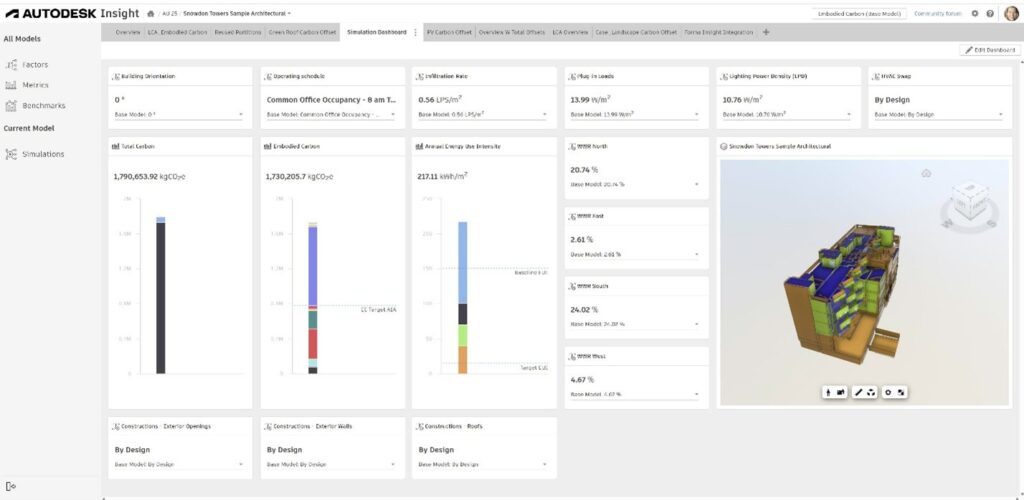
This capability makes performance analysis more transparent, iterative, and connected to design intent. Headline Simulation Factors in this release are:
- Window-to-Wall Ratio factor lets you vary glazing proportions by orientation and instantly see the effect on daylight, heating, and cooling performance. It helps you strike the right balance between transparency, comfort, and energy efficiency, supporting early façade optimization without leaving Revit.
- Envelope Constructions Simulation Factors
Construction Simulation Factors expand Insight’s capabilities by allowing users to test how different envelope assemblies affect building performance. You can now swap out constructions for Exterior Walls, Roofs, and Exterior Openings using a curated set of alternatives.
- HVAC System factors allow you to compare different mechanical system strategies, such as heat pumps, radiant systems, or VAV configurations, and measure how each influences energy use and carbon impact. This enables earlier collaboration between architecture and engineering, aligning envelope and system decisions from the start.
Together, these Simulation Factors make Insight a more dynamic and informative environment for performance-driven design, helping sustainability teams evaluate trade-offs, improve outcomes, and move confidently toward high-performing, low-carbon buildings.
Accelerated Views Supports Image Backgrounds
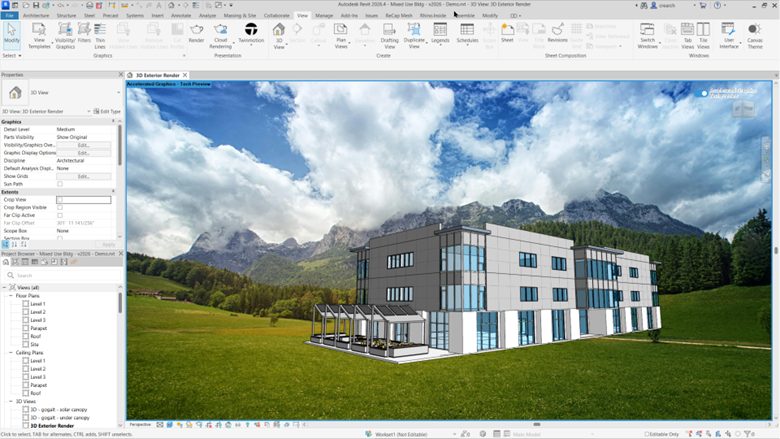
Working with contextual imagery just got easier. Accelerated Views (Tech Preview) now support Image Backgrounds in elevations, sections and 3d Views. helping you visualize your design in real-world context with faster, high-quality performance.
Set Your Preferred Twinmotion Version
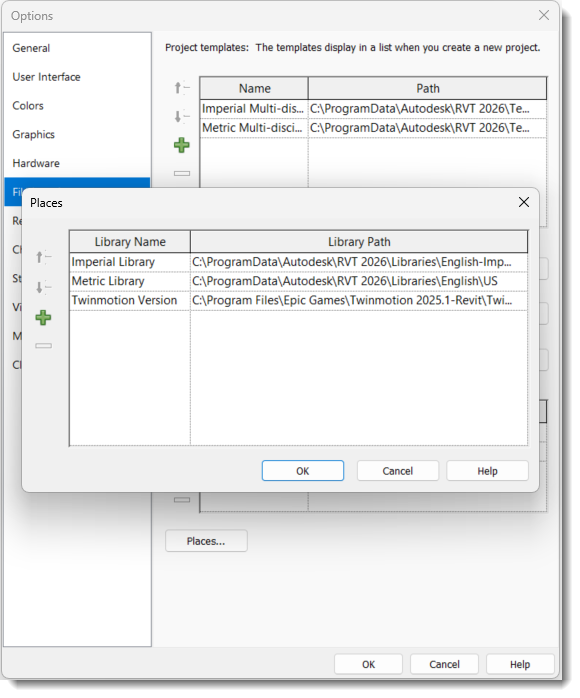
You can now specify which version of Twinmotion for Revit to use, ensuring alignment with your firm’s visualization standards and shared workflows. Under Options > File Locations > Places, you can set the path of a specific Twinmotion version executable, giving you greater control when collaborating across teams and maintaining consistent, predictable visualization results. This preference is configurable in the Options menu for easy deployment and reuse.
Simplified Datasmith Export
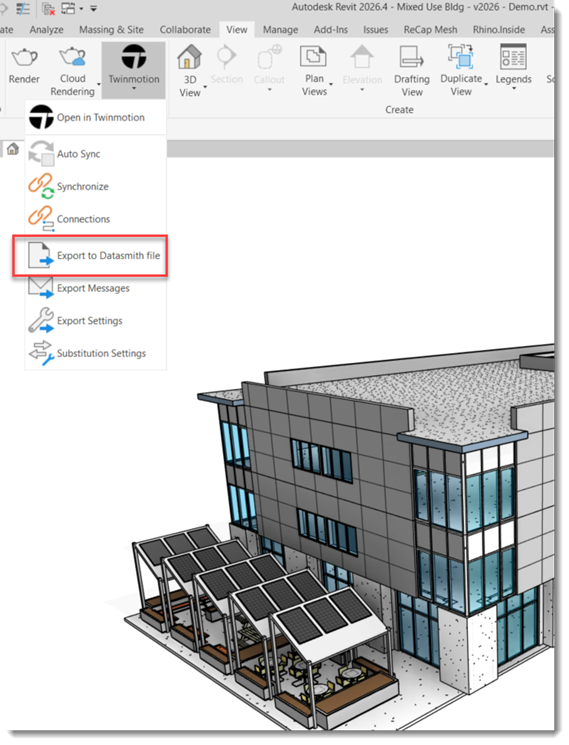
Exporting from Revit to visualization tools is now more flexible. In 2026.4, you can generate a Datasmith file (.udatasmith) without needing a Twinmotion installation, or even GPU resources. This streamlines visualization workflows, giving you quick, alternate access to Twinmotion, Unreal Engine, or any Datasmith-compatible application.
Smarter Manage Links Dialog
Link management gets a major usability boost in Revit 2026.4. The updated Manage Links dialog simplifies how you load, highlight, and modify linked files.
- Batch unload: Unload multiple links at once for workshared cloud models.
- Batch edits: Change Reference Type and Path Type for several links simultaneously. Links with undefined types are ignored.
- Highlight selections: Selected PDFs, images, and CAD references in the dialog box are highlighted in the views where they are placed.
- Show across views: Cycle through all views containing instances of linked or imported images or PDFs.
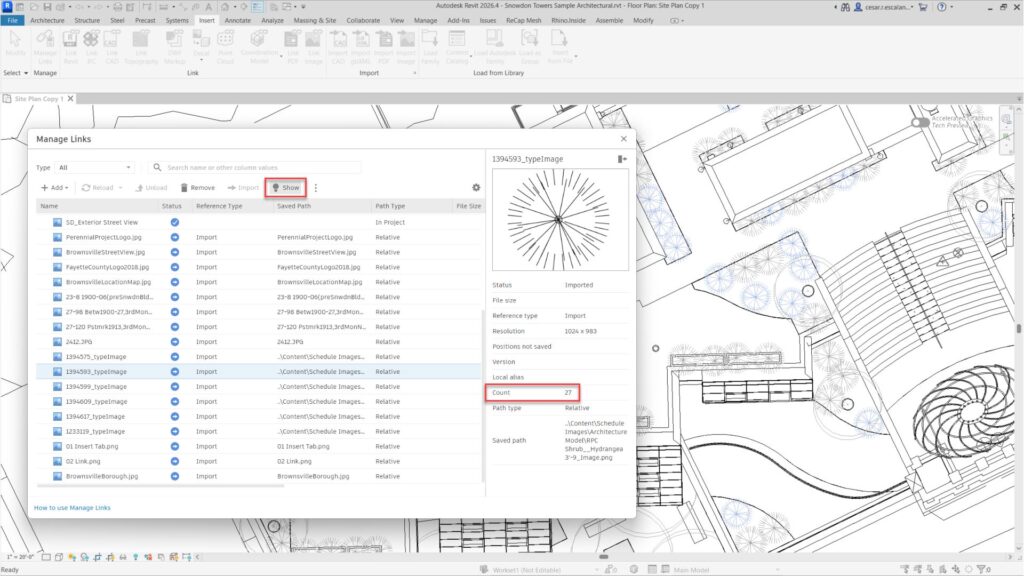
These enhancements make it easier to keep projects tidy and synchronized in collaborative environments.
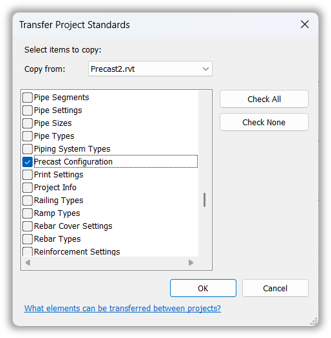
Transfer Precast Configuration Settings
For structural teams, Revit 2026.4 introduces a convenient way to transfer Precast Automation Rules between projects. Simply transfer configurations settings from one project to another. Revit automatically overrides existing settings in the target file, allowing you to streamline setup and ensuring consistency in structural precast projects.
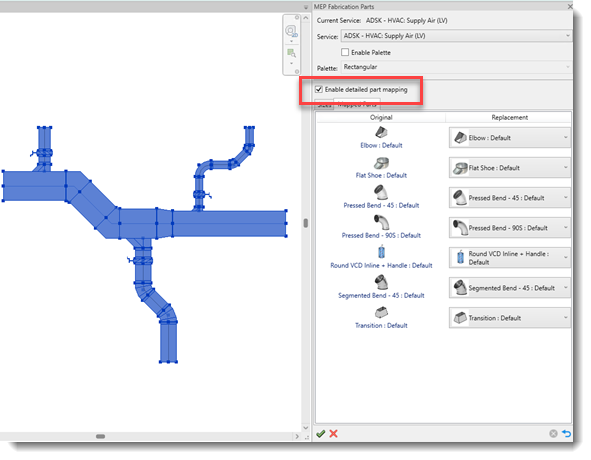
Part Mapping for Design-to-Fabrication and Change Service
Connecting design intent to fabrication continues to improve. The Part Mapping tool now supports detailed mapping for fittings and in-line components, with options to reset mappings to default, retain failed elements, and enable detailed part mapping for greater control. These updates strengthen design-to-fabrication workflows for MEP and industrial applications where accuracy and configurability matter.
Dynamo Core 3.6.1
The integrated Dynamo Core delivers greater stability and reliability for designers and developers. Version 3.6.1 addresses bug fixes and performance refinements.
Looking Ahead
Revit 2026.4 advances our goal to make design workflows more efficient, intelligent, and connected. From simulation and visualization to coordination and automation, each update helps teams design and deliver with greater precision and impact.
To learn more, visit the Revit product page or check out the Revit Public Roadmap for what’s next.
Get started with Revit 2026.4 through the Autodesk Access application on your desktop. And if you’re not yet a subscriber, be sure to check out a free trial of Revit 2026.
Happy Revit-ing!
The Factory