 Cesar Escalante
Revit 2026.2 arrives as a targeted update, delivering important productivity gains—particularly for residential designers—while raising the bar for performance, automation, and documentation across all disciplines. With the introduction of the expanded Residential Content Pack and technical enhancements, teams can design, document, and deliver projects with greater speed, accuracy, and confidence.
Residential Content Pack: Powering residential design
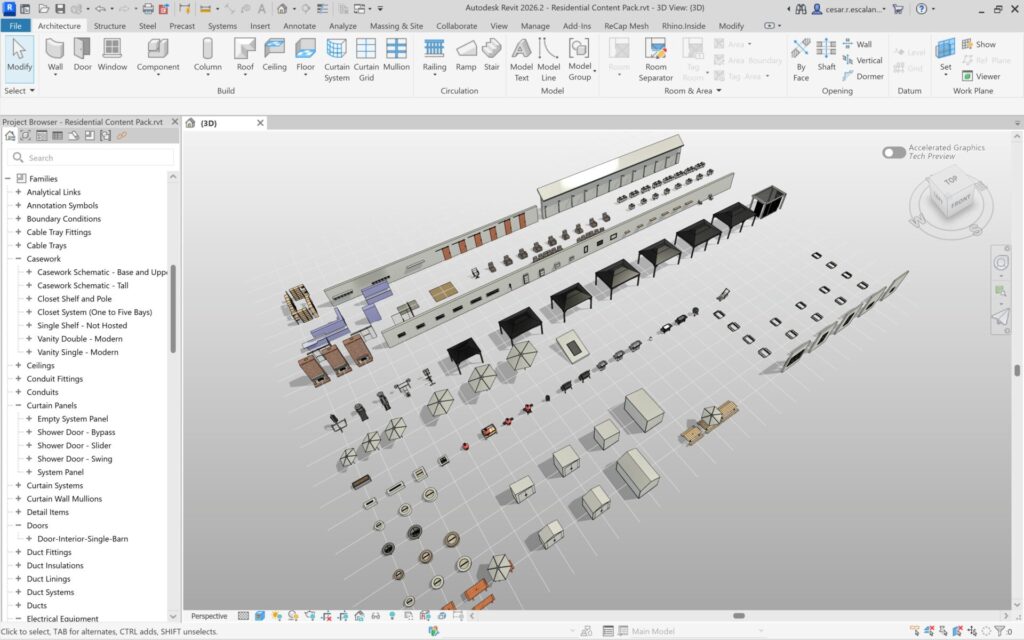
The standout feature in Revit 2026.2 is the expanded Residential Content Pack, offered to accelerate residential project workflows.
This comprehensive library delivers:
- Over +100 new loadable families, available both as individual files and conveniently consolidated within a single container file (RVT). The extensive range of content includes:
- Window shutters
- Barn doors
- Kitchen casework (with closets and shelving)
- Bathroom showers and vanities
- Fireplaces and fire pits
- Indoor and outdoor furniture
- Grills and planters
- EV batteries and inverters
- Exercise equipment
- Downspouts, and more
- A new System Family container file (RVT) with new definitions for Wall, Curtain Walls, Materials, Floors, Roof, Toposolids, and upgraded Stairs and Railing.
With this pack, residential designers can rapidly populate their models with consistent, high-quality components—reducing time spent on family creation and ensuring uniformity across projects. This translates to quicker project initiation, enhanced design iteration, and improved documentation accuracy. The US-English Residential Content Pack is now conveniently available as an optional download for Revit and Revit LT through your account management page, located under the “Libraries” section in the “Product Updates” section. The pack is only available in English – US Imperial Units.
Accelerated views: Performance and visualization upgrades
Revit 2026.2 delivers new graphical improvements to the Accelerated Graphics Tech Preview—Revit’s newest graphics engine, first introduced in Revit 2026, which enhances performance and visual quality in both 2D and 3D model views by shifting graphics processing from the CPU to the GPU. The new enhancements include:
- Faster Orbiting: Smoother navigation in 3D views with crop regions enabled, making model review and design exploration more responsive.
- Transparent Highlighting: Selected elements can be displayed with transparency, enhancing clarity when working with complex assemblies.
- Rectangular Crop Regions: Support for rectangular cropped views in accelerated mode.
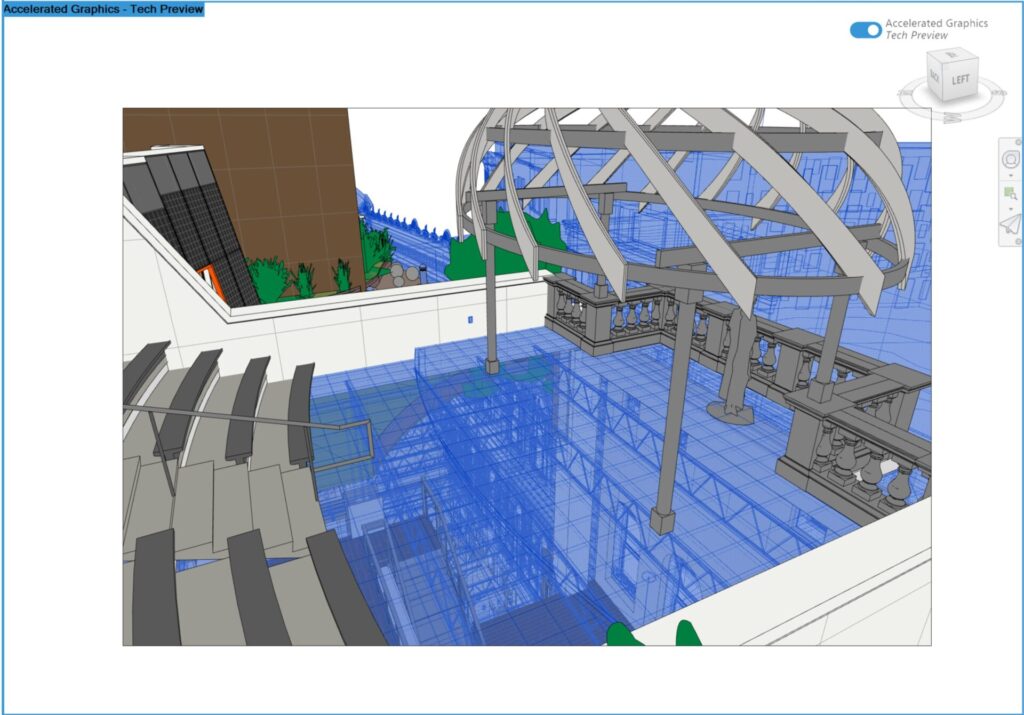
These improvements leverage GPU acceleration, optimizing large model handling, reducing lag, and delivering more precise visual feedback, especially valuable during design reviews and coordination.
Workflow automation and documentation enhancements
This release also brings a handful of technical upgrades to streamline automation and documentation, including:
- Dynamo Core 3.5.2: Enhanced stability and new features for visual programming, enabling more sophisticated automation and custom workflows.
- Background PDF Export: PDF exports now run in the background by default, allowing uninterrupted work and boosting productivity during documentation phases.
- Text Editor Navigation: Support for Ctrl + arrow keys to move the cursor between words and paragraphs in the text editor, enabling faster navigation for annotation and documentation tasks.
- MEP Fabrication: Assemblies with fabrication parts now behave as unique elements, even when they match, ensuring accurate scheduling and reducing errors in fabrication workflows.
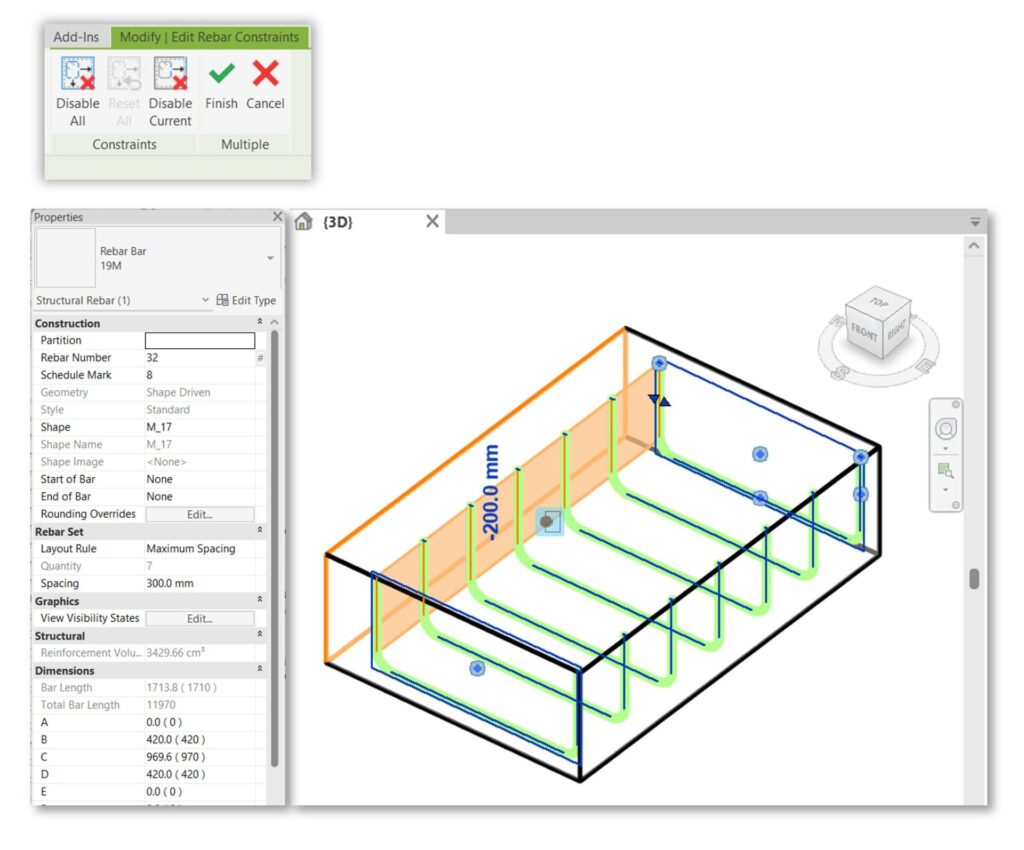
- Enhanced Rebar Constraints: Users can undo/redo constraints, switch views, apply constraints to multiple sets, and modify rebar properties while editing constraints, offering greater flexibility in structural documentation.
For full documentation on Revit 2026.2, refer to this link. To see what’s coming next, visit our Public Roadmap for upcoming feature plans.
Get started with Revit 2026.2 through the Autodesk Access application on your desktop. And if you’re not yet a subscriber, be sure to check out a free trial of Revit 2026.
Happy Revit-ing!
The Factory