 Adam Simmons
Autodesk Model Analytics Essentials brings near real-time visibility into how Revit cloud models are really performing
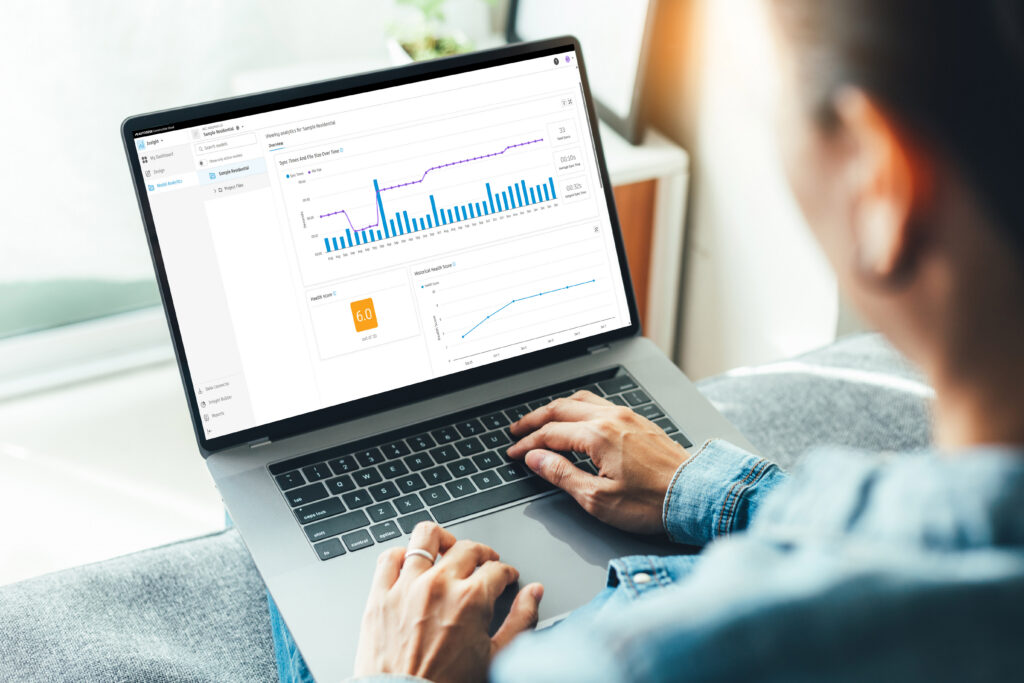
If you’ve ever worked inside an AEC project, you know how quickly things can get complicated. Models grow. Teams expand. Deadlines tighten. And small issues can quietly snowball into big problems before anyone has time to react. While Revit Cloud Worksharing gives teams incredible flexibility, it also introduces something most firms struggle to stay ahead of model health.
Until now, understanding a model’s true health often meant piecing together clues: digging through Revit journals, asking around about sync issues, manually checking model size, or making educated guesses when things started to slow down. The data existed, but it was spread across logs, spreadsheets, and tribal knowledge, making it difficult to turn into something meaningful or actionable.
That’s where Autodesk Model Analytics Essentials comes in. Built directly into Autodesk Forma Insight, it gives project teams near real-time visibility into how their Revit cloud models are performing.
Why Model Health Matters More Than Ever
Model health isn’t just a “BIM manager’s problem.” It affects everyone:
- Designers feel the pain when sync times climb.
- Project managers struggle when unpredictable model behavior delays downstream work.
- And when a model slows down or crashes, the ripple effects are felt across the entire project team.
The reality is: Poor model health is one of the biggest hidden risks on AEC projects.
When file sizes surge, versions drift, or uncontrolled changes stack up, performance suffers. And once models get bogged down, recovering stability can take hours—time no project can afford.
Autodesk Model Analytics Essentials was created to change that dynamic, helping teams move from reacting to issues to proactively identifying and reducing them.
What Autodesk Model Analytics Essentials Does — In Plain Language
At its core, Model Analytics Essentials tracks the key signals that shape day-to-day model performance and presents them in clear dashboards directly inside Insight. There’s no third-party setup, no separate systems to manage, and no need to open Revit just to understand what’s happening.
Here’s what Model Analytics Essentials helps teams understand:
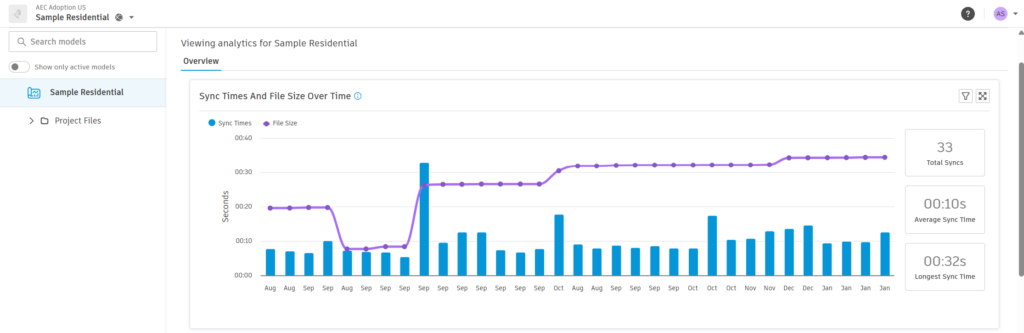
1.) Sync Behavior
Sync-to-central times tells a powerful story about how a model is behaving day to day. Long or inconsistent sync times often signal network strain or an overloaded model, early warning signs that performance issues may be forming.
2.) File Size Growth
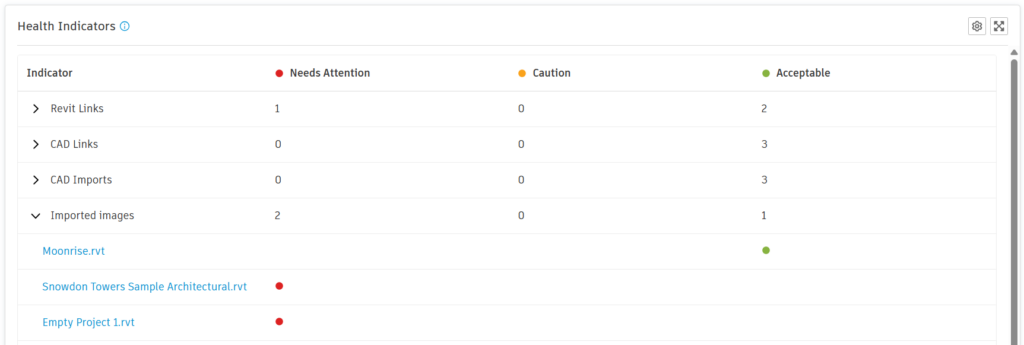
As models become more complex, performance dips. Model Analytics Essentials visualizes this growth over time so teams can step in early by using health indicators like Imported or linked files and poor model practice identifiers.
3.) Version Alignment
When teams drift onto different Revit versions, corruption and instability follows. Model Analytics Essentials highlights misalignment before it disrupts work with the Revit minor version check for all users on each Revit model.
4.) Change Patterns Between Syncs
Every sync leaves a snapshot. Model Analytics Essentials stitches these snapshots together, making it easier to see what changed between syncs, when those changes occurred, and which user was involved. This information appears in the compare dashboard, where each dot on the scatter plot can be selected to view the details of an individual user’s sync.
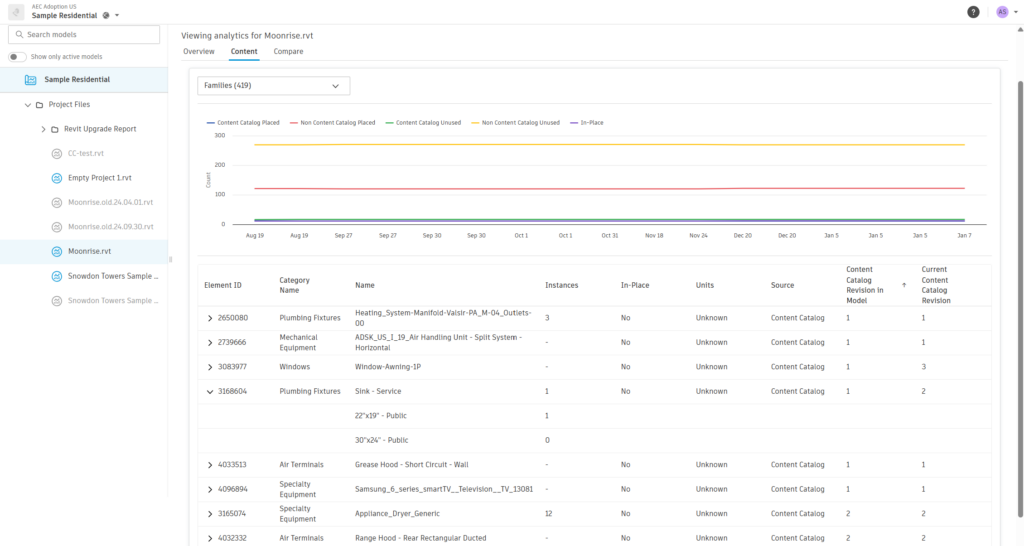
5.) Content and Element Trends
Things like CAD imports, in-place families, outdated content, or unapproved elements often hide in plain sight. Model Analytics Essentials surfaces them before they cause issues. These signals are automatically collected and visualized, giving teams a real window into the health and behavior of their models.
This isn’t just “more data.” It’s structured, meaningful, actionable information that reveals the heartbeat of your models and makes it easier to spot issues before they disrupt work.
A Tool for Everyone on the Project
Autodesk Model Analytics Essentials was built for the entire project ecosystem.
For Designers
It takes the guesswork out of slowdowns. Using simple color-coded health scores, Model Analytics Essentials helps designers quickly see trends in model health and understand whether an indicator represents an anomaly or a downward trend. This provides visibility into where issues are forming, without designers needing to dig through technical logs.
For BIM Managers
It replaces opening Revit for slow manual model checks, spreadsheets, and screenshots, with dashboards that update automatically every time someone syncs.
For Project Admins and Coordinators
It brings consistency across teams and locations. You can finally see how models are behaving, where risks are forming, and where models need attention.
For Project Managers
Model health becomes a predictable, monitorable part of project delivery, not a wildcard.
A Connected Foundation for the Future
Autodesk Model Analytics Essentials is also built on top of the growing AEC data model, meaning the information it processes is part of a broader ecosystem of model intelligence. Over time, this foundation could unlock new ways of analyzing model behavior, connecting insights across projects, and supporting future automation and AI-driven workflows.
Model Analytics Essentials gives teams something they’ve never had before: continuous, automated, built-in visibility into model health across their entire cloud portfolio.
Why This Matters for Your Firm
Healthy models mean:
- Fewer unexpected crashes
- Shorter sync times
- More predictable coordination
- Clearer accountability
- Less downtime
- More time spent designing – not troubleshooting
It also means teams can stay proactive rather than reactive, which directly impacts schedules, budgets, and stress levels.
Better data = better decisions.
Better decisions = better outcomes.
Included for All Autodesk Forma Design Collaboration Subscribers
As part of this launch, we’re excited to share that Autodesk Model Analytics Essentials will be included as an entitlement for all Autodesk Forma Design Collaboration (formerly BIM Collaborate Pro) subscribers.
Forma Design Collaboration will automatically gain access to Model Analytics Essentials inside Insight – no separate purchase required.
That baseline experience of real, meaningful visibility into your cloud-hosted Revit models, is available for teams to start using right away. Get more information here and click this link to add Model Analytics Essentials to your workflow to discover its benefits today.