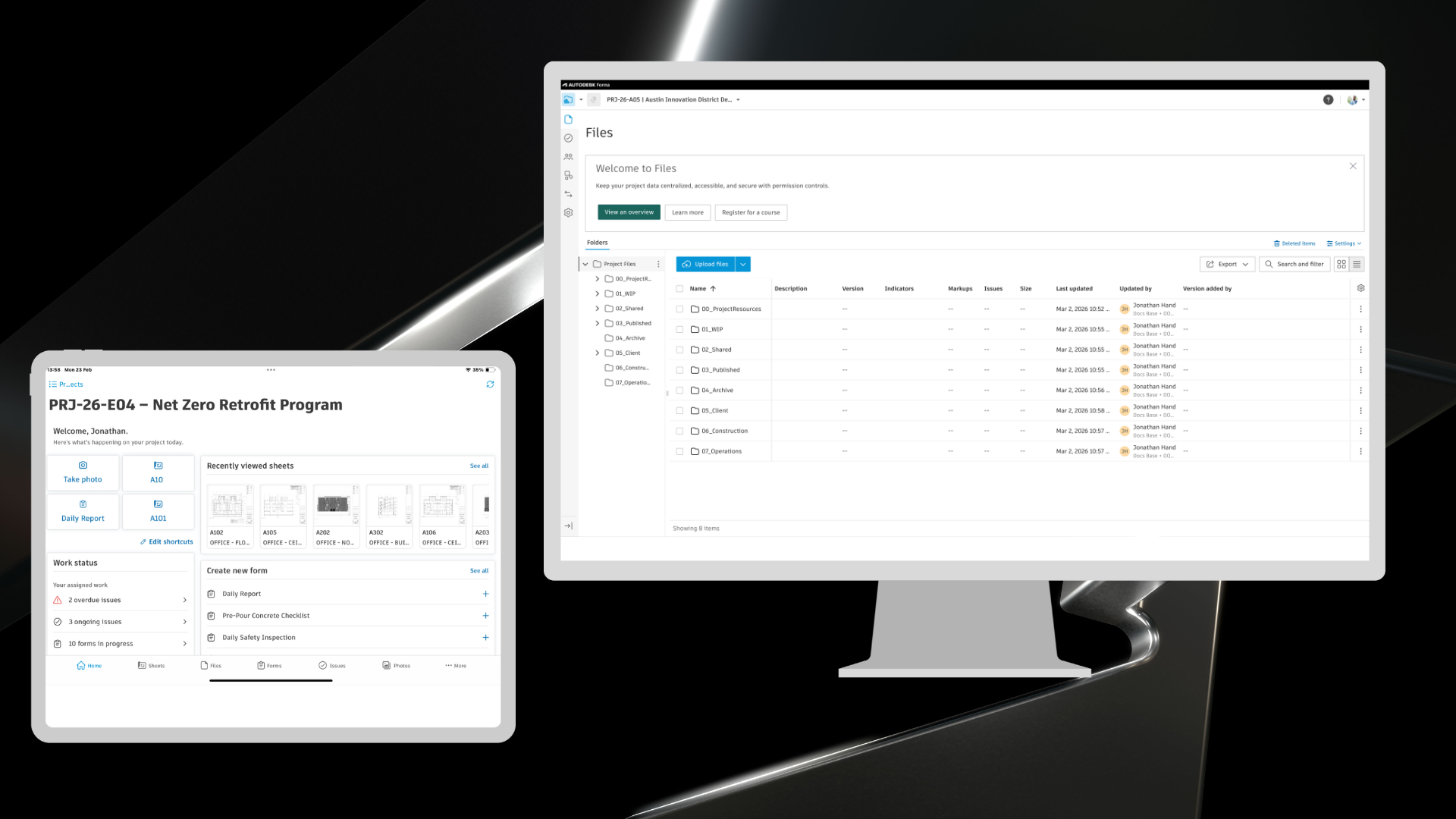
Autodesk Construction Cloud has joined the Autodesk Forma industry cloud and has taken on the Forma brand. As part of this evolution, additional Autodesk Construction Cloud product names have also been updated to align with the Forma brand. You will see these updates reflected throughout this blog.
This month, Autodesk Forma introduces over 70+ construction product updates to support more efficient, connected project delivery. These releases strengthen how teams manage access, information, and change across projects.
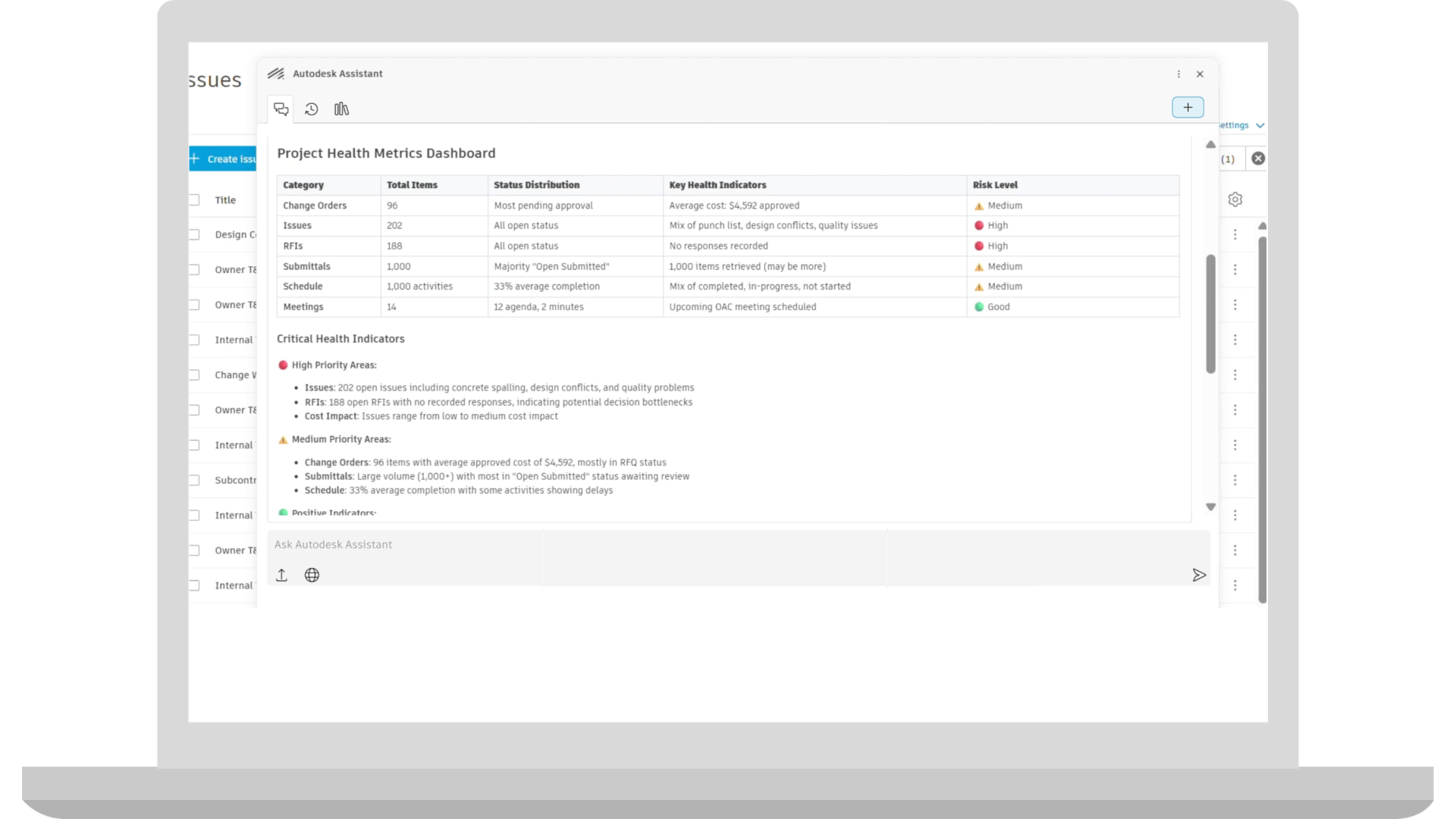
Autodesk AI | Autodesk Assistant: Project Data
The Project Data agent in Autodesk Assistant is exiting beta, unlocking a smarter way for construction teams to interact with their project data. Embedded directly in the Autodesk platform, the Assistant helps teams instantly surface insights, automate routine work, and stay focused on what matters most.
Admin (Hub) | Default Roles Simplification
Three new default roles—Administrator, Power Collaborator, and Collaborator—are now available for new hubs. These roles include predefined permissions designed to simplify project setup and help teams onboard users more quickly.
Project Admins can still create custom roles and adjust tool permissions within individual tools when additional configuration is needed.
As-Built Export | Enhanced Photos Experience Support
As-Built Export now supports photo albums created with the enhanced photos experience in new projects. Photos are organized by album in the export, making it easier to deliver site photos, inspections, and progress documentation as part of project closeout.
Bridge | Repeat Sharing Across Projects - Bridge Tool
The Bridge tool now includes a share again option that allows users to quickly repeat a share to another project without starting the process of Bridge process over. After sharing to one project, users can select another project while keeping the same selected files, title, and message. This helps teams distribute the same information across multiple projects with fewer steps.
Dashboards | Quality KPI Dashboard Improvement
"Overdue issues or forms by company" will include issues and forms assigned to users associated with the companies.
Dashboards | ACC My Home - Surface Items Assigned to Roles and Companies
My Home "Assigned to me" card now includes items assigned to a project member's roles and companies in addition to their assignments. It now aggregates their tasks from across all active roles and companies, even if they span multiple projects or accounts.
Data Connector | Forms Data Enhancement
Forms Data Enhancement for Data Connector removes signature SVG files from exports and replaces them with a lightweight signed indicator. This reduces dataset size and improves extract performance while still allowing customers to report on whether a Form has been signed.
Data Connector | Cost Data Enhancements
Cost Data Enhancements introduce new Data Connector fields to support deeper analysis of project costs and financial performance. These additions enable better tracking of budgets, forecasts, quantities, compliance status, and financial deadlines for more robust cost reporting and dashboards.
Data Connector | Issues Data Enhancements
Issues Data Enhancements add new Data Connector fields that provide more context on where issues appear within project content. These fields link issues to their placements and related viewables, making it easier to analyze how issues relate to models and documents.
Data Connector | Plan Data in Data Connector
Plan data is now supported in the Data Connector export. Export information about individual work plans, tasks and task progress, commitments, handoff and task comments to be used to create BI dashboards on a project and company level.
Handover | Expanded Export Configuration
Handover now supports additional export configuration options for Sheets, RFIs, and Submittals to match the capabilities available in As-Built, giving teams more control over the project records included in Handover packages and making it easier to prepare final deliverables for project closeout.
Insight Builder | Estimate Data in Insight Builder
Estimate data is now available in Insight Builder to help create custom dashboards and reports. A prebuilt Estimate dashboard template is included to help users quickly create powerful analytics for their estimates. The template includes pre-built visuals such as total cost of estimates across projects, average cost by project type, project totals by line item, number of takeoff packages, and other data points to help estimating teams quickly uncover cost implications and make informed decisions during preconstruction.
Insight Builder | Share Dashboards with Projects
Teams with any value-based subscriptions or EBAs, can utilize Insight Builder to add customized dashboards to the project home page. Admins can create role-based dashboard templates with one click to improve data standardization.
Issues | Photo Grid
Photo Grid introduces a visual grid view for Issues, allowing project members on mobile to quickly browse issues using their associated photos. The grid view can be pinched to resize, making it easier to scan, and locate issues visually.
Issues | Quick Issue Create
Accelerate multiple issue creation on site through Quick Issue Create. Project teams can snap a photos, add context, and create multiple issues in one go.
Issues | Issue-Associated Markups
Associate 2D markups directly with issues. Project teams can now create and edit markups that are persistently tied to an issue, so the markups stay connected with the issue. To support issue resolution, these issue-associated markups can be edited and deleted at any point in the issue lifecycle.
Issues | Copy/Paste Issues
Project members can now copy and paste issues, accelerating entry for commonly found problems on site.
Mobile App | Share Effortlessly
Project members can send content via deep links using their mobile device's native share options.
Mobile App | Faster Project Entry
Project members using the Forma mobile app now can enter projects faster, with data downloading in the background.
Mobile App | Improved Mobile Photo Sync
Improved Mobile Photo Sync speeds up photo access on mobile by downloading optimized images first, reducing sync times and storage usage. Full-resolution photos remain available on demand when higher detail is needed.
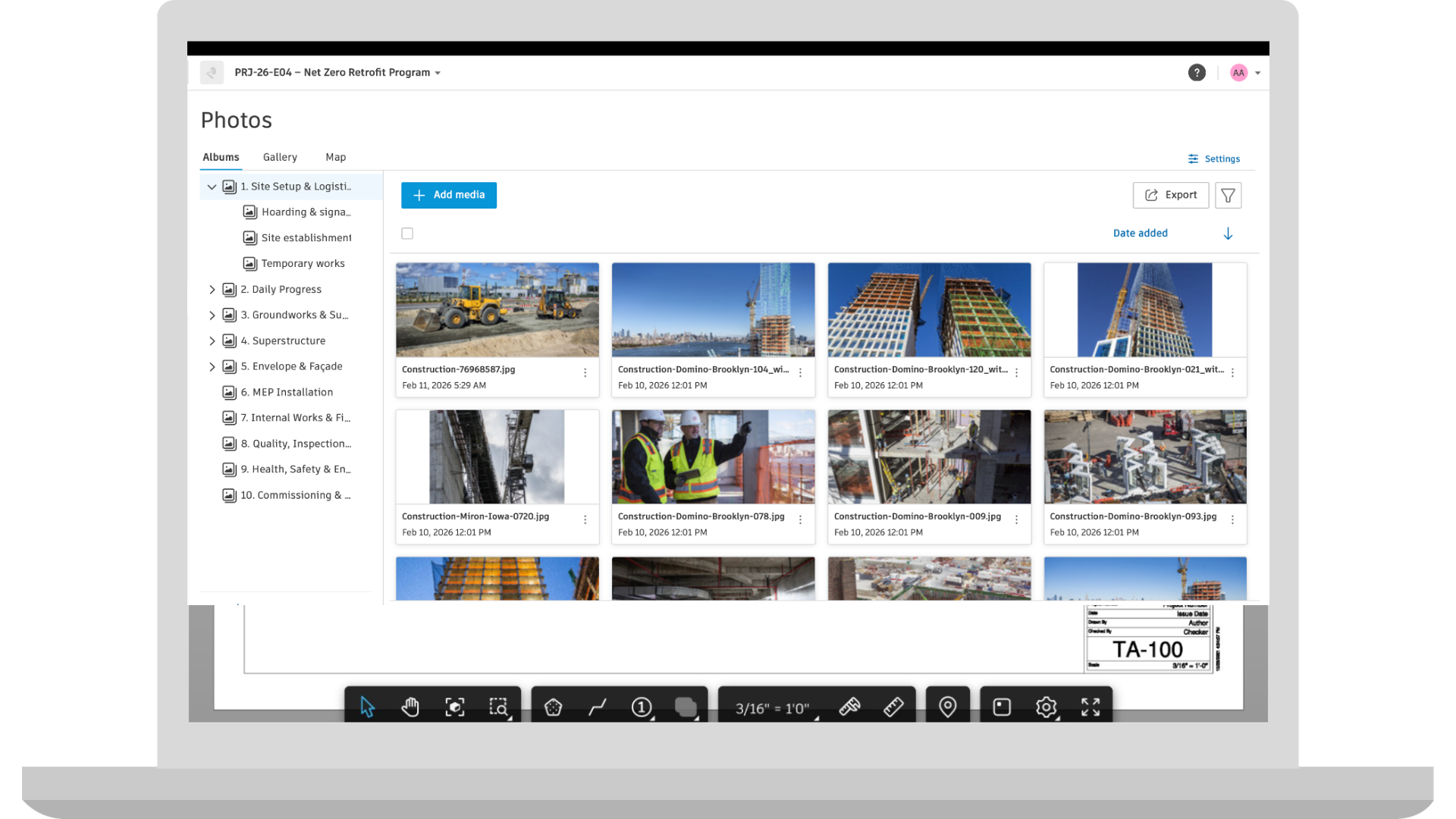
Photos | Enhanced Photos Experience
The new, enhanced photos experience provides new projects with creatable photo albums, permission management, and bulk actions:
Albums and Permissions in Photos:
Bulk Download, Delete and Move:
Project Templates | Cost Report Templates in Project Templates
Cost report templates will be included in project templates, allowing teams to start new projects with predefined cost reporting structures. This helps standardize how project costs are tracked and shared, reduces setup effort, and supports consistent financial reporting across projects.
Project Templates | Safety Project Template
Jobsite safety template for construction teams. This template helps project teams stand up safety programs that support consistent standardization and proactive risk management.
Reports | High-resolution Photo Thumbnails in Reports
Customers will now see change that allows for larger photo thumbnails (1024px) for newly uploaded photos via attachment component.
Reports | User Created Templates in Create Report Template Workflow
User-created report templates are now available directly within the Create New Report workflow, alongside standard templates. This brings all templates into one place, making it easier to reuse custom report configurations and create reports that align with project or business needs.
Specifications | Auto-Sectioning Improvements
Auto-sectioning improvements will deliver more accurate and reliable spec document structuring for non-CSI MasterFormat and non-English specifications.
Specifications | Delete Spec Sections
Specifications will support deleting individual spec sections from a version set. This allows outdated and incorrect spec sections to be removed so that the version set accurately reflects the current project and maintains up-to-date documentation.
Specifications | Current Version Determined by Issuance Date
Issuance date of a version set will drive what is considered current in the Specifications tool. This update aligns to the logic of the Sheets tool and supports project managers to control the current version of the project spec.
Workspaces | In-Product Hub Provisioning
Users can now create a hub directly from within Autodesk Forma through My Home, without needing to go to manage.autodesk.com. This allows customers to start using Autodesk Forma as soon as they get access, reducing setup steps and improving the onboarding experience.
Workspaces | In-Product Purchasing
Customers will be able to purchase additional licenses for select Autodesk Forma products directly from the Hub Admin tool, including converting trials and adding seats for Forma Build Essentials, without needing to leave the product.
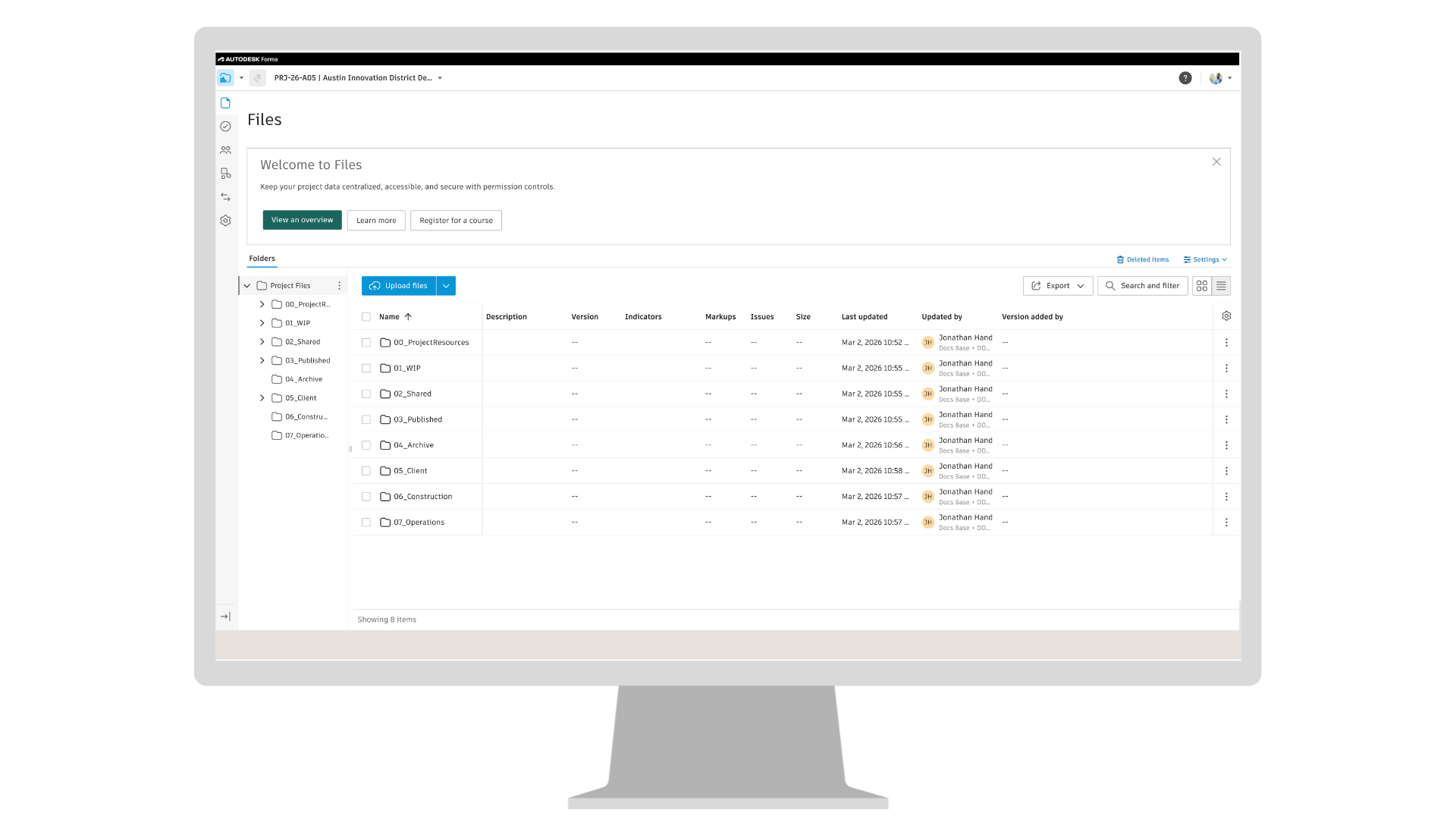
Forma Data Management Essentials
Introducing Forma Data Management Essentials, a new starting point for connected project data in Autodesk Forma. It is included with standalone AutoCAD, Revit, and Civil 3D subscriptions, as well as the Product Design and Manufacturing Collection. Forma Data Management Essentials connects desktop workflows to a shared data foundation, enabling teams to organize project information, track changes, and stay aligned from the start of a project through cloud-connected collaboration. Coming to standalone subscriptions AutoCAD, Revit, and Civil 3D subscriptions, as well as the Product Design and Manufacturing Collection.
Forma Board as a tool in Forma Data Management
Forma Board will be available within Forma Data Management as a BIM-connected collaborative visual workspace for AECO teams. Included with Forma Data Management and Forma Data Management Essentials, it will allow teams to place live BIM content such as Revit views and design options into boards, add markups and comments in context, and collaborate in real time while keeping design reviews connected to project data. This helps teams compare options, align direction, and avoid design reviews getting split across PDFs, screenshots, and chat threads. Coming to Data Management and Data Management Essentials.
Files | Datasets
Datasets are a new data type in Forma Data Management that represent granular project data generated through supported workflows such as Revit Extended Properties and Forma Connected Clients. These workflows create Datasets that may contain project data such as properties, geometry, or analysis results, depending on the workflow. Datasets are surfaced in the Files tool, where they can be organized and managed alongside project files and made available across connected applications. This helps teams reduce manual data transfer between tools and keep shared project data consistent as work moves between workflows. Coming to Data Management and Data Management Essentials.
Files | Lock Published Markups on Previous File Versions
Published markups can no longer be edited on previous file versions by default in new projects. This helps protect the project record by preventing changes to markups on historical or reviewed documents while allowing teams to continue sharing, downloading, and creating new versions as needed. Coming to Data Management and Data Management Essentials.
Library | AutoCAD Support Files in the Library
Hub Admins can now create, import, and manage AutoCAD support files in the Library and add them to selected projects or project templates. These files can include drawing templates, plot styles, fonts, etc. Once added, AutoCAD users working in those projects can use the support files within their AutoCAD workflows.
Previously, AutoCAD support files had to be configured separately in each project. Managing them in the Library allows Hub Admins to distribute and maintain these files across multiple projects from a central location, helping teams stay aligned on the same setup. Coming to Data Management and Data Management Essentials.
Reviews | Send Notification for Closed Reviews
Approvers and admins can now send notifications for closed reviews, allowing additional project members to access and view approved review information. This helps teams share approved project information with stakeholders who were not originally part of the review. Coming to Data Management.
Reviews | Initiator to Rename Closed Reviews
Project Admins can now rename closed reviews, helping teams maintain consistent naming and making it easier to organize, find, and reference reviews after they are complete. Coming to Data Management.
Transmittals | Transmittal Setting in the Project Template
Project Admins can now configure transmittal settings in project templates so they are automatically applied to new projects created from those templates. Transmittal settings are also copied when creating a template project from an existing project, helping teams maintain consistent project standards when setting up new templates. Coming to Data Management.
Viewing | Model Viewing Enhancements
New viewing enhancements improve how teams filter, measure, and interpret BIM models in Forma Data Management. Teams can apply advanced filters, align PDFs with 3D models more easily when creating Hypermodels, measure shortest distances, and assign colors to model elements to better communicate scope and improve coordination. Coming to Data Management and Data Management Essentials.
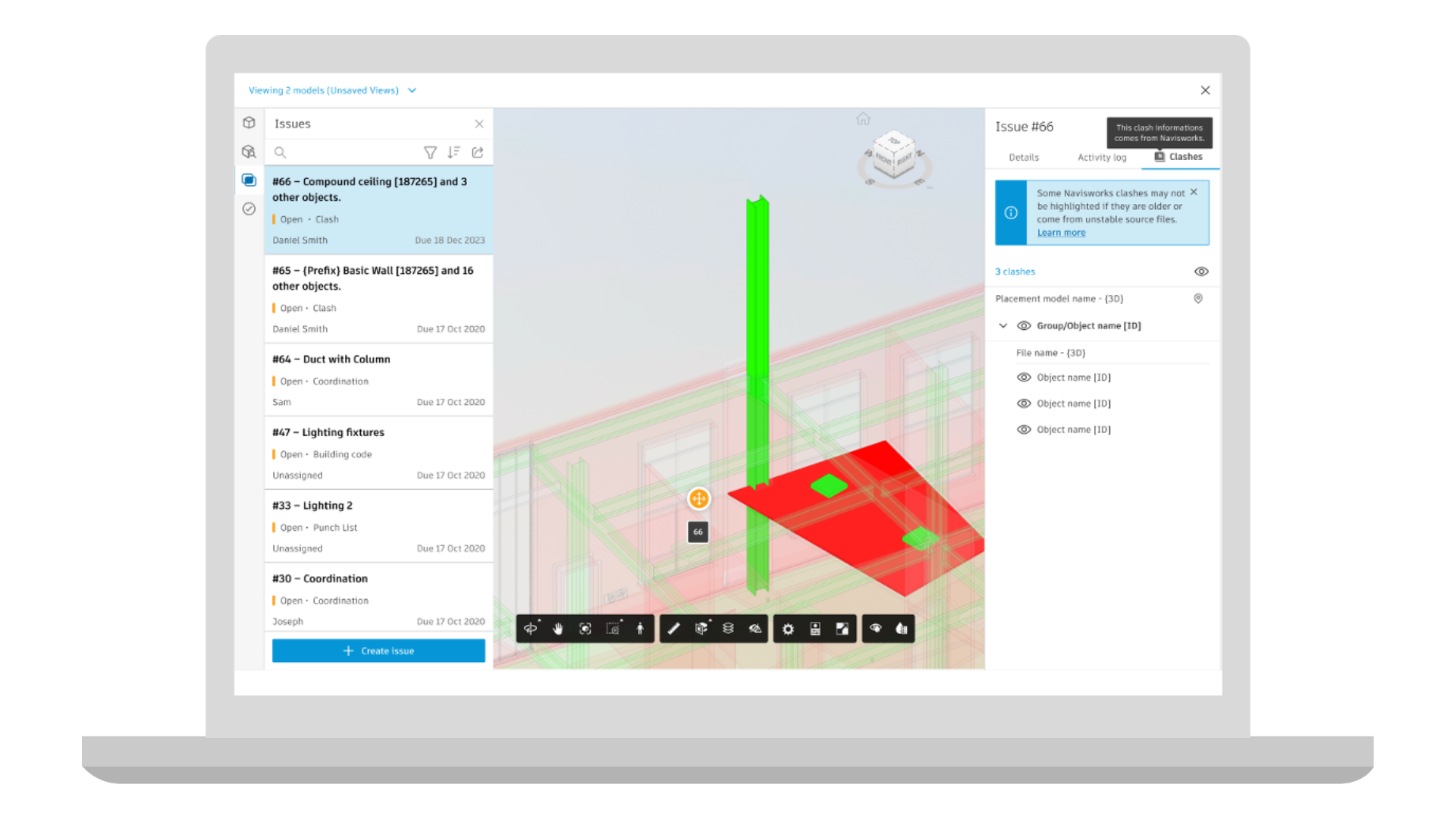
Coordination | Clash Checks Dashboard [Beta]
Clash Checks Dashboard introduces a new way to review clash checks outside the 3D viewer in Model Coordination. Instead of navigating through the model to understand coordination issues, teams can start with a summary view of clash checks and quickly see which ones need attention.
From the dashboard, users can identify clashes that require triage or follow-up and open the relevant clash context directly in the viewer for deeper investigation. Available in Open Beta, Clash Checks Dashboard gives teams earlier access to a more streamlined way to review and prioritize clash information. Coming to Model Coordination.
Coordination | Search Sets
Search Sets introduces a faster way to work with model data in Model Coordination workflows by letting teams save and reuse property-based queries. With this release, users can select matching objects in the model from a saved Search Set with a single click instead of rebuilding filters or searching through the model tree each time. Selected objects are also reflected in the object table, making it easier to confirm counts and review details during coordination. Coming to Model Coordination.
Coordination | Search Inside Clash Panel
Quickly find the clashes you need with a new search capability in the Clash Panel. Teams can now type keywords to locate specific clashes instead of manually scrolling through long results. This helps keep coordination reviews moving, especially during meetings, by reducing time spent navigating and making it easier to focus on resolving issues. Coming to Model Coordination.
Coordination | Navisworks Clash Highlighting in Model Coordination
Better understand clash issues from Navisworks directly in Model Coordination. When opening issues created from Navisworks clashes, the viewer will automatically highlight the clashing elements and reduce surrounding geometry, so the conflict is immediately clear. This removes the need to visually search for the issue in the model and helps teams review clashes more quickly and confidently when working across Navisworks and Autodesk Forma. Coming to Model Coordination.
Correspondence | Company-Wide Visibility Permission Level
A new viewing permission level allows project members to view all public correspondence involving anyone in their company, even when they are not a direct recipient. Admins can assign this view to members, roles, and companies, as well as set it as the default view for the entire project. Coming to Build, Design Collaboration, and Model Coordination.
Dashboards | Autodesk Model Analytics Essentials
Autodesk Model Analytics Essentials will be included with Forma Design Collaboration subscriptions. It provides visibility into Revit cloud model health and performance directly in Insight. Teams can track sync activity, model growth, version alignment, and model changes to better understand how models evolve over time and identify potential issues earlier in the project lifecycle. Coming to Design Collaboration.
Forma Build Essentials
Introducing Forma Build Essentials: the core jobsite tools crews rely on together in one workspace helping teams to capture issues with permission-gated photos and root causes, access latest sheets and 3Dmodels, mark up drawings, and log daily work.
Assets | Exporting Asset Markups to PDF
Now, project teams can generate a PDF that includes asset markups directly from a sheet. During export, asset markups can be chosen alongside other issues, photos, and standard markups. Coming to Build.
Assets | System QR Codes
Automatically generate QR codes for asset systems. Project teams can print and place them on site, and scan them with a mobile device to open the asset system in app. Coming to Build.
Assets | Multi Select Model-Based Assets on Mobile
Project teams can on site can select multiple model-based assets in the viewer or via the list. These selected assets can bulk edit or update properties directly within the Forma mobile app. Coming to Build.
Cost Management | Add Forecast Option Columns to Budget Overview Table
Users can now view Calculated Final Budget and Calculated Final Cost directly in the Budget view, making it easier to track budget performance without opening each line item. These values automatically update based on the Date Range Resource schedule defined in project settings, and new base values have been added for use in custom calculated columns. Coming to Build.
Cost Management | Custom Attributes & Required Fields for Collaborators
Project Admins can now make custom attributes visible to collaborators. And when needed, require them to complete specific fields. Coming to Build.
Cost Management | Batch Apply Fields in Budget View
The new Batch edit fields button in the budget view allows teams to update fields across multiple budget line items at once, saving time by reducing clicks. Coming to Build.
Correspondence | Company-Wide Visibility Permission Level
A new viewing permission level allows project members to view all public correspondence involving anyone in their company, even when they are not a direct recipient. Admins can assign this view to members, roles, and companies, as well as set it as the default view for the entire project. Coming to Build, Model Coordination and Design Collaboration
Forms | Recover Deleted Forms
Recover Deleted Forms allows Project Admins to view and restore forms deleted within the past 60 days. Restored forms return with their attachments, and actions tracked in the activity log. Coming to Build and Build Essentials.
Forms | Sequential Assigned Sections
Sequentially Assigned Sections allow forms to be completed in a set order by project members, with one section activated at a time. Coming to Build and Build Essentials.
Forms | Custom Tables Basic Equations
Custom Tables Equations allow form builders to create simple calculations within custom table rows. Team members can add or multiply numerical fields or calculate the difference between two time fields. Coming to Build and Build Essentials.
RFIs | Quick Create RFI Enhancements
When using AI to generate an RFI form, AI will be able to populate the Location field and Custom Fields when relevant information is provided in the prompt. Additionally, improvements made to the AI engine will improve the quality and accuracy of generated RFIs. Coming to Build.
RFIs | Default Co-Reviewer in RFI Types
Admins can set default co-reviewers for RFI types to automatically assign co-reviewers whenever the type is applied to an RFI. Coming to Build.
Specifications | Submittal Log Generation in Build
Automatically generate construction submittal logs from CSI MasterFormat specs in the Specifications tool. Once submittals are generated, the items can be reviewed and refined in the context of the spec document and published directly to the Submittals tool with links between submittals and spec sections. Coming to Build within Forma for Construction Operation.
Specifications | Auto-Sectioning Improvements
Auto-sectioning improvements will deliver more accurate and reliable spec document structuring for non-CSI MasterFormat and non-English specifications. Coming to Build, Data Management, and Takeoff.
Specifications | Delete Spec Sections
Specifications will support deleting individual spec sections from a version set. This allows outdated and incorrect spec sections to be removed so that the version set accurately reflects the current project and maintain up-to-date documentation. Coming to Build, Data Management, and Takeoff.
Submittals | Custom Fields [Beta]
Submittals will support custom fields, allowing teams to customize submittal data collection while aligning with company wide standards. Admins can configure custom field names and response options, with support for multiple response types including text, numbers, dates, and multi select. Custom fields can be tailored for specific project needs, as well as shared across projects for company wide standardization cross-project data analysis. Coming to Build. Capability will become available over the coming weeks.
Workplan | Task Comments
Workplan will support task comments, allowing users to comment on tasks they have access to. Add comments to share updates or blockers, mention users, roles, and companies, and receive notifications for comments and mentions. Available on web, Android, and iOS, task comments help improve communication, traceability, and context sharing among project teams. Coming to Build.
Workplan | Plan Data in Data Connector
Plan data is now supported in the Data Connector export. Export information about individual work plans, tasks and task progress, commitments, handoff and task comments to be used to create BI dashboards on a project and company level. Coming to Build.
Bid Management | Bidding Tool [Beta]
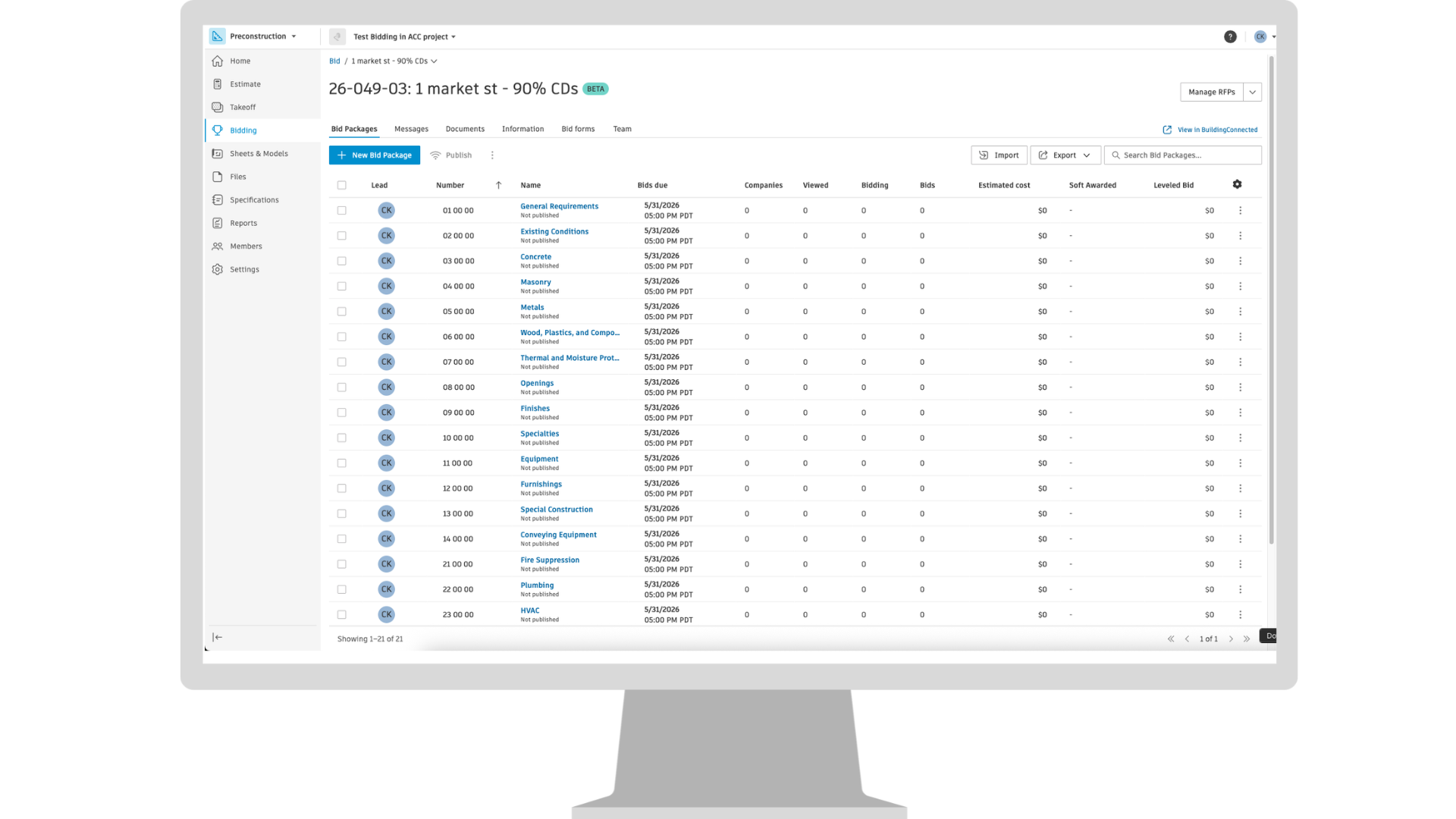
The Bidding tool Beta brings proven bid management and prequalification workflows from BuildingConnected into Autodesk Forma industry cloud, enabling teams to more accurately send and manage bid invites and find qualified subcontractors using the most up‑to‑date network of construction professionals, all within a connected preconstruction experience. Public beta is limited to specific subscription types and only available on US server. Coming to Forma for Preconstruction.
Estimating | Copy and Bulk Edit Line Items
Forma Estimate now supports copying line items within the estimate table, making it easy to duplicate data for similar entries. In addition, users can select multiple line items and bulk edit them in a single action. These enhancements will streamline workflows and save time by reducing repetitive edits. Coming to Estimate.
Estimating | Export Cost Database in ProEst to Excel
ProEst users will be able to export their cost database to Excel, enabling them to use their cost library across other systems. By providing an easily transferable Excel version of their cost data, this feature helps empower teams to leverage their curated cost library wherever it’s needed. Coming to ProEst.
Estimating | Turn Estimate Tool On/Off at Project Level
For Forma for Preconstruction Bundle subscriptions, account administrators can turn the Estimate tool on or off at the project level. This setting is managed in Account Administration by navigating to Products & Tools, selecting a project, and updating the configuration for that project. The change must be applied individually to each existing and newly created project. When Estimate is turned off for a project, the experience reverts to the pre‑Preconstruction bundle workflow, and the Estimate tool is no longer available within that project. Coming to Estimate.
Insight Builder | Estimate Data in Insight Builder
Estimate data is now available in Insight Builder to help create custom dashboards and reports. A prebuilt Estimate dashboard template is included to help users quickly create powerful analytics for their estimates. The template includes pre-built visuals such as total cost of estimates across projects, average cost by project type, project totals by line item, number of takeoff packages, and other data points to help estimating teams quickly uncover cost implications and make informed decisions during preconstruction. Coming to Estimate.
Qualification | Company Name Management
Users can now manage their company name and choose how it shows to subcontractors upon invitation to qualify. Coming to TradeTapp.
Qualification | International Data Entry for Qualification Applications
Subcontractors will be able to enter international addresses, phone numbers, and currencies directly within the qualification forms. Office details will be automatically synchronized from their Builders Network profile, eliminating the need for manual data entry and reducing the risk of errors. Coming to TradeTapp.
Takeoff | Bulk Edit via Inventory
Takeoff will support bulk editing within the inventory panel, allowing users to select multiple items and update properties such as height and distance in one action. This enhancement streamlines workflows and saves time by eliminating repetitive edits. Coming to Takeoff.
Takeoff | Paste Enhancements
When using the Paste command, copied items appear next to the cursor in a halftone display, indicating a temporary state until placement is confirmed with the click. This helps users see exactly where items will be placed before clicking. For large selections (over 10 items), a bounding box appears instead of individual previews reducing screen clutter. Additionally, repeated pastes maintain a consistent offset from the original copy allowing quick, organized placement in any direction. Additionally, now you can also copy/paste takeoff to another sheet with a different scale. Coming to Takeoff.