
CAD + CAM Integration for CNC Machinists
Autodesk Fusion and Haas Automation
Autodesk Fusion and Haas Automation
Achieve faster integration for output to your Haas Automation CNC machine, reduce data translation issues, and produce higher-quality parts with Autodesk Fusion and Haas CNC machines.
Who is Haas Automation?
Who is Haas Automation?
Haas Automation is the largest machine tool builder in the United States, and one of the largest builders of CNC machines in the world.
Haas manufactures a complete line of CNC vertical machining centers, horizontal machining centers, turning centers, 5-axis machining centers, and rotary products. They also offer wide selection of fully integrated automation solutions, including automatic parts loaders, pallet-pool systems, and 6-axis robot systems.
Haas and Autodesk are preparing students for the future
Haas and Autodesk are preparing students for the future
Educators must stay up-to-date while preparing students for the future as the world evolves around them.
That's why Haas and Autodesk have joined forces to offer the industry's only integrated CAD, CAM, and CNC curriculum.
This innovative partnership delivers a "plug-and-play" solution, giving students hands-on experience from design through to machining.
Haas Automation and Autodesk Fusion Partnership
Haas Automation and Autodesk Fusion Partnership
Haas Automation and Autodesk have partnered to streamline your workflow from CAD/CAM to CNC Machining through various in-product integrations, add-ins, and vetted machine and tooling data.
Our integrations bring Haas Machines and Haas Tooling into the CAD/CAM environment to allow you to program and simulate your cut parts faster while reducing the number of errors at the machine. Produce parts with more confidence and decrease the time needed to program your machines using extensive libraries of vetted machine models, post processors, and tooling databases.
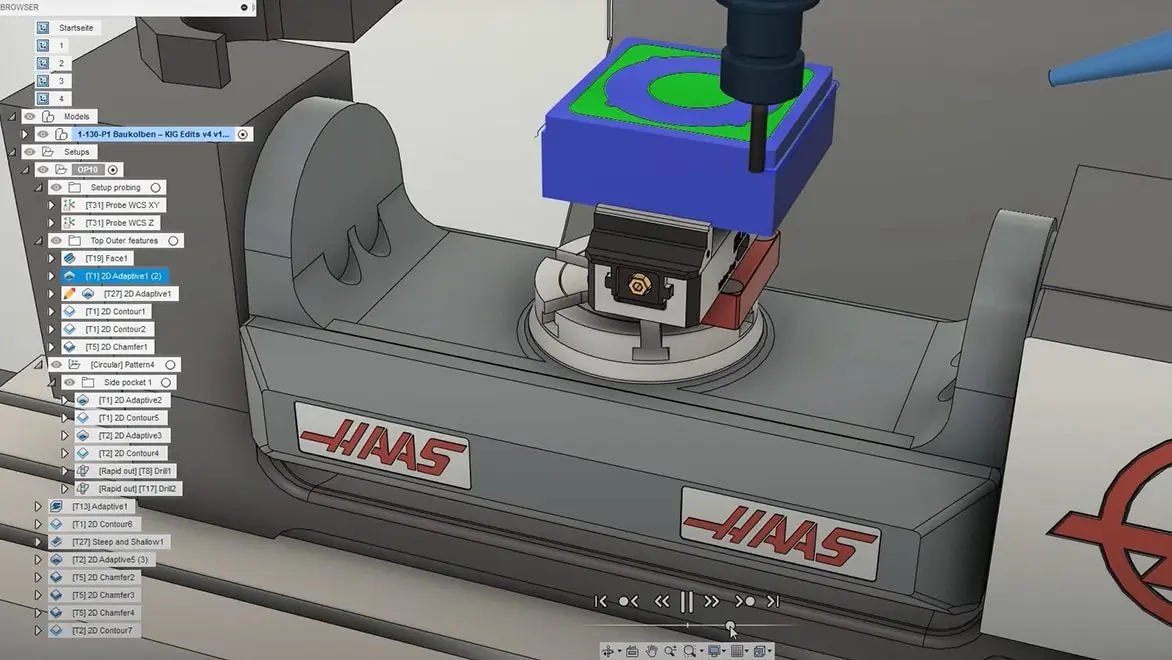
Haas Driver Add-in for Autodesk Fusion
Haas Driver Add-in for Autodesk Fusion
The Haas Driver add-in enables instant-on productivity for Autodesk Fusion users with Haas Milling Machines fitted with the Haas NGC controller.
By reading data directly from each machine, an accurate representation of its settings and optional equipment is created, helping to make sure that the NC programs produced run correctly on the chosen machine. This connectivity allows NC code to be directly transferred to the machine tool streamlining the file transfer process.
Machine Like Pro
Machine Like Pro
View the following video tutorials to learn how to achieve faster integration for your Haas Automation CNC machine, reduce data translation issues, and produce higher-quality parts with Autodesk Fusion and Haas CNC machines.
Autodesk Fusion and Haas Automation Resources
See what makes Autodesk Fusion and Haas CNC machines compatible, including tool libraries and more.
See the Haas Automation tooling available in the Autodesk Fusion tool library and how to access them.
Learn how to set up a one-piece flow using Haas CNC workholding tools and tool holders by creating a digital twin in Autodesk Fusion.
Get tips from our Autodesk Fusion CAM experts on how to work smarter, not harder when running your Haas CNC machines.
Get tips from our Autodesk Fusion CAM experts on how to work smarter, not harder when running your Haas CNC machines.
Download your free Haas Automation post processors here.
 ▶View video
"This strategy has taken a 5-minute profiling cycle down to just 30 seconds, and it has improved the aesthetics of the part and eliminated any potential secondary hand finishing."
—Phil Law, Founder, PEMBREE
90%Reduction in cycle time
 →View story
“With Fusion for our production process and CAM, we essentially have the entire robot system modeled in there. When we program a new part in Autodesk Fusion, it’s all systematized around a template. You can program a part, and no one has to re-indicate or set up a machine differently. You just program the part machine and the job and run it.”
—Wiley Davis, Co-Founder/CEO, Go Fast Campers
2XReduction in cost
Unlock your full potential with Autodesk Fusion and Haas Automation
Download Autodesk Fusion for free
Download Autodesk Fusion for free
Try Fusion for free with a 30-day trial. Access all capabilities and features with integrated CAD, CAM, CAE, and PCB software.