 Shannon McGarry
Unlocking efficient BOM management with PLM is essential for modern product development, as it integrates CAD and BOM information, automates workflows, and provides lifecycle visibility, enabling businesses to make better decisions faster and deliver high-quality products efficiently.
We’ve all heard the saying “Putting the cart before the horse,” which perfectly explains the way many businesses have approached product development over the years. The focus has frequently been on CAD and product design, while often overlooking one of the most crucial aspects of product development – the Bill of Materials (BOM).
Autodesk Fusion Manage: Connect People, Processes, and Data
Streamline workflows, enhance collaboration, and gain real-time visibility with PLM.
BOM management: The heart of product development
A Bill of Materials, simply put, is a list of all the different parts, materials, and components needed to make a product. It is at the core of product development and spans the entire lifecycle of the product. From the initial idea to the final product, the BOM evolves, taking many forms as it progresses through the different stages of development.
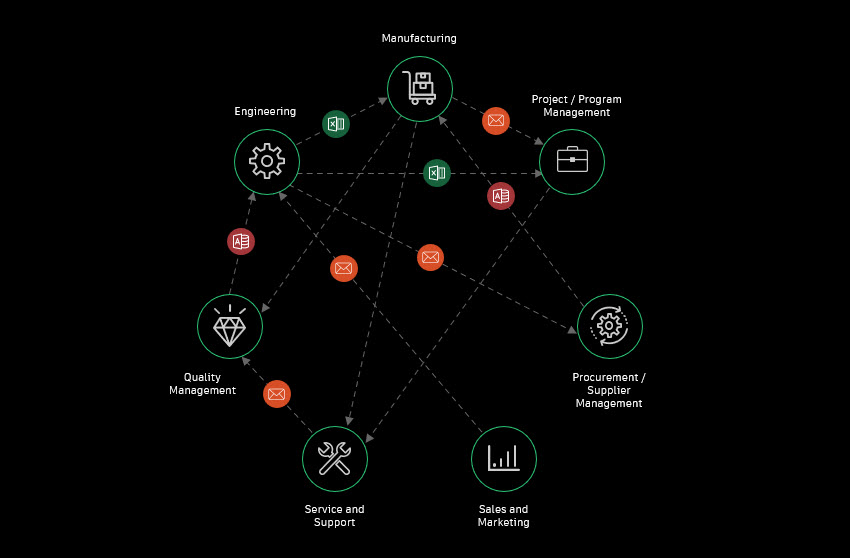
The evolution of BOM management
In the past, managing BOMs was a cumbersome process, often involving paper documents and spreadsheets. However, with the advent of digital workflows, BOM management has undergone a significant transformation. Digital tools now allow for more efficient, accurate, and collaborative management of BOMs, enabling teams to make better decisions faster.
Core capabilities of effective BOM management
For businesses to harness the full potential of BOM management, certain core capabilities are essential:
- Integration of CAD and BOM information: Combining CAD data with BOM information ensures that all stakeholders have access to the latest designs and component lists.
- Accessibility across disciplines: BOM information should be easily accessible to multiple teams and stakeholders, including design, engineering, manufacturing, and procurement.
- Customization and flattening of BOM views: The ability to customize BOM views and flatten them for quantity roll-ups is critical for efficient purchasing and inventory management.
- Automated change tracking: Automated tracking of changes to the BOM over time helps in maintaining accuracy and reduces the risk of errors.
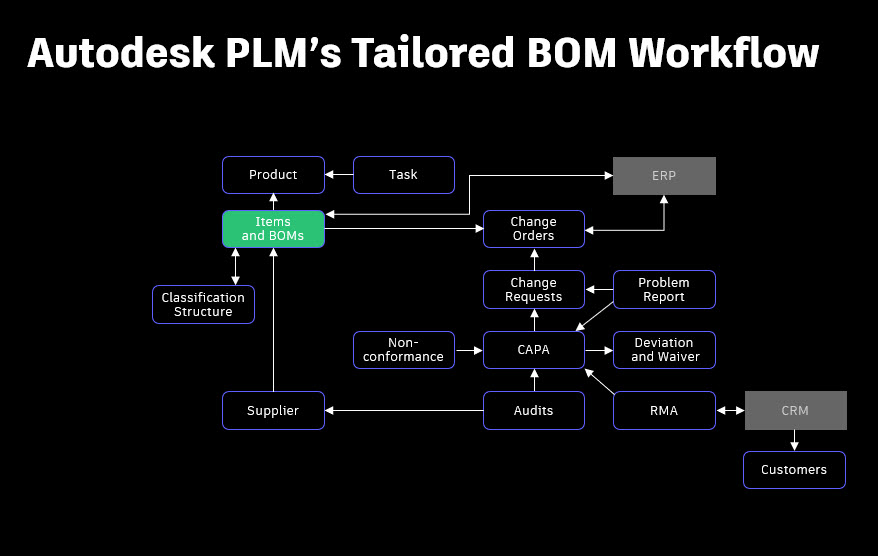
How Autodesk PLM supports efficient BOM management
Autodesk PLM is uniquely positioned to help businesses achieve efficient BOM management. It offers several key benefits:
- Centralized data management: Autodesk PLM centralizes BOM data, making it easily accessible to all relevant stakeholders.
- Seamless integration: With complete APIs, Autodesk PLM integrates seamlessly with other enterprise systems like PDM (Product Data Management), ERP (Enterprise Resource Planning), and CRM (Customer Relationship Management).
- Automated workflows and approvals: PLM automates workflows and approvals, ensuring that changes to the BOM are tracked and managed efficiently.
- Visibility and accountability: PLM provides visibility into the entire lifecycle of the product, enabling better decision-making and accountability.
The importance of BOM in different manufacturing processes
Traditional consumer products
In traditional consumer product manufacturing, the process typically follows this sequence: Design > Buy > Make > Sell. The BOM plays a crucial role in ensuring that all necessary components are identified and sourced before manufacturing begins.
Engineer-to-Order (ETO) businesses
For ETO businesses, the process is slightly different: Sell > Design > Buy > Make. While many decisions about components are made upfront, customer customizations introduce unknowns into the process. The BOM must adapt to these changes so that all modifications are tracked and managed.
Outsourced manufacturing
In cases where businesses outsource their manufacturing, BOM management becomes even more critical. Without control over the manufacturing process, businesses rely on accurate BOM information to ensure quality and timely delivery of their products.
The BOM as a living document
A BOM is not static; it is a living and breathing document that evolves throughout the product development process. It must be flexible enough to accommodate changes in design, manufacturing, and customer requirements.
Different types of BOMs
Various types of BOMs serve different purposes during the product lifecycle:
- fBOM (Functional/Sales BOM): Describes what the customer wants and what they ordered.
- cBOM (CAD BOM): Digital prototype detailing the components and their dimensions.
- eBOM (Engineering BOM): Includes items like paint, adhesives, and labeling.
- mBOM (Manufacturing BOM): Lists raw materials needed for fabricated parts.
- lBOM (Logistics/Shipping BOM): Details packaging and shipping requirements.
- sBOM (Service BOM): Tracks what went into a specific build/product.
Managing BOM complexity
Managing the complexity of BOMs requires a robust system that can handle multiple BOMs, revisions, and integrations with other enterprise systems. Autodesk PLM is designed to meet these needs, providing a comprehensive solution for BOM management.
Conclusion
Unlocking efficient BOM management with PLM is essential for modern product development. By integrating CAD and BOM information, automating workflows, and providing visibility into the product lifecycle, Autodesk PLM helps businesses make better decisions faster. Whether you are managing traditional consumer products, ETO businesses, or outsourced manufacturing, effective BOM management is crucial for success. With Autodesk PLM, businesses can ensure that their BOMs are accurate, up-to-date, and accessible to all stakeholders, enabling them to deliver high-quality products at record speed.
Autodesk Fusion Manage: Connect People, Processes, and Data
Streamline workflows, enhance collaboration, and gain real-time visibility with PLM.