Get help with Download and install
Installation for individuals
Run and authenticate your software
When you first run your software, authentication of your product takes place automatically.
In some cases, the "Let's Get Started" window may be shown displaying three activation methods, "Sign in with your Autodesk ID", "Use a network license", or "Enter a serial number". The exact wording can vary between product versions
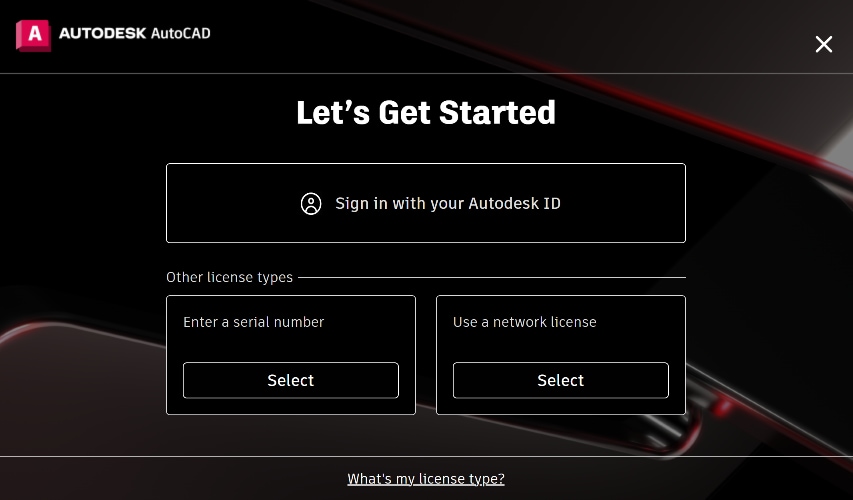
Your activation type depends on the "products license type", see How to check your Autodesk software license type.
Activation types:
Depending on the product version, "Sign in with your Autodesk ID", "Single-user", or "Sign in" option should be selected if the product license type is an Autodesk subscription license. The Autodesk subscription license type requires your "Autodesk ID" and "Password" to complete sign in.
Note: Check that the Autodesk ID you’re using has been assigned to a license by the contract primary or secondary admin. If no license is assigned, request an admin to assign your Autodesk ID a product license. To learn more, see User management overview.
Use a network license, or Multi-user option should be selected if the product license type is "Network" or "Multi-user". You may be prompted to input the license server information.
Enter a serial number option should be selected if you received a serial number with your software. To find your serial number sign into your Autodesk account, go to "Products and Services" tab and click on the tile of your product, then click "License Details".
Related resources
Need help? Ask the Autodesk Assistant!
The Assistant can help you find answers or contact an agent.
What level of support do you have?
Different subscription plans provide distinct categories of support. Find out the level of support for your plan.
View levels of support