Get help with Account management
Account management for admins
Manage subscription usage for external Forma projects
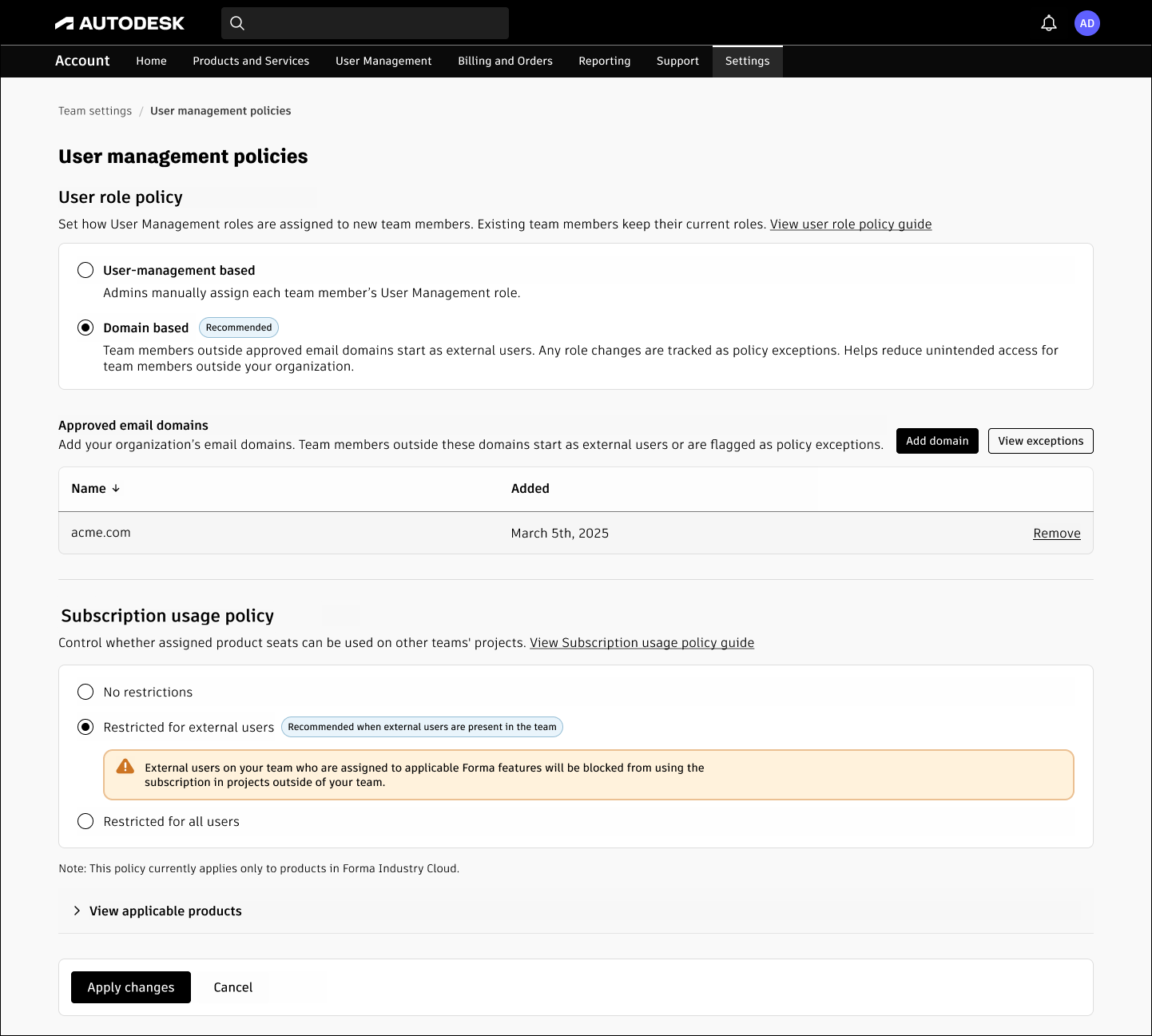
Use Subscription usage policy to control whether applicable Forma subscriptions assigned by your Autodesk account team can be used on projects associated with another team. This team-level setting controls Bring Your Own Subscription (BYOS) usage across teams.
Use this guidance if you want to stop contractors from using your subscriptions on other organizations’ projects, understand why an assigned subscription cannot be used on an external project, or check how an external user’s role affects subscription use.
You set the policy for a team. You cannot set a different Subscription usage policy for an individual user or group.
On this page
Choose your path
Understand who pays and which subscription is used
Choose a subscription usage setting
Review user roles before restricting external users
Change the subscription usage policy
See which products are affected
Examples
Troubleshoot access and entitlement questions
Get help
Choose your path
If this sounds like you… | Start here | This path is for… |
I want to stop contractors from using our subscription on other companies’ projects. | Choose a subscription usage setting | Restrict cross-team use for people classified as external users. |
I want our subscriptions used only on projects associated with our team. | Choose a subscription usage setting | Restrict cross-team use for everyone on the team. |
This person has their own subscription but cannot access our project. | Troubleshoot access and subscription issues | Check project access, subscription availability, trials, and team policy separately. |
Why is this person treated as an external user? | Review user roles before restricting external users | Check the Autodesk account team role used by the external-user restriction. |
Which products does this affect? | See which products are affected in the Frequently asked questions. | Check whether the workflow is covered by this team-level policy. |
Understand who pays and which subscription is used
A project invitation and a product subscription are separate. A person must have access to the project and an applicable subscription or active trial for the product they need to use. Under BYOS, that subscription can come from the person's own organization or another team that assigned it to them.
Subscription usage policy does not decide who can be invited to a project. It controls whether an applicable Forma subscription assigned by your team can be used when that person works on a project associated with another team.
If your team's policy blocks that cross-team use, the person needs an applicable subscription that is allowed for the external project, such as a subscription from the team associated with that project or a subscription they purchase for themselves.
Choose a subscription usage setting
Setting | What it means | Use this when |
No restrictions | People on the team can use applicable Forma subscriptions assigned by this team on projects associated with this team or another team. | You intentionally allow assigned subscriptions to be used across teams. |
Restricted for external users | People classified as external user on this team cannot use applicable Forma subscriptions assigned by this team on projects outside this team. Other users on the team are not restricted by this setting. | You want to limit cross-team use for contractors, vendors, or other people you classify as external users. |
Restricted for all users | People on the team cannot use applicable Forma subscriptions assigned by this team on projects outside this team. | You want team-assigned subscriptions used only on projects associated with this team. |
Note: The restriction follows the team and the user's Autodesk account team role. It is not a per-user, per-group, or per-project restriction.
Review user roles before restricting external users
If you select Restricted for external users, review who is classified as an external user before relying on the policy. Users added through an integrated cloud collaboration product can be classified as external users unless your user role policy classifies them differently.
Domain-based user role policy can automatically classify people from approved email domains as standard users and people from other domains as external users. Existing users whose roles do not match the domain policy can appear as exceptions for an admin to review.
If your organization already has another reliable process for keeping Autodesk account user roles correctly classified, you do not need to change that process solely to use Subscription usage policy.
Change the subscription usage policy
Sign in to your Autodesk account and open Settings > Team settings.
Select the team whose subscription usage you want to control.
In User management policies, find Subscription usage policy.
Select No restrictions, Restricted for external users, or Restricted for all users.
Select Apply changes.
Confirm that the selected option remains shown for the team after you apply the change.
Examples
Restrict a contractor’s subscription use outside your team
Company A assigns an applicable Forma subscription to a contractor who is classified as an external user. The contractor is also invited to a project associated with another organization.
If Company A selects Restricted for external users, the contractor cannot use the Company A-assigned subscription on that external project. The contractor needs an applicable subscription that is allowed for the external project.
Restrict cross-team use for everyone
Company A selects Restricted for all users. An employee and an external contractor both have applicable Forma subscriptions assigned by Company A. Neither person can use the Company A-assigned subscription on projects associated with another team.
Allow cross-team subscription use
Company A selects No restrictions. People on the team can use applicable Forma subscriptions assigned by Company A on projects associated with Company A or another team, subject to the product’s other access and subscription requirements.
Invite a contractor who has another subscription
You invite a contractor to your project but do not assign the contractor one of your team’s subscriptions. The contractor still needs project access and an applicable subscription or trial.
If the contractor uses a subscription assigned by another team, the rules for that subscription apply. For a covered Forma offering, that can include the assigning team’s Subscription usage policy.
Troubleshoot access and entitlement questions
Problem | Check this concept | What it can mean |
They already have their own license. Why can’t they get into our project? | Project access and entitlement | A subscription alone does not grant project access. Confirm the person was invited to the required project and has an applicable subscription or trial. |
Why can’t they use the subscription our team assigned? | Subscription usage policy | The assigning team may restrict use on projects associated with other teams. |
Why are they an external user? | User role policy | Their Autodesk account team role may come from the user-management behavior or domain based rules. |
Their trial expired / they are asked to upgrade. | Trial and entitlement status | Do not assume the subscription usage policy is the cause. Confirm the applicable subscription and project access, then use the documented trial/entitlement troubleshooting path. |
Why are we consuming tokens? | Token/Flex charging | Subscription usage policy is not a general token-charging control. Use the applicable Flex or product-specific usage guidance. |
Get help
Before you contact support
Check this first | What to do | Contact support when… |
Right team and role | Confirm the correct team is selected in Team settings and that you are an admin who can manage the setting. | You cannot view or change the setting for a team you administer. |
Right path | Use Choose your path to separate user-role, subscription-use, project-access, trial, and token questions. | The symptom does not match any documented path. |
What changed recently | Note any recent role, team, subscription assignment, project invitation, or policy change. | Access changed unexpectedly after a known change and the documented behavior does not explain it. |
The steps on this page | Review the user's role, selected policy, project association, and applicable subscription. | The documented configuration is correct but the user still cannot use an entitlement that should be allowed. |
Information to have ready | Capture the team name, user's Autodesk account role, affected product, project/hub, policy selection, and exact message. Do not send passwords. | Autodesk needs to investigate entitlement or policy behavior. |
When you need help from Autodesk or someone else
If you need… | Why self-service stops here | Who should help | Have this ready |
A user's role changed for your organization | The role is controlled by your organization's user-management decision. | Your Autodesk account team admin | User email, expected role, team, and domain-policy details. |
Access to another organization's project | The project admin controls invitations and project permissions. | The other organization's project or hub admin | Project/hub name, product, user email, and access needed. |
An entitlement that should be allowed still is not recognized | The account state needs investigation beyond the documented checks. | Autodesk Support | Team, user, product, project/hub, policy selection, subscription source, and exact error. |
An exception to subscription terms or commercial policy | Terms or commercial exceptions require an authorized decision. | Your Autodesk sales/partner contact or the appropriate commercial owner | Contract/subscription details and the business requirement. |
Related resources
Need help? Ask the Autodesk Assistant!
The Assistant can help you find answers or contact an agent.
What level of support do you have?
Different subscription plans provide distinct categories of support. Find out the level of support for your plan.
View levels of support