LANDSCAPE DESIGN SOFTWARE
LANDSCAPE DESIGN SOFTWARE
Discover how professionals are using Autodesk’s landscape design software.
Image courtesy of Alexandria Real Estate Equities, Inc.

What is landscape design software?
What is landscape design software?
Landscape design software provides the tools and automation to create accurate layouts and models of landscapes. Landscape designers and landscape architects can use Autodesk software to create 2D drawings or 3D models that save time, cost, and materials.
What is landscape design software?
What is landscape design software?
Landscape design software provides the tools and automation to create accurate layouts and models of landscapes. Landscape designers and landscape architects can use Autodesk software to create 2D drawings or 3D models that save time, cost, and materials.
Landscape design software

Landscape design tools
Landscape design tools
Expediate landscape design and drafting with industry-specific toolsets included with AutoCAD. Learn about the various ways in which the toolsets can help optimize your design workflow.
Landscape design tools
Landscape design tools
Expediate landscape design and drafting with industry-specific toolsets included with AutoCAD. Learn about the various ways in which the toolsets can help optimize your design workflow.
How to design a landscape with Autodesk software
Build a BIM landscape model with Civil 3D
Build a BIM landscape model with Civil 3D
Learn how to create a landscape architecture BIM model in Civil 3D. Uncover the challenges facing landscape architects and urban designers and learn how to create a workflow used to deliver a large-scale landscape project in a BIM environment. Explore eight fundamental videos related to BIM in site and landscape design that would be beneficial.

Landscape modeling with Infraworks
Landscape modeling with Infraworks
Discover how to model landscape elements in InfraWorks and how to import information from different data sources, including Revit and Civil 3D.

Landscape design tutorials

Landscape architecture
Landscape architecture
Learn how you can use Revit software for landscape architecture with some assistance from Dynamo Studio extension.

Landscape architecture rendering
Landscape architecture rendering
This tutorial shows how you can use AutoCAD and SketchBook to create beautiful and functional hand graphics for a landscape plan.
Site development is driving the future of building design
Site development is driving the future of building design
Learn more about Site development is driving the future of building design
See how Autodesk software is used in landscape design

Helping a landscape-design business blossom
Helping a landscape-design business blossom
A landscape designer shares the inspiration to start her own business and how AutoCAD LT helps her succeed with the design process.

MUNDEN FRY LANDSCAPE ASSOCIATES
Creating a sustainable garden setting with AutoCAD
Creating a sustainable garden setting with AutoCAD
Landscape-design firm uses AutoCAD to help with sustainable landscape design of a unique space at Pinterest headquarters in San Francisco.

THOMAS AND HUTTON
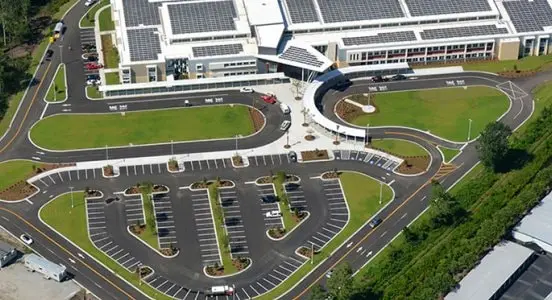
Site development is driving the future of building design
Site development is driving the future of building design
Thomas & Hutton, an engineering firm laid the groundwork for energy efficiency with site planning, civil design and landscape architecture services.
FAQs on landscape design
What are the elements of landscape design and landscape architecture?
Landscape design and landscape architecture combine functionality with artistry. The following are a few of the key elements:
Form – The shape of a plant or branch structure.
Line – The connection, focus, and movement of the design.
Texture – Surface elements of the site, including plants, water, and pavement materials.
Color – Combination and balance of color for visual interest with plants and hardscapes.
What are the principles of landscape design?
Unity – An entire garden is cohesive or in-line with a specific theme. It may also include repetition of common elements.
Balance – Symmetrical balance is often used in formal landscapes where each side of the garden is the same and mirrors the other. Asymmetrical balance is known as “informal balance” and more unconstrained.
Proportion – The scale and balance of sizing for the overall design.
Focalization – A focal point where the viewer’s attention will be drawn.
Sequence – Transition of elements that creates a gradual and appealing change.
Emphasis – Highlighting of elements to provide visual interest.
What is the difference between landscape designers and landscape architects?
Landscape designers typically work on smaller projects and specialize in the overall design, horticulture, and plant placement. Landscape architects must have a bachelor’s degree in the field as well as a state license. The scope of work ranges from residential to commercial and often includes much larger public outdoor spaces for parks, offices, resorts, and more.
Landscape design resources
Discover the best ways to use Revit to build common landscape elements and topography.
Explore the real life of a landscape architect on Redshift, an Autodesk publication telling stories about the future of making things.
Learn how to create a simple landscape in Revit workflow.
Autodesk’s infrastructure design software simplifies the identification and mapping of terrain features of a project area.
Learn how to create a simple landscape design in AutoCAD.
See how AutoCAD is used to draw a 2D layout of park with basic commands.