 Trevor English
As the world’s water infrastructure continues to grow, the number of projects and models to build it increases alongside it. That often means challenges with model management and collaboration across teams from utilities, service providers, and independent consultants or modelers. Our teams at Autodesk Water Infrastructure have long seen these issues and have been working to develop a new solution for how you and your collaborators can interface with our water portfolio: introducing Project Administration.
Project Administration is a new functionality, offered as a technical preview, designed to help you manage new project-based outcomes by allowing better collaboration between a group of users based on the project, not your company or team. This new functionality in our cloud and desktop solutions streamlines onboarding and extends workflows so that software and IT administrators can self-manage your project deliverables. Our goal with rolling out this new functionality is to simplify how you as an Autodesk Water Infrastructure customer, manage your projects, users, licenses, and data across a wide variety of projects within the field.
For most users of our software, you likely won’t notice many changes, but for IT and account administrators managing water infrastructure licenses, Project Administration’s new workflows and structure should make your job a lot easier.
A better way to manage collaborators
For Engineering Service Providers (ESPs) in the water industry, managing project-based deliverables for a variety of different utility customers has long been a point of pain. You need to validate proof of concept and capabilities before the project kicks off, and you do not want to stumble right out of the gate with client approvals just because you can’t easily share a file or grant access to a model or dataset. Before Project Administration, there wasn’t a satisfactory way of sharing project deliverables with proper data integrity, security, and end-client separation using only app-specific user-based permissions.
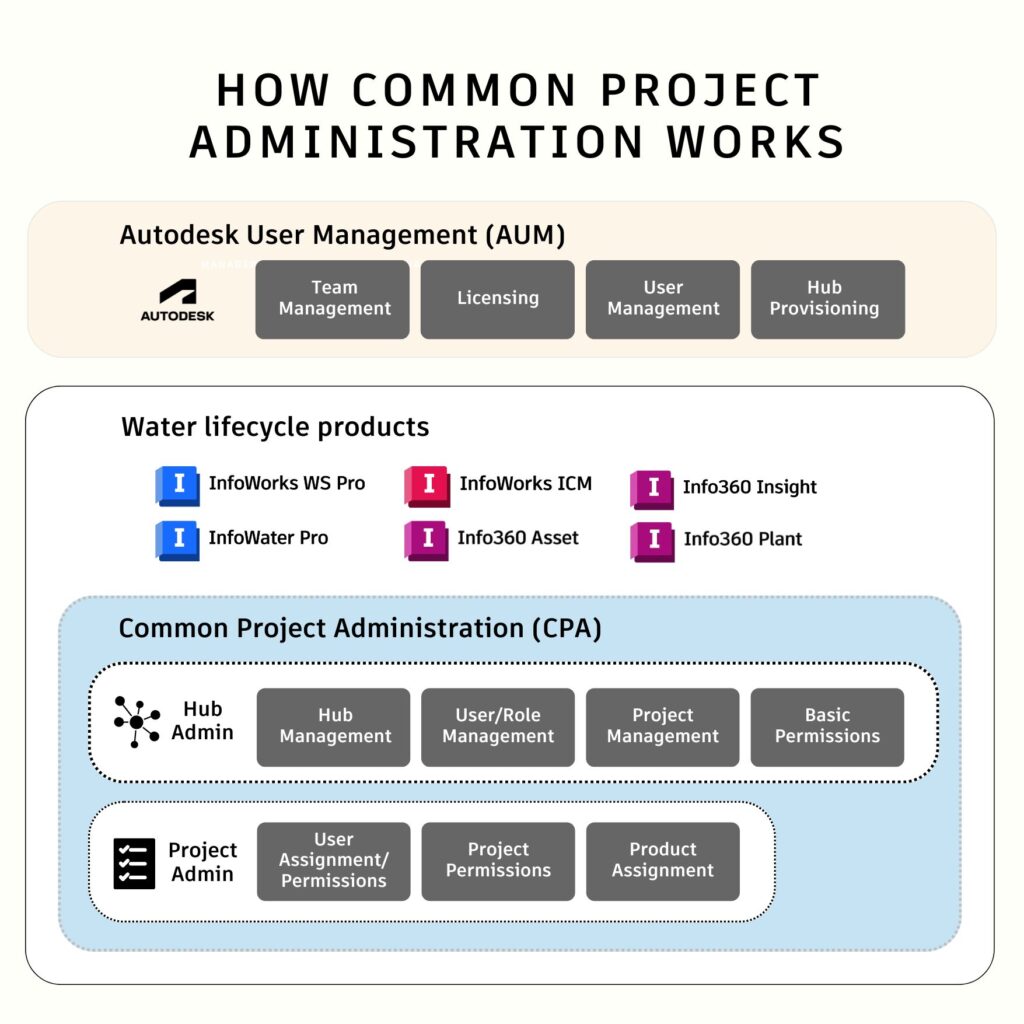
Under the new Project Administration framework, collaborative workflows have been rethought and improved, allowing your team to manage multiple projects and teams with both high data security and license flexibility. In the diagram below, you’ll see how this framework fits together and what functionalities are available for our water products.
How Project Administration works and common questions
The rollout of common project administration for the water infrastructure portfolio at Autodesk is mainly beneficial for account administrators and managers at ESPs and consulting firms. It allows administrators to create secure data environments across a collaborative set of user members within a single project. For the majority of users – hydraulic modelers and asset managers – you likely won’t notice anything different, other than your IT administrator perhaps being a little more chipper than usual.
Managing projects now incorporates Teams, Hubs, and Project groups, so you might wonder what the differences between these were and how you could manage them. Here’s the breakdown:
- Teams are managed in Autodesk User Management at manage.autodesk.com. Teams have associated product subscriptions where Team members and Hubs are assigned.
- A Hub is a collaboration of Team members that is managed in a single regional data center with assigned Projects. Hubs can be managed in Hub admin where hub creation is managed in Autodesk User Management at manage.autodesk.com. While Hubs are currently limited to a total of 10, there are no limits on the number of Projects.
- A Project is a collaboration of team members contained in siloed data environment within a designated hub with assigned products
If you want to learn a little bit more about what the new Project Administration workflow might look like for you and your team, Product Managers Samer Muhandes, Ph.D, and Nathan Gerdts have you covered in the whimsical-but-practical video below.
How we’re keeping your data safe
Data security is of utmost importance to our teams at Autodesk. We have an extensive security framework that goes deep into the details, and one of the most important aspects of our service to our customers is the ability to choose regional data centers to conform with legal, regulatory, or just personal preferences. Your hubs and projects are stored in secure data centers in a single region for United States, Europe or Australia, and the hub admin designates the specific region for the Hub. This cannot be modified once the Hub is created, giving your teams the peace of mind that you are complying with all of the data security needs of your organization.
How to take advantage of Project Administration
If you’re an Info360 user, you already have access to common project administration functionalities in your online interface. For desktop users of InfoWater Pro, InfoWorks WS Pro, and InfoWorks ICM, Project Administration is backward compatible so that new Projects will appear in the list of available Hubs when access is assigned to the user. The new versions from 2026.2 offer a direct Project Selection from the desktop. You can manage your updates in your Autodesk account.