 Jay Desai
In the competitive world of product development and manufacturing, managing data efficiently is paramount. Using Items has become the industry standard across product data management (PDM) and product lifecycle management (PLM).
An Item acts as a common currency across your PDM, PLM, and ERP systems. The model captures business-critical information from files and user inputs, making it accessible across the organization without requiring a native authoring tool. As a comprehensive and mature structure, it can hold disparate information about a product component compared to a file-based model. This approach also improves collaboration by ensuring the right stakeholders access the right information at the right time.
Then what’s the holdup?
While Autodesk Vault PDM offers robust capabilities for managing product data, the adoption of Items can present several challenges, worth overcoming. Transitioning to an Item-centric approach requires careful planning and execution to ensure a smooth integration into existing workflows.
Here are some key challenges that might be holding you up:
- 1. Understanding the Concept and Benefits of Items to build the business case
- 2. Data migration and integration – files to items strategies
- 3. How to drive change management and user adoption?
- 4. What about my unique requirements and existing customization and configuration?
- 5. How do you maintain data integrity and quality during transition?
- Learn more
Let’s address these challenges one by one. To clearly articulate the benefits and strategy you really need to understand the business value of the additional feature capabilities of the Item-centric data model.
1. Understanding the Concept and Benefits of Items to build the business case
Items differ from traditional file-based management. While Autodesk Vault primarily focuses on managing individual CAD files and documents, Items represent a holistic view of product components. Items encompass not only physical parts but also associated metadata, relationships, and lifecycle states.
Items uniquely identify each product component and its associated files and metadata across systems. Cross-functional stakeholders can find this unique Item in the system and get all related information under an Item as shown in the image below.
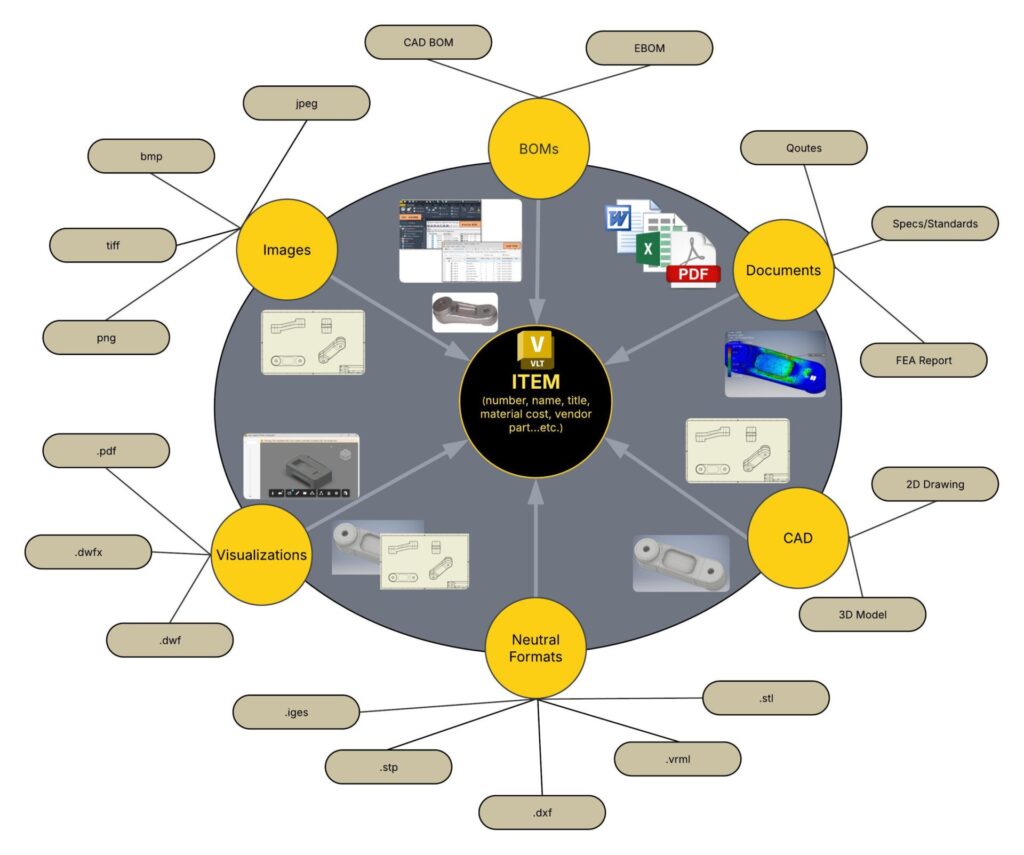
a. Enhanced organization and traceability
Items provide a structured way to organize all components of a product. Each Item is uniquely identified, making it easier to track revisions, changes, and dependencies.
For example, in Vault, an engineer can quickly locate a specific Item, identify the primary design file, view its history, and understand its relationship with other parts and reference documentation. This organization and traceability are crucial for maintaining consistency and quality throughout the product lifecycle.
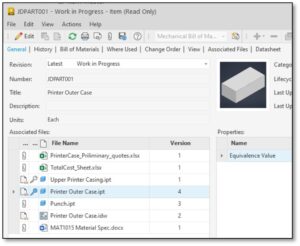
To make this happen, Items bind disparate data under one container for the product components that you design and manufacture. Vault Item makes it possible through associated files. There can be a primary, a secondary, or a tertiary link to the Item or necessary documentation added as attachments. Once you create an item for a CAD part or assembly with drawings, the smart Items creation automatically grabs the drawing file and puts it under the same item.
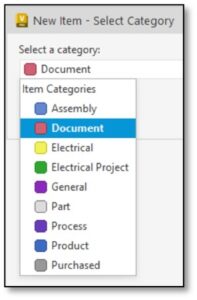
Also, items can receive a category (i.e., parts, assemblies, documents, purchased, processes, etc.) that is OOTB or you can define a custom category which can be selected while assigning items to files.
b. Improved collaboration
Items facilitate collaboration by providing business-critical information (i.e., properties and BOMs) stored at the item level, which can be accessed by any persona, not just engineering. A centralized repository of Items, allows everyone to access the latest information, make updates, and share insights.
In an integrated PLM/PDM system, manufacturing and quality teams can work together seamlessly, reducing errors and accelerating time-to-market. For instance, a design team can update a part specification, and the manufacturing team can instantly see changes and adjust processes accordingly.
c. Regulatory compliance and documentation
Many industries require strict adherence to regulatory standards and thorough documentation. Items in Vault PLM can help you establish links between product definition and associated documentation, including certifications, test results, and regulatory approvals.
This simplifies audits and inspections. For example, a medical device manufacturer can use Vault PLM to maintain records of all components, materials, and processes, ensuring compliance with FDA regulations.
d. Reduce integration complexity with other enterprise systems
In Vault, when files are assigned to Items, it extracts property values from the files based on which properties are set to read. This information, now stored at the Item’s level, is readily available to non-CAD users. Not only that, but it is also available for integrations to allow sync to PLM or ERP systems. This means, that if you are integrating with ERP or PLM, your integration doesn’t have to perform this step of extracting property values from Files.
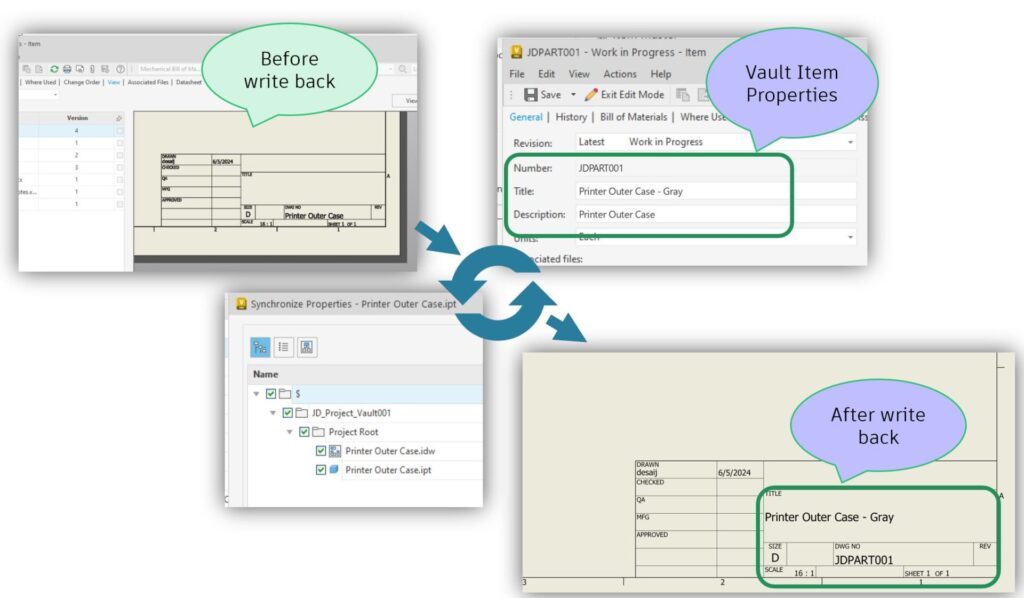
On the other hand, Items to Files property writebacks are also possible; thus, if your integration to ERP and PLM is bi-directional, property writebacks to files can be handled with an Item-centric approach inside Vault.
e. Efficient Bill of Materials (BOM) Management
Fully integrated BOM structures with Inventor BOMs and CAD assembly trees can be derived using Vault Items and BOMs functionality. In addition, the Vault BOMs can be created either top-down, bottom-up, or hybrid, depending on your large assembly or product management strategies. Vault BOM provides additional capabilities to reorder, regroup, add, or remove rows without affecting your CAD structure.
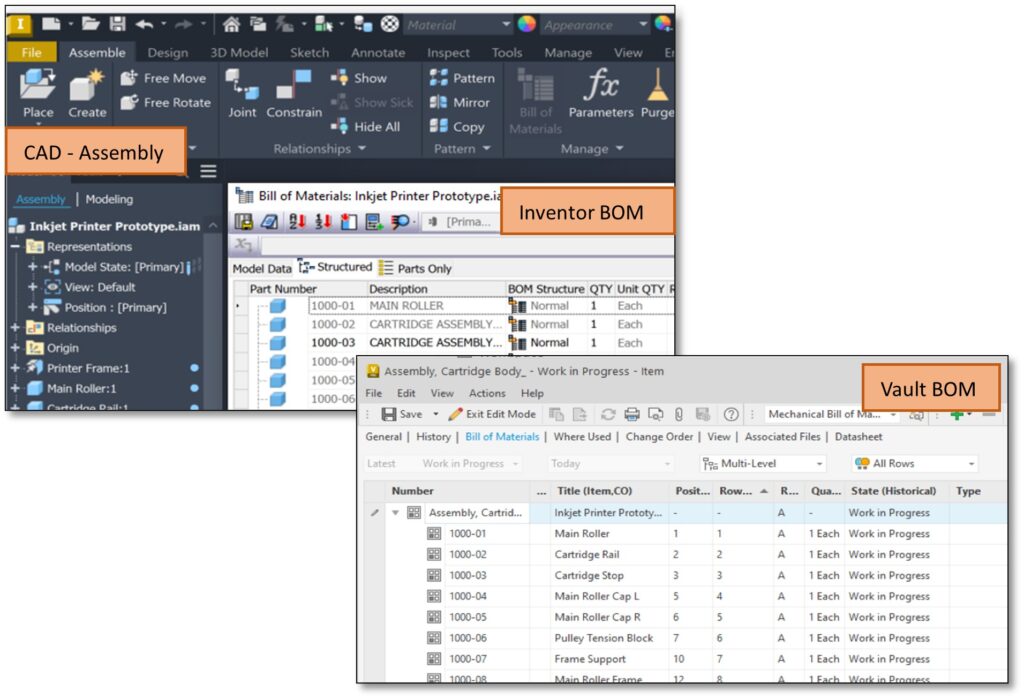
Position number and raw order can be tweaked to adjust manual positions. This way, you can gain a more flexible BOM structure for downstream usage.
With a top-down Items and BOM creation approach, you can start the procurement process early in the product development for long-lead items even before the design is yet to complete, improving time to market.
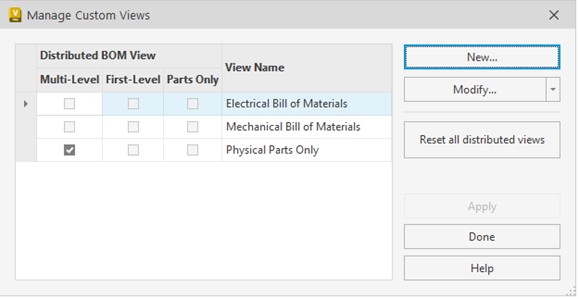
Different distributed BOM views can be derived once the Vault BOM is created to serve different user personas, such as procurement, quality, and manufacturing.
Additionally, Vault BOM will recognize Autodesk Inventor BOM structure types i.e., Normal, Purchased, Reference, Phantom, and Inseparable. Depending on the structure, Vault will determine if the Vault Item will be required or not. Vault BOM will create an Item for Normal, Purchased, and Inseparable structure types.
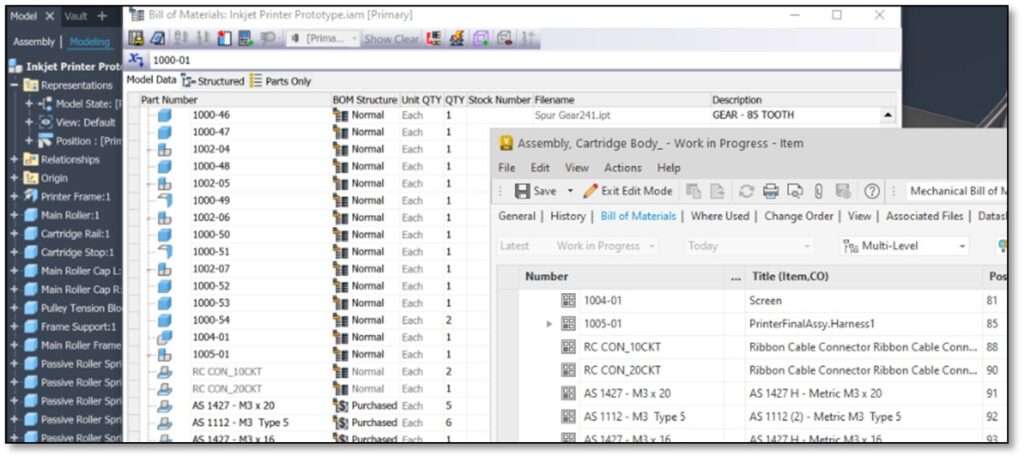
It will not create an item for BOM structure types of “Reference” or “Phantom” for any component of an assembly defined inside Inventor. This will allow you to strategize which components will participate in the BOM that downstream functions in the organization will use, such as procurement, manufacturing, service, etc.
2. Data migration and integration – files to items strategies
Existing Autodesk Vault PDM customers have vast amounts of data already stored in the system. Migrating this data to an Item-centric model can be complex and time-consuming. Ensuring that all relevant data is accurately transferred, maintaining relationships, and preserving metadata is crucial for a successful transition. The following strategies could be considered to make it a less disruptive transition.
- For the legacy data, you can consider a staggered approach or as-needed conversion rather than bulk conversion. This can eliminate upfront heavy efforts. Any files going through a change, or any new design, can be assigned to an Item by each designer responsible as part of the standard design release process.

- Alternatively, you can leverage the auto item assign feature for children’s items on a CAD BOM. For bulk item creation, executing the assign/update item command for the top-level assembly allows you to create bulk items for all its children simultaneously. This applies to all levels of BOM. Strategically identify such product-level or significantly large assemblies and process them through the assign/update Item command.
3. How to drive change management and user adoption?
Adopting Items requires changes in user workflows and processes. Resistance to change is a common challenge, as users may be accustomed to their existing ways of working. Encouraging user adoption and minimizing disruptions to daily operations are essential for a smooth transition.
A phased implementation approach can help ease users into the new system. Start with pilot projects and gradually expand the use of Items across the organization. Engage users in the process by gathering feedback, addressing concerns, and highlighting the benefits of the new approach. Training programs and support resources can also play a critical role in facilitating user adoption.
4. What about my unique requirements and existing customization and configuration?
Every organization has unique requirements and workflows. Configuring Items to align with existing processes and customizing the system to meet specific needs can be challenging. Ensuring that the new Item-centric approach integrates seamlessly with other enterprise systems and tools is vital for maintaining operational efficiency.
Autodesk Vault provides flexible Items configuration options (numbering and revision schema, categories, workflow transitions, lifecycle, properties, etc.) and customization (APIs) tools to tailor the system to individual customer needs.
5. How do you maintain data integrity and quality during transition?
During the transition to an Item-centric approach, maintaining data integrity and quality is paramount. Ensuring that all data is accurate, complete, and up to date is critical for effective product management. Any discrepancies or errors in data can lead to significant issues down the line.
Implement robust validation and verification processes to ensure data integrity during migration. Regular audits and quality checks can help identify and address any issues promptly. Follow the best practices and guidelines for maintaining high data quality standards.
Conclusion
With the right strategies and support, the most common challenges, such as understanding the concept, data migration, change management, customization, and data integrity, can be effectively addressed, paving the way for a smooth transition and unlocking the full potential of an Item-centric approach.
Embrace the journey of adopting Items in Autodesk Vault and gain new opportunities for growth and excellence in your product development and manufacturing processes.
Learn more
Read related post, Autodesk Vault Connector for Seamless PDM and PLM Integration, here.
Visit the Vault PLM product center here.