 markuscueva
Digital simulation is one of the most powerful tools for helping manufacturers optimize factory throughput. Learn how simulation strengthens planning and how Autodesk FlexSim provides a powerful platform for modeling production behavior and reducing operational risk.
FlexSim: 3D Discrete Event Simulation Software
Easy-to-use 3D simulation modeling and analysis software with high-end capabilities. Predict and optimize production processes with realistic 3D visuals and data-driven scenarios.
Today’s factories contend with blistering timelines, variable demand, and increasing product complexity. With so much pressure on manufacturers, every decision about layout, staffing, material movement, and equipment utilization carries substantial financial weight. Digital simulation has become a necessary method for reducing this risk.
By modeling production behavior before capital is committed, engineering teams can more clearly examine the impact of equipment choices, routing strategies, staffing patterns, and scheduling decisions on throughput. With tools like FlexSim from Autodesk, teams can follow a more confident, verifiable path from concept to operation.
How digital simulation influences reliable throughput decisions
Discrete-event simulation has become a preeminent means of validating factory behavior before physical change. Instead of relying on static spreadsheets or heuristic estimates, production engineers can build dynamic models that represent material flow, operator activity, machine behavior, and variability. Such models can replicate the production environment with high fidelity and enable teams to examine how changes might propagate throughout their system. For example, when a conveyor slows down or stations produce inconsistent cycle times, the digital model exposes the impact on overall flow. Engineers can see whether the system maintains target throughput or whether queues grow in unexpected locations.
The ability to explore staffing strategies in this virtual environment is equally valuable. Many plants struggle to understand when additional operators will improve flow or when the true constraint lies elsewhere. With simulation, new staffing patterns can be tested without disrupting existing schedules. Models also reveal whether operators are overburdened, underutilized, or positioned inefficiently.
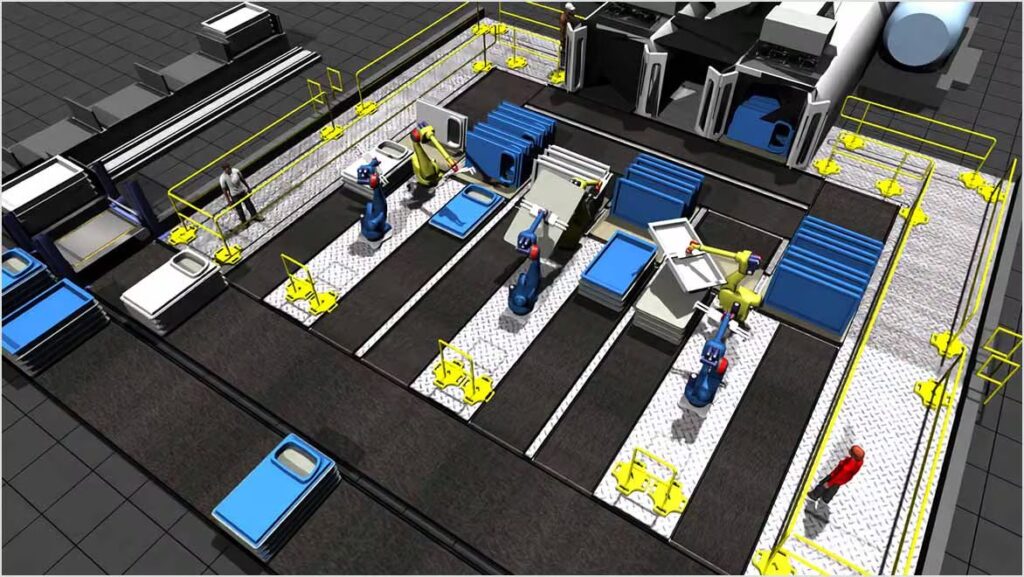
While production variability often makes real-world testing impractical, simulations allow controlled exploration of fluctuations in demand and machine availability. By observing behavior across thousands of virtual production hours, engineers can identify conditions that lead to reduced throughput. As a result, they can better prepare for peak periods, unexpected stoppages, or product mix changes.
However, complexity grows further when planning new facilities. Without digital testing, layout decisions rely heavily on experience and assumptions. Simulation gives project teams the ability to validate routing logic and space allocation before construction begins. Potential conflicts between equipment and pedestrian movement become visible immediately, and project stakeholders can make decisions based on measurable effects rather than guesswork.
Autodesk FlexSim for throughput optimization
Autodesk FlexSim provides a specialized environment for building and analyzing high-resolution digital factory models. With a discrete-event simulation engine that accurately recreates real system behavior, FlexSim unlocks true throughput analysis, bottleneck identification, and system-wide optimization.
One benefit of FlexSim is that it integrates production data, so simulations reflect actual performance rather than estimates. Machine cycle times, staffing patterns, shift rules, arrival schedules, and equipment reliability profiles can all be incorporated directly into the model. When engineers adjust scenarios, FlexSim’s built-in experiment manager runs structured comparisons that help teams isolate the conditions that deliver the strongest throughput improvements.
For material flow analysis, FlexSim includes libraries for conveyors, automated transport, buffering, and manual handling. Engineers can observe how each element interacts with upstream and downstream processes. When bottlenecks occur, animations highlight where queues form and how long products wait before advancing. And, because the environment supports both 2D and 3D visualization, teams can clearly understand spatial constraints and the operational impact of new equipment.
Finally, FlexSim’s logic-building capabilities also support complex operational rules. Facilities managing variable product mixes or seasonal spikes can encode those behaviors directly within the model. As scenarios become more complex, the software’s flowchart-style interface offers clarity and eliminates the need for custom code. In turn, engineering teams can explore sophisticated what-if cases without lengthy development cycles or programming expertise.
Test first, implement later
Digital simulation is the best way for manufacturers to validate decisions before committing to physical change. Autodesk FlexSim strengthens this process by giving engineering teams a robust, data-driven platform for exploring scenarios and optimizing throughput with accuracy. With simulation guiding decision-making, manufacturers can move into construction and commissioning with a stronger understanding of how their factory will operate from day one.