 Irvin Hayes Jr.
Synchronizing information between your product data management and product lifecycle management solutions is easier than ever with the Autodesk Vault Connector, now available in the release of Vault 2026.1. This innovation streamlines workflows, enhances collaboration, and improves productivity across teams and stakeholders.
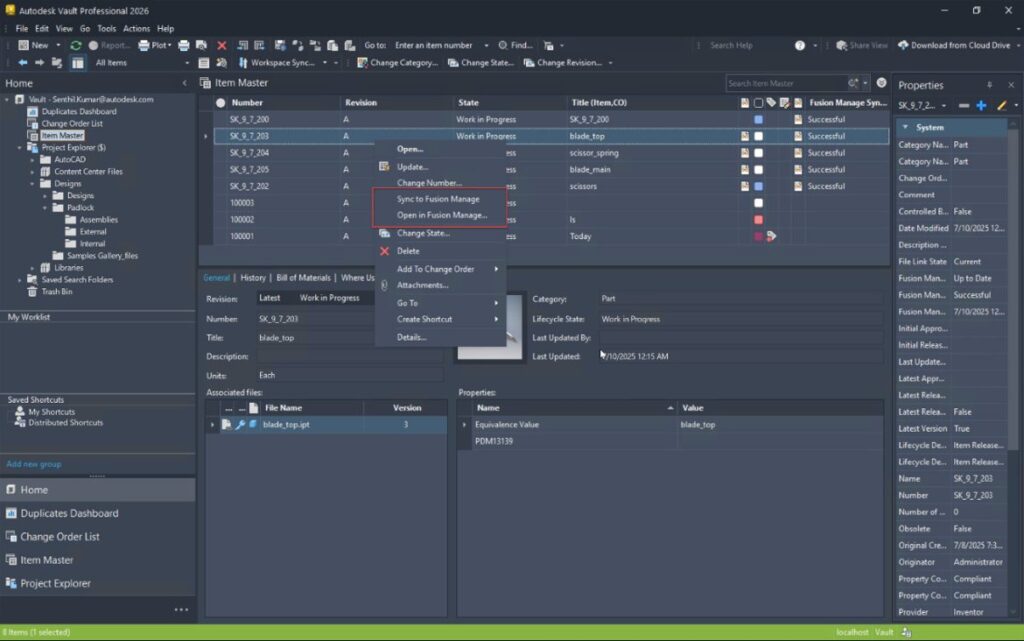
What is the Autodesk Vault Connector?
The Vault Connector is a native, out-of-the-box (OOTB) connector that bridges the gap between design data management and process management systems. Built for such solutions as Autodesk Vault PLM, the Vault Connector seamlessly integrates Vault Professional (PDM) with Autodesk Fusion Manage (PLM), combining the power of data and process management.
For example, the Vault Connector automates the synchronization of items and bills of materials (BOMs), attaches neutral-format files, and matches attributes between Vault Professional and Fusion Manage. As a result, information remains current across both systems, enhancing data accuracy and collaboration.
Watch the video below to learn more about how this integration works.
How to use the Vault Connector
The Vault Connector is an on-premise, agent-based integration installed with the Vault server. It features an intuitive user interface that enables you to easily configure an out-of-the-box Vault environment with an out-of-the-box Fusion Manage tenant.
Implementing the Vault Connector is straightforward and requires minimal setup. Follow these steps to enable and configure the connector:
Steps to enable Vault Connector on ADMS console
- Navigate to Tools > Administration in the ADMS console.
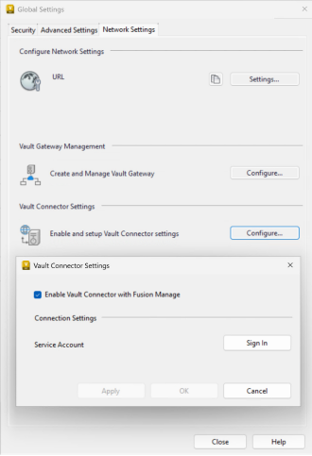
- Select the “Network Settings” tab in the global settings dialog box and click “Configure” under Vault Connector Settings.
- In the Vault Connector Setting dialog box, check the box “Enable Vault Connector with Fusion Manage” and provide the service account credentials.
- Sign in using the Autodesk SSO login dialog and apply the settings.
Steps to enable Vault Connector on Vault Client
- Log in to Autodesk Vault Client with administrator credentials and go to Tools > Administration > Vault Settings.
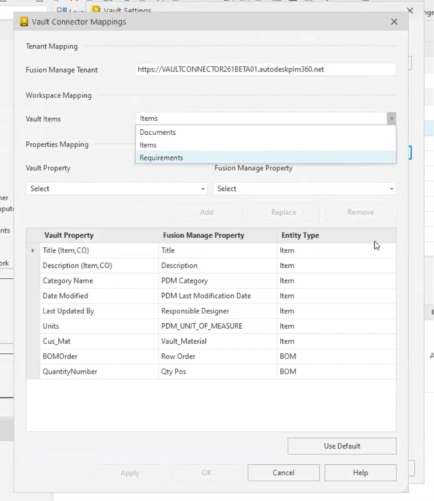
- Select the “Collaborate” tab inside the Vault Settings window and click “Configure” under Vault Connector Management.
- Log in with Autodesk ID if prompted, then provide the URL for your Fusion Manage tenant and map property fields between Vault and Fusion Manage.
- Use the “Use Default” mapping option for OOTB property mapping or customize the mapping as needed.
Vault Connector workflow benefits and business value
The Vault Connector offers numerous advantages that transform workflows and enhance productivity:
Streamlined data synchronization
By automating the synchronization of Items, BOMs, and design representations between Vault Professional and Fusion Manage, the Vault Connector ensures data accuracy and consistency. This eliminates manual data entry, reduces errors, and saves valuable time.
Enhanced collaboration
The integration between Vault Professional and Fusion Manage improves collaboration among design and downstream teams by providing access to consistent and accurate data. Teams can make informed decisions quickly, accelerating project timelines and boosting efficiency.
Efficient change management
The Vault Connector facilitates efficient change management processes, allowing users to track and manage changes across both systems effectively. This ensures that revisions are implemented correctly, maintaining alignment between designs and change requests.
Improved operational efficiency
Features such as the automation of attaching 2D PDF files during the Assign/Update Item process and intelligent property updates during file check-out enhance operational efficiency. These improvements mitigate errors, conserve time, and expedite transitions to downstream teams.
Enhanced visibility
Non-engineering and engineering users gain better visibility into the lifecycle of products through integrated data management. This allows teams to focus on delivering results rather than searching for information.
Conclusion
The Vault Connector in Vault 2026.1 is a game-changer for organizations seeking to streamline workflows, enhance collaboration, and improve productivity. By connecting Autodesk Vault Professional with Fusion Manage, a cohesive solution is provided with Vault PLM that extends the value of your data and accelerates product development across your organization and supply chain. Every step is faster, smarter, and connected with the Vault Connector.
Learn more
Read related post, The Value of Autodesk Vault Items in your Digital Transformation Journey, here.
Visit the Vault PLM product center here.