In construction, even the smallest disconnect can snowball into costly delays and frustration. Picture this: The construction project manager flags a budget overrun, only to discover that a change order was approved weeks ago but never communicated to finance. Or a field crew is halfway through installation when they realize the spec sheet they’re using is outdated — and the new version was uploaded to a different folder without notification.
These moments aren’t rare. They’re daily realities for teams trying to keep complex projects on track. The more moving parts a project has, the easier it is for things to slip through the cracks.
And construction projects involve more than just installations and documents — they involve people. According to Autodesk’s 2025 State of Design & Make: Spotlight on Construction report, a typical construction project has 42 external collaborators from design through handover. That’s 42 opportunities for miscommunication, lost data, and delays.
And while collaboration is essential, more people mean more chances for information to get struck, misinterpreted, or missed entirely. When communication breaks down or information is hard to find, teams lose momentum. Projects slow down. Profits can shrink. Clients get frustrated, And pressure builds.
That’s why keeping every team member connected and informed is the key to keeping projects moving without a hitch.
If you prefer to skip ahead to learn about our latest releases, click below:
Everyone knows the importance of connecting teams and processes, yet many projects continue to be derailed by disconnected systems and siloed stakeholders.
The root of the problem is access. When teams can’t quickly find the information they need, at the time they need it, or aren’t confident it’s accurate, they’re forced to make decisions in the dark.
This is where a construction platform comes into play. By centralizing project data, workflows, and teams in one shared environment, it eliminates the need to jump between disconnected tools or chase down updates across emails, spreadsheets, and file folders. A shared data environment ensures everyone—from the field to the office—is working from the same source of truth, improving accuracy and accountability.
Connected platforms also unlock powerful insights. Linking data across phases and disciplines helps teams identify risks earlier, forecast more accurately, and optimize performance. Whether it’s managing RFIs, tracking progress, or coordinating trades, connected workflows streamline operations and keep teams aligned. Autodesk Forma (formerly Autodesk Construction Cloud) is built to deliver exactly that.
Today, we’re introducing new feature releases that eliminate interruptions and empower construction teams to work without friction. Because when your information flows, your projects do too.
The field is the heartbeat of construction: where plans meet pavement and decisions become action. When field and office teams are out of sync, disconnects turn into delays and the jobsite can’t afford either. That’s why our latest Field Forward releases are designed to eliminate interruptions and empower crews to work with speed, clarity, and confidence.
Crews now have more control over how and when project data downloads, what appears on screen, and how information is synced. Mobile download options and in-project sync help teams get the information they need faster, with less confusion. Filtering improvements, like hiding closed issues by default, keep the focus on what matters most.
Workflows are smoother and more intuitive. Scan a QR code to instantly view assets with their associated models, fill out referenced forms without losing your place, and attach permission-specific photos for added context. Or bulk edit assets, like updating status or location across multiple items in seconds. These enhancements make it easier to move from insight to action, right where the work is happening.
Model coordination is now even more connected to the field. The new Model Viewer delivers richer context and faster access to the information crews need to build with confidence. And project teams can keep everyone aligned with ACC Viewpoints now available to create web and view on mobile, field teams can instantly access the same guidance created in the office.
In the trailer, speed matters too. Insight Builder dashboards are now in public beta for Enterprise customers. These dashboards bring customizable views to the web, helping project teams get up to speed on any facet of the project without chasing down updates.
When field teams are empowered, construction moves forward without interruption.
Interruptions in construction don’t always come from major issues. All too often, they’re the result of small inefficiencies like the time spent hunting for information. These moments add up, pulling teams away from critical tasks and slowing down decisions.
Autodesk Assistant, the Autodesk AI-powered chatbot within ACC, is designed to eliminate those disruptions. With the newest release focused on Project Data, users can ask the Assistant natural language questions about RFIs, Submittals, Change Orders, Schedule tasks, Issues, or Specifications and get instant, context-rich responses.
By cutting through complexity, the Assistant helps teams save time, maintain momentum, and make faster, more informed decisions. What makes this Assistant especially powerful is its ability to understand relationships across project data by identifying and connecting related elements. For instance, if a user asks about a schedule delay, the Assistant can surface relevant RFIs, unresolved issues, or pending submittals that may be contributing factors—providing a more complete and actionable answer. And saved prompts create a personal library of go-to questions, speeding up future tasks and boosting efficiency over time.
AI is evolving fast, and with it comes crucial questions about how data is handled, especially when using LLMs. At Autodesk, protecting your information isn’t just a checkbox—it’s a commitment. Our dedicated privacy team works to ensure your data stays secure, compliant, and firmly under your control.
Small inefficiencies in cost management workflows like manually updating forecasts or waiting on reports can quietly slow down progress and decision-making. These delays often stem from disconnected data and limited visibility into financials. That’s why the latest release in Cost Management, Budget/Revenue Forecast and next 3 Point Fee Analysis, will improve how teams plan, track, and adjust project financials.
With Budget/Revenue Forecast, users can apply the same dynamic, date range–based forecasting logic used for cost to budget and revenue projections. This is especially useful for GMP, Cost Plus, Reimbursable, and T&M projects, where accuracy and agility are key. The addition of 3 Point Fee Analysis will give project managers a clearer view of what’s planned, what’s current, and what’s forecasted—making it easier to project final contract value and fee.
Together, these features eliminate the need to hunt for financial data or wait on manual updates. Instead, teams get real-time insights, full visibility across departments, and a transparent view of project health. That means faster decisions, fewer disruptions, and more time spent on what matters most.
Keeping projects on track starts with reliable, well-organized files. With Required Attributes in Files, admins can now enforce mandatory metadata, so every document meets project standards before it’s uploaded.
This capability helps provide teams with the metadata they need to manage their drawings better and ensure they adhere to project standards.
Additionally, having required attributes leads to accurate, consistent data that’s easier to search, filter, and report on. That way, you and your team can spend less time chasing files and more time getting work done.
This highly requested feature also supports ISO 19650 compliance and strengthens data practices.
Sharing project data shouldn’t mean sacrificing security, wasting hours chasing down files or, worse yet, copying them to share. Thanks to Bridge in ACC, teams can stay on the same page while maintaining strict control over their data.
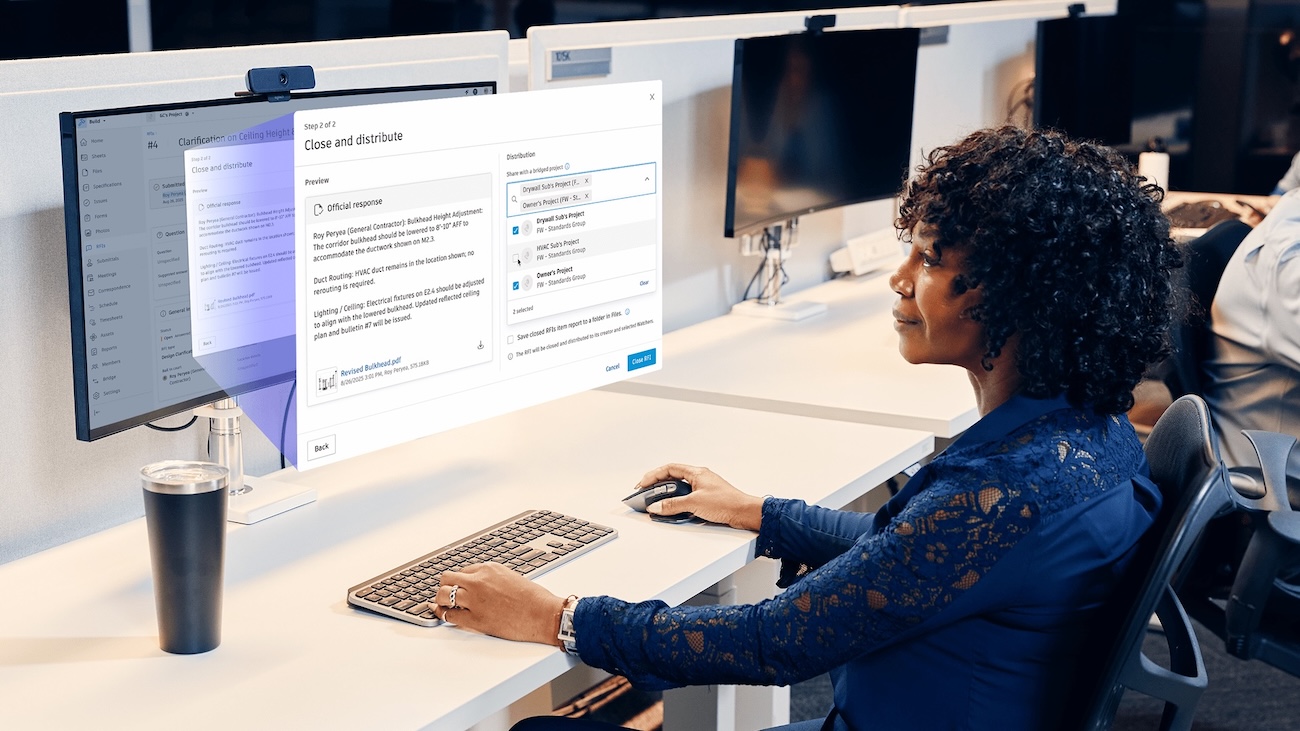
The latest advancement, Closed RFIs on Bridge, takes this further by enabling teams to share closed native RFIs across projects and ACC accounts. The result? Standardized data, faster access, and tighter control—so you can wrap projects sooner, reduce rework, and get paid faster.
Instead of juggling disconnected RFI records across multiple accounts, teams now have a streamlined way to access the information they need. These new advancements in Bridge enable all project stakeholders to work across organizations, accounts, and workflows without compromising collaboration, confidentiality, or creating unnecessary risk.
These updates are just the beginning. Explore our complete product roundup for a deeper dive into these releases and subscribe to our blog so you’re always in the loop on construction tech trends.