TECHNICAL DRAWING
TECHNICAL DRAWING
Draft precise and detailed drawings quickly with CAD software from Autodesk.
Image courtesy of Engineering Centre LTD, Russia

What is a technical drawing?
What is a technical drawing?
A technical drawing, also known as an engineering drawing, is a detailed, precise diagram or plan that conveys information about how an object functions or is constructed. Engineers, electricians and contractors all use these drawings as guides when constructing or repairing objects and buildings.
A technical drawing, also known as an engineering drawing, is a detailed, precise diagram or plan that conveys information about how an object functions or is constructed. Engineers, electricians and contractors all use these drawings as guides when constructing or repairing objects and buildings.
 Image courtesy of MartinCSI
Why are technical drawings important?
Why are technical drawings important?
Technical drawings bridge the communication between designers, the people who come up with ideas, and producers, the people who put those ideas into practice. They’re designed as a universal language to be understood by engineers, contractors and architects.
Technical drawings bridge the communication between designers, the people who come up with ideas, and producers, the people who put those ideas into practice. They’re designed as a universal language to be understood by engineers, contractors and architects.
Types of technical drawings
Mechanical Engineering Drawing
Mechanical Engineering Drawing
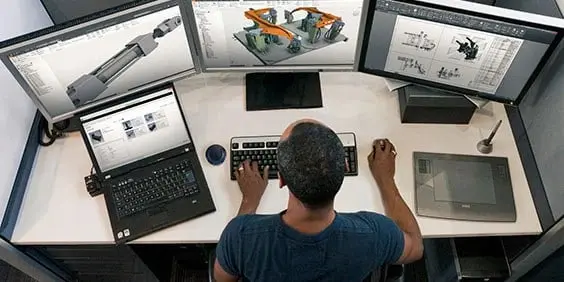
Mechanical engineering drawings are used to define the requirements for engineering products/components. They serve as technical manuals and as trouble-shooting tools for identifying the weak spots in a mechanical design (US site). Mechanical drawings rely on precise mathematical equations to accurately depict the mechanism and its component parts
Mechanical engineering drawings are used to define the requirements for engineering products/components. They serve as technical manuals and as trouble-shooting tools for identifying the weak spots in a mechanical design (US site). Mechanical drawings rely on precise mathematical equations to accurately depict the mechanism and its component parts
Electrical drawing
Electrical drawing
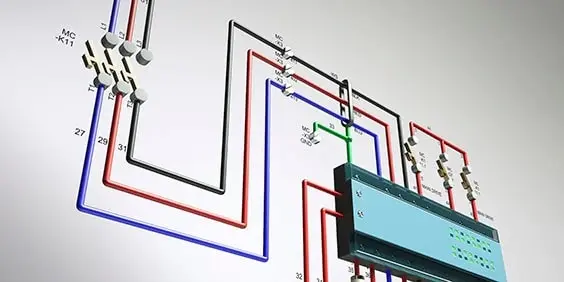
Electrical drawings are technical documents that depict and notate designs for electrical systems. They convey relevant information about lighting, wiring and power sources, as well as information about voltage and capacity. Technicians rely on electrical drawings during a building’s construction or when repairing a building’s electrical system.Electrical drawings are technical documents that depict and notate designs for electrical systems. They convey relevant information about lighting, wiring and power sources, as well as information about voltage and capacity. Technicians rely on electrical drawings during a building’s construction or when repairing a building’s electrical system.
Electrical drawings are technical documents that depict and notate designs for electrical systems. They convey relevant information about lighting, wiring and power sources, as well as information about voltage and capacity. Technicians rely on electrical drawings during a building’s construction or when repairing a building’s electrical system.Electrical drawings are technical documents that depict and notate designs for electrical systems. They convey relevant information about lighting, wiring and power sources, as well as information about voltage and capacity. Technicians rely on electrical drawings during a building’s construction or when repairing a building’s electrical system.

Architectural drawing
Architectural drawing
Architectural drawings are detailed, precise depictions of every aspect of the construction being proposed. Architects use the drawings to visualise ideas and concepts, turn a design idea into a coherent plan for a building and decide the type of supplies and labour that is needed for the project.
Architectural drawings are detailed, precise depictions of every aspect of the construction being proposed. Architects use the drawings to visualise ideas and concepts, turn a design idea into a coherent plan for a building and decide the type of supplies and labour that is needed for the project.
Technical drawing software

Expedite your technical drawing process
Expedite your technical drawing process
AutoCAD includes specialised toolsets, such as architecture, mechanical, electrical and more. Access over 750,000 intelligent objects and parts with industry libraries. Automate common actions in technical drawings such as inserting doors, generating bills of materials and creating PLC I/O drawings.
AutoCAD includes specialised toolsets, such as architecture, mechanical, electrical and more. Access over 750,000 intelligent objects and parts with industry libraries. Automate common actions in technical drawings such as inserting doors, generating bills of materials and creating PLC I/O drawings.
Getting started with technical drawing software

AutoCAD
AutoCAD
Get started in AutoCAD with these free guides and develop your skills with videos and tutorials.
Learn moreGet started in AutoCAD with these free guides and develop your skills with videos and tutorials.


Technical drawings in action
See how customers are using Autodesk software to create technical drawings.
 Image published with the kind permission of Lightning Motorcycles
Delivering the world's fastest electric motorcycle
Delivering the world's fastest electric motorcycle
Electric motorcycle builders outraced the petrol-powered competition with a superbike developed with generative design and 3D-printed prototypes. Autodesk’s iterative process to auto-design translated into significant gains in speed and range for the motorcycle, helping them to achieve world records.
Electric motorcycle builders outraced the petrol-powered competition with a superbike developed with generative design and 3D-printed prototypes. Autodesk’s iterative process to auto-design translated into significant gains in speed and range for the motorcycle, helping them to achieve world records.

Creating a "ropeless" lift for the US navy
Creating a "ropeless" lift for the US navy
Federal Equipment Company designs highly innovative lifts for the US Navy with help from Autodesk software, including AutoCAD, Revit and Inventor. Collectively, these programmes helped perform initial finite element analysis (FEA) (US site), track materials and optimise designs for manufacturability, ultimately reducing cost overruns associated with production stoppages and rework.
Federal Equipment Company designs highly innovative lifts for the US Navy with help from Autodesk software, including AutoCAD, Revit and Inventor. Collectively, these programmes helped perform initial finite element analysis (FEA) (US site), track materials and optimise designs for manufacturability, ultimately reducing cost overruns associated with production stoppages and rework.
Technical drawing resources
Create an engineering drawing in AutoCAD
Learn how to create mechanical engineering orthographic projection drawings in AutoCAD.
Learn how to create mechanical engineering orthographic projection drawings in AutoCAD.
Essential commands for technical drawing
Discover the commands you need to create 2D drawings in AutoCAD or AutoCAD LT.
Discover the commands you need to create 2D drawings in AutoCAD or AutoCAD LT.
Get started in AutoCAD
Get the most out of your AutoCAD subscription with these tutorials, tips and free resources.
Get the most out of your AutoCAD subscription with these tutorials, tips and free resources.
Update technical drawings anywhere
Explore the capabilities of the AutoCAD web app.
Explore the capabilities of the AutoCAD web app.
Autodesk keyboard shortcuts (US site)
Get shortcut keys and commands lists for popular Autodesk products.
Get shortcut keys and commands lists for popular Autodesk products.
AutoCAD and Inventor work better together (US Site)
Design faster and get more from your models by combining the capabilities of AutoCAD and Inventor.
Design faster and get more from your models by combining the capabilities of AutoCAD and Inventor.