
If you work in construction, you’ve likely had several conversations about how AI (artificial intelligence) can transform your workflows. But if those discussions focus on theoretical possibilities—i.e., what AI could do instead of what teams are actually doing—then you’re not really tapping into its potential.
Here’s the good news: AI is already being used in several areas, particularly in preconstruction. Smart teams are leveraging the technology to automate time‑consuming work, surface hidden risks, and support better decisions. From takeoff and estimating to scope review and risk analysis, AI is being used in a lot of interesting ways.
Before we dive in, a quick note: The examples below illustrate how preconstruction professionals are using AI today through a variety tools and approaches. While not all of these capabilities are available within Autodesk solutions, they highlight where teams are already realizing value.
AI is gaining traction not as a replacement for expertise, but as a way to process information at scale. With artificial intelligence, teams can crunch the numbers much faster and surface insights sooner.
This is especially important in preconstruction because the decisions during this phase of the project are made under immense pressure, and often with disconnected data. Not only that, but estimators and precon teams are expected to work faster and navigate increasingly complex requirements.
This is where AI can really add value. AI-powered platforms like Autodesk Forma are beginning to help teams connect the dots so they focus on executing meaningful work.
Here’s a caveat: in order to truly be useful, AI must be workflow-native, not just a chatbot. Professionals want AI embedded in takeoff, estimating, and bidding workflows with human-in-the-loop control. It should support decisions with suggestions, surface insights from historical data, and help organize information without adding extra steps.
With that in mind, here are examples of how preconstruction teams are using—and in some cases experimenting with—AI in their workflows today.
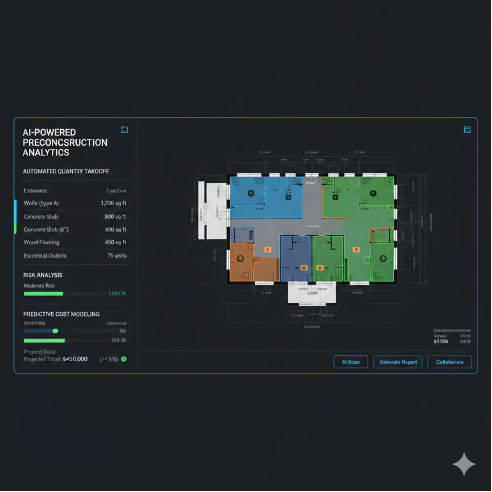
Quantity takeoff is one of the most immediate areas where AI is beginning to deliver value. It can reduce repetitive manual work and improve consistency across estimates by assisting with:
Some preconstruction teams are already applying AI in this way today. Some companies rely on model-based (3D) quantity takeoff where available, while supplementing it with quantity extraction from 2D drawings to ensure completeness, especially when model detail is limited. “I use AI to automate quantity takeoff and risk analysis,” writes Vishal Mistry, Engineer, and a member of The Big Room, an online community for AECO professionals.
Throughout the entire process, teams still review outputs, validate quantities, and apply judgment where it matters most.
All in all, the result is faster estimates, fewer manual errors, and stronger early-stage confidence.
Beyond takeoff, preconstruction professionals are also beginning to apply AI to streamline adjacent workflows like bid management and subcontractor qualification, areas that are often highly manual and document-heavy.
For example, teams using TradeTapp can leverage AI to automatically extract and structure financial data from subcontractor PDF financial statements. Instead of manually entering information into qualification forms, AI helps streamline qualification reviews, improve consistency, and surface key insights faster for more informed decision-making. Where in bid management workflows, subcontractors using BuildingConnected can automatically extract relevant information from bid invitation emails into their Bid Board to manage and aggregate their invites from various general contractors.
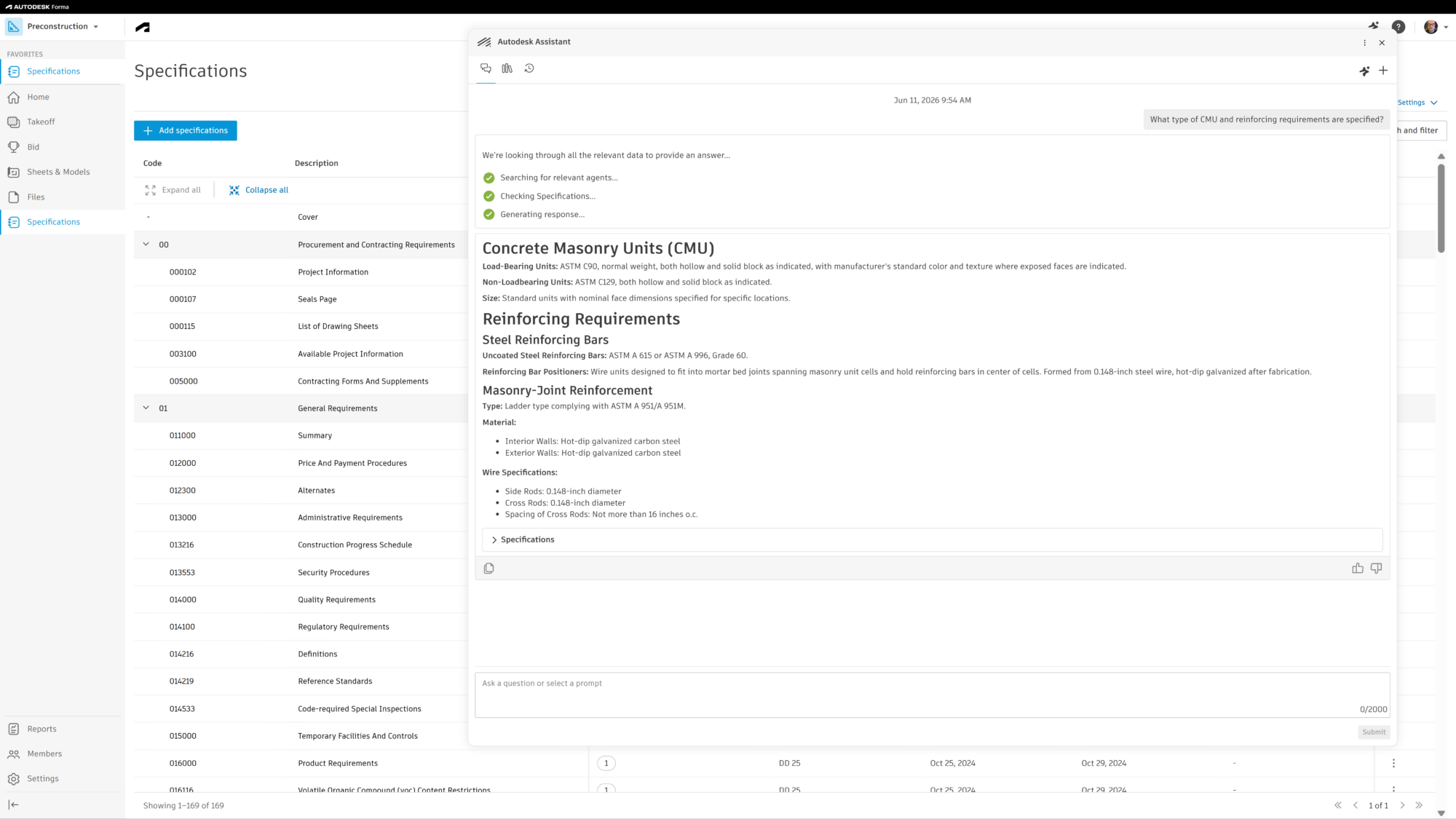
Specifications and scopes are dense and complex, and are often interpreted differently across groups, making them a major source of risk. To make this process more manageable, many preconstruction teams are beginning to apply AI to help break down and analyze large specification documents. Instead of manually reviewing hundreds of pages, AI-powered capabilities within Autodesk Forma can be used to split large specification documents into more digestible sections, making it easier to understand working relationships, liability considerations, and design intent.
Some teams are also starting to use AI chatbot interfaces to interact with project information more naturally. Rather than manually searching through specification and scope documents, they can ask questions in plain language, generate summaries, and quickly surface key details needed to make informed decisions. A great example of this is Autodesk Assistant, users gain a more intuitive and flexible ways to access, validate, and summarize the critical information in published project specifications.
“One of the greatest advantages of Autodesk Assistant is its ability to search for a term within the specs, locate it, and reference where it was found. This is crucial for our team in identifying concerns and addressing them promptly. From there we can immediately send an RFI or share information with a trade partner.” - Jason Fuhrmann, Executive Vice President, Project Development, Miron Construction Co., Inc.
Another thing AI is really good at? Analyzing patterns across large volumes of historical project data. This is difficult for project teams because that information is usually scattered across multiple previous projects and time-consuming to pull together manually.
But with AI, teams are starting to experiment with ways to process and analyze that information more efficiently. For example, some organizations are exploring how AI can help identify patterns in historical data, surface inconsistencies, and highlight areas that may require closer review.
Some teams are also investigating how data can be exported or aggregated from preconstruction tools and then leveraged in external AI tools or large language models to generate additional insights. In these workflows, teams may combine data from drawings, specifications, estimate, and past projects to support more advanced analysis or validation outside of their core preconstruction systems.
This can act as an additional checkpoint during preconstruction, helping teams compare current assumptions against past projects or flag concerns that warrant further investigation. In some cases AI may be used to benchmark current estimates against historical costs and outcomes or surface anomalies and potential risk areas earlier in the process.
When used thoughtfully, these approaches can help teams validate assumptions instead of discovering issues after awarding the job. However, many of these workflows are still evolving and often require teams to connect multiple tools and data sources together as they experiment with how best to apply AI to their data.
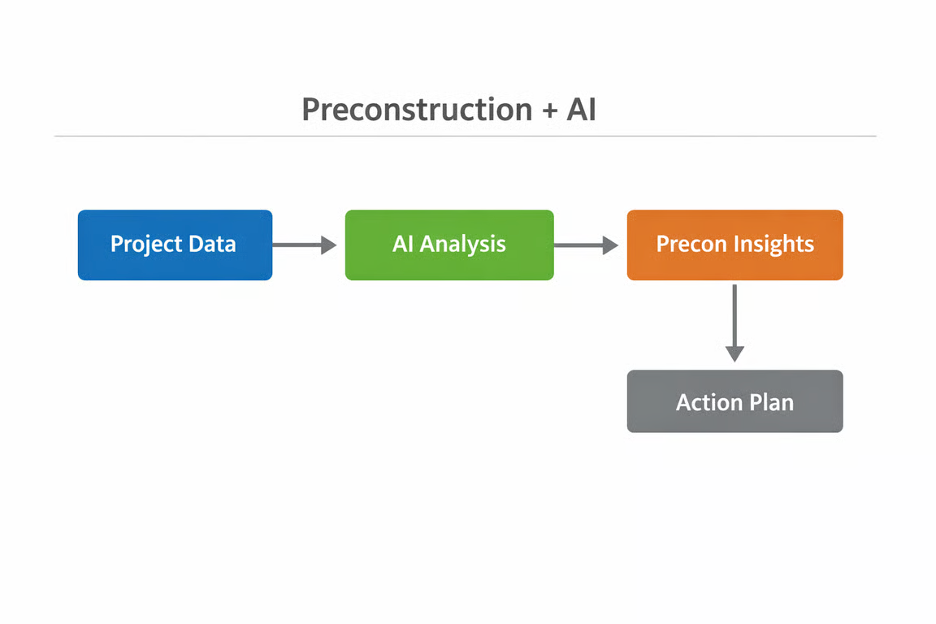
Image courtesy of Jorge Brizuela, Building Designer
AI adoption in preconstruction is extending into adjacent workflows that shape downstream success.
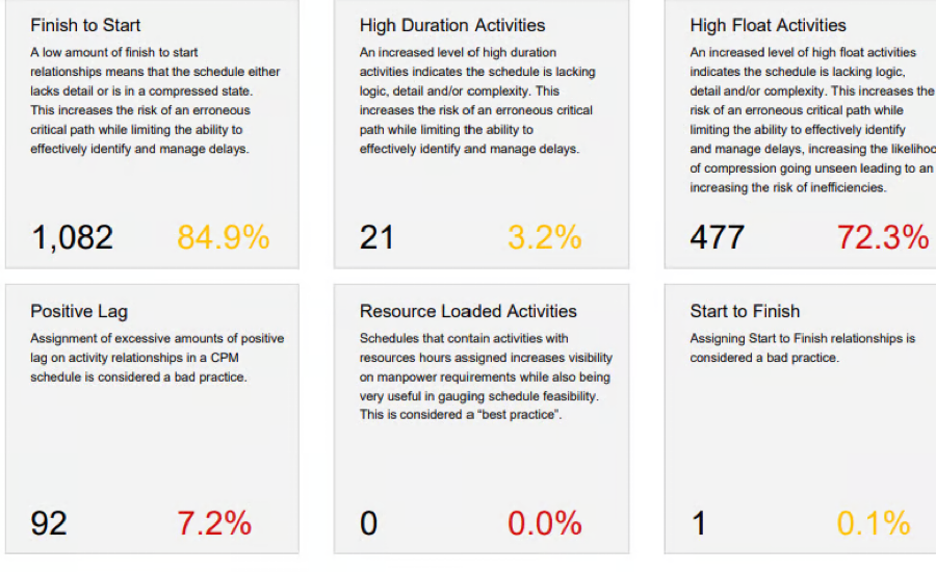
Some of the ways AI is supporting earlier, more informed planning decisions include:
With AI, teams achieve stronger alignment between preconstruction and execution and fewer late‑stage surprises.
Across every example, one theme is consistent: AI works best with connected, reliable data.
Ask anyone who’s prompted a chatbot before, and they’ll tell you that the output you get from AI is only as good as your input.
In preconstruction, AI delivers the most value when it can access connected data from estimating, takeoffs, documents, schedules, and historical projects.
On the flip side, if your data is fragmented, then your AI outputs will be severely limited. It’s difficult to get accurate and reliable analysis when information is siloed, incomplete, or inconsistent. Historical context, comparable projects, and clear project attributes are also foundational for meaningful AI insights.
Another thing these workflows have in common is that they still require human-in-the-loop review.
As helpful as it is, AI remains just that: helpful.
It can assist and make your life easier around things like takeoffs, spec review, and early risk identification. However, AI doesn’t eliminate the need for experience, judgment, or context. It’s not making final pricing decisions, nor does it take accountability for project outcomes.
At the end of the day, AI is not replacing estimators or preconstruction leaders.
AI is evolving fast, and going forward, preconstruction pros can expect deeper integration, better context, and stronger decision support.
Expect AI to continue to deepen its role in core preconstruction workflows, including takeoff, estimating, scope creation, and bid leveling.
This includes:
AI’s primary value will remain speed and verification. Teams will rely on it to surface inconsistencies, missing scope, and out-of-the-norm conditions faster. That being said, experienced professionals will still have final say.
As AI tools continue to learn and mature, they will be able to draw on past projects to benchmark costs, flag risk patterns, and inform early decisions with greater confidence. Future AI capabilities will rely more heavily on:
Most projects still run on drawings and specs. Models help, but they don’t always tell the full story. AI is getting better at reading across sheets, specs, schedules, and models together, so teams can catch gaps earlier and stay aligned. The real value comes from connecting all of it, not relying on a single source.
When it comes to AI, you don’t need a full transformation to start seeing value.
Take it one piece at a time, and start with workflows that slow teams down the most. That could be takeoff, spec review, scope analysis, or benchmarking. From there, make sure your data is connected so AI can actually surface useful insights.
Just as important, train your team to treat AI as a second set of eyes, not the final answer. The teams getting the most out of it aren’t chasing features. They’re focused on outcomes like faster turnaround, clearer scope, and fewer surprises when the job kicks off.
Before jumping into AI, many teams need to focus on digitizing their workflows, reducing manual effort, and connecting their data across estimating, takeoff, documents, and bidding. Without that foundation, it’s difficult to get the most out of AI, but even taking these core steps alone can significantly reduce manual disconnects and improve efficiency across preconstruction workflows.
From there, AI can begin to play a more impactful role. From takeoff to scope review to early risk identification, teams can use it to move faster, reduce tedious work, and support better-informed decisions.