At Autodesk, our commitment to our customers is unwavering: to give construction teams the tools they need to work smarter and faster. In September, we are thrilled to share product releases that will be rolling out across the Autodesk Construction Cloud platform to bring even more value to our users.
With updates across Autodesk Construction Cloud Platform, Autodesk BIM Collaborate Pro, and Autodesk Build, let's dive in to discover how these enhancements can supercharge your construction processes.
Dig in by product:
* Autodesk Construction Cloud Platform & BIM 360
** Autodesk BIM Collaborate/Pro, Navisworks Manage
*** Autodesk BIM Collaborate/Pro, Autodesk Build
**** Autodesk Build, Autodesk Docs
Admin (Account) | Disable New Project Creation (Opt-In)
Account admins can now request to disable new project creation in PlanGrid, BIM 360, and BIM 360 Field. This supports your organization’s transition to Autodesk Construction Cloud by encouraging teams to start new projects in ACC from day one.
For more information, reach out to your Autodesk point of contact, including but not limited to your Account Executive, Technical Solutions Executive, Customer Success Manager, or Autodesk Support.
Admin (Account) | Secure Service Accounts
Secure Service Accounts help Admins manage which projects a custom third-party app can access, so sensitive data stays protected. These accounts show up in member lists, are clearly labeled, and provide full visibility into how third-party apps interact with sensitive project data. This feature is only for custom-built integrations, not apps installed from the App Gallery.
Autodesk Assistant | Project Data [BETA]
Using the new Project Data agent, project administrators can now ask questions about RFIs, submittals, issues, schedules, specifications, and change orders—and receive instant, context-rich answers. By simplifying complex data, the Assistant helps teams save time, keep projects moving, and make faster, more informed decisions.
Bridge | Email Notification When Bridge Invitation is Accepted
When a Bridge invitation is accepted and a Bridged Project is created, the user who sent the invitation will now receive an email notification. This helps Project Admins stay informed about new connections without needing to check manually.
Desktop Connector | Data Panel
The new Data Panel in Desktop Connector gives teams instant access to cloud-based file properties directly in Windows File Explorer. View version history, lock status, thumbnails, and who last modified a file, all without opening the file or switching to the browser. Whether you're reviewing drawings, specs, or markups, it's a faster way to verify information, reduce errors, and keep your workflows moving.
Desktop Connector | On-Demand File Processing when using Desktop Connector
Instead of auto-processing every upload from Desktop Connector, teams can now decide when a file should be processed for viewing in Docs. It’s a simple shift that gives teams more control, speeds up performance, and streamlines access to files that matter most. Cloud connected workflows, including Revit Cloud Worksharing, Model Coordination, Civil 3D to Revit Topology, and Bridge Automations, still process for viewing automatically. Click here for more details on what’s changing and why.
Files | Files Settings Layout Restructure
Files settings now feature a reorganized tab structure to make it easier for teams to find and manage settings across projects and templates. A new secondary submenu layer helps streamline the Files settings menu and better aligns settings with how teams actually work. Key changes include:
Files | Holding Area Settings Change
The Holding Area setting is being relocated from the Naming Standards setting page to its own dedicated tab, where it will now be turned off by default for all new projects.
Files | Required Attributes
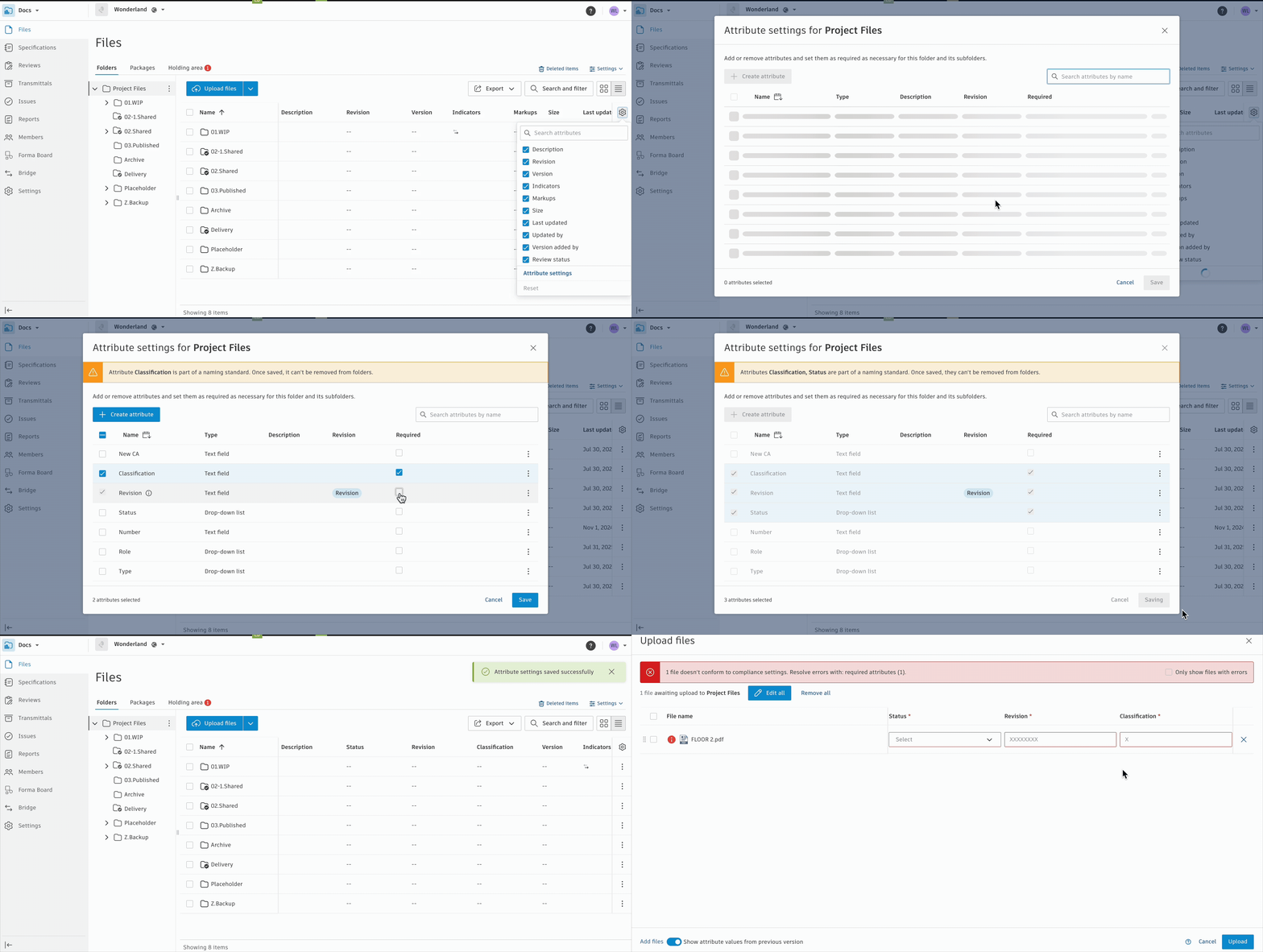
Project Admins can now designate specific file attributes as required in Autodesk Docs. When enabled, files must include these attributes before they can be uploaded, helping teams maintain consistent metadata and improve document control.
Packages | Add References from a Package
Package Managers can now link Packages directly to key project items using the reference picker. This enhancement allows teams to connect Issues, RFIs, Forms, Assets, Submittals, Plan Tasks, Schedule Activities, PCOs, and other File Packages to give additional context and improve visibility across workflows.
Reviews | Number of Archived Reviews Increased to 30k
Project administrators can now archive up to 30,000 reviews per project, helping teams keep their review lists organized and focused. This update supports better review data management at scale, while maintaining secure access to historical records.
Issues | Closed Issues Download/Sync Behavior Change
To reduce visual clutter on mobile devices, closed issues will no longer automatically download or sync. This update helps streamline the mobile experience by keeping the focus on active, relevant items.
Reports | Insight Builder – Share Dashboards with Projects
Customers with Enterprise Business Agreements (EBAs) can now utilize Insight Builder to add customized dashboards directly to the project home page. Admins can quickly create role-based dashboard templates with a single click, helping improve data standardization.
Templates | Add Sample Project Templates to the Project Template List Page
Sample Project Templates are now visible directly on the Project Template list page. These out-of-the-box templates are tailored to different roles, industries, and use cases. Making them more accessible helps new users spin up projects faster, adopt best practices, and standardize processes across teams and workflows.
Templates | Project Templates UI Update
Project templates now offer clearer visibility into member roles and show exactly which users will be added to new projects created from the template.
Viewing | Mobile Larger Models
The new native viewer introduces a major advancement in visualizing large 3D models on mobile devices. It’s optimized to load only the visible portion of a large model, enabling teams to open significantly larger models than previously possible without compromising performance or usability.
Viewing | ACC Viewpoints
See & select Viewpoints created in ACC web. With this update project teams will be able to create and consume viewpoints across Autodesk Docs, Model Coordination, and the ACC mobile app.
Coordination | Clash Performance**
Currently, in Model Coordination, we preload all detailed clash information when initializing the application. Now, we only download detailed clash information when it is requested in the viewer, improving the performance and scalability of clash-on coordination spaces. Most Model Coordination workflows remain unchanged, with only minor adjustments.
Coordination | Extended Properties (Beta)**
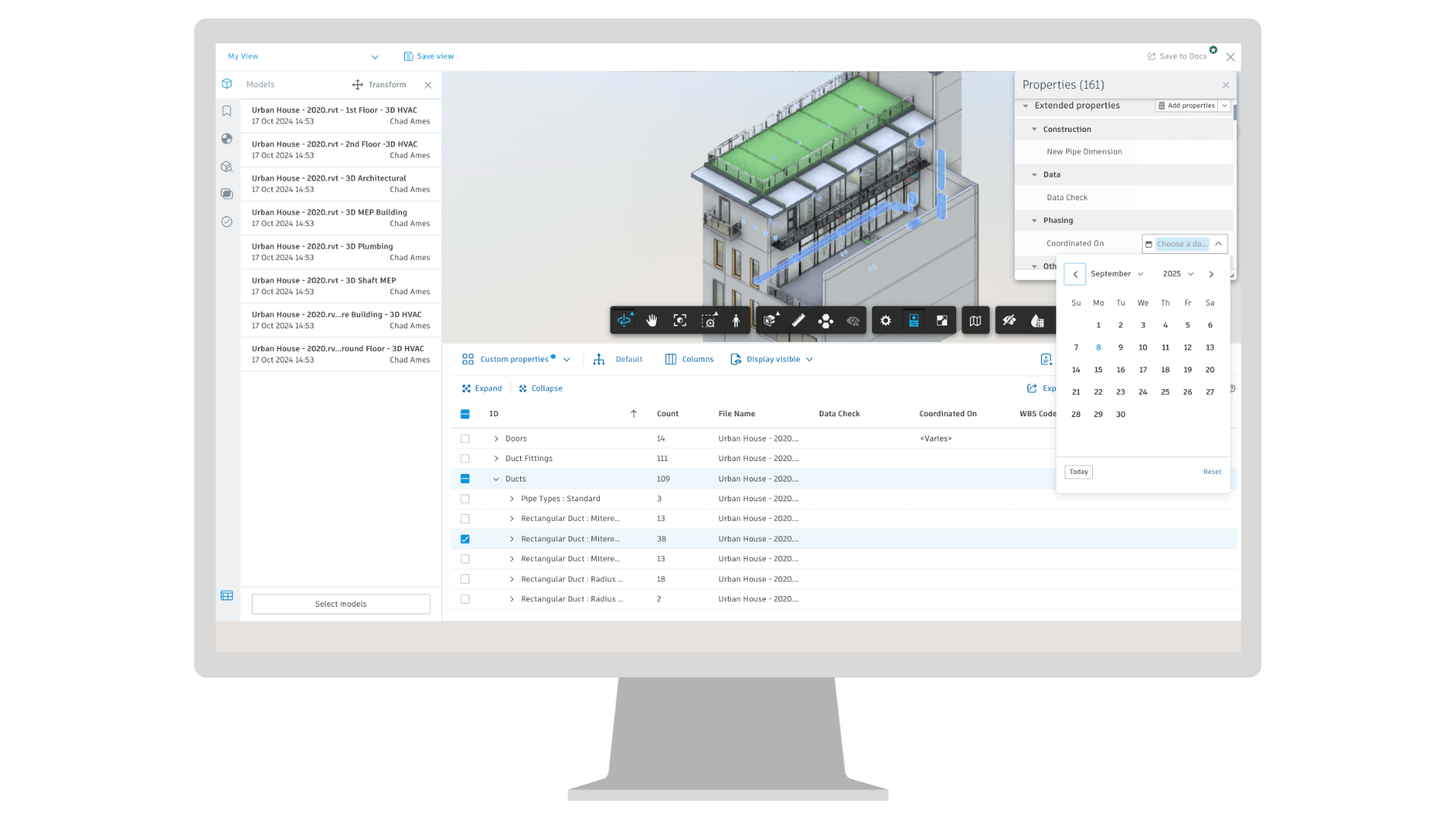
We’re excited to announce a powerful new Model Coordination feature in ACC: Extended Properties. With this capability, users can now add and edit custom metadata directly to 3D objects within aggregated models, making it easy to tag elements with program dates, supplier information, object status, and more. With inline editing in the Object Table, and extended properties being supported in Save to Docs views, this enhancement offers flexibility to enrich your models with meaningful data and ensures critical information remains embedded and accessible to both office and field teams whenever needed.
Coordination | Coordination Spaces Configuration – File Extension Filters**
BIM professionals now have greater control over coordination spaces by selecting which file types to include. When adding folders into a coordination space, you are now able to select specific file types to be included.
Assets | Restore Deleted Assets
Project admins can now recover recently deleted Assets for up to 60 days, helping maintain project continuity and prevent accidental data loss. This update makes it easier to restore important information and keep asset records intact.
Correspondence | Filters on Mobile iOS***
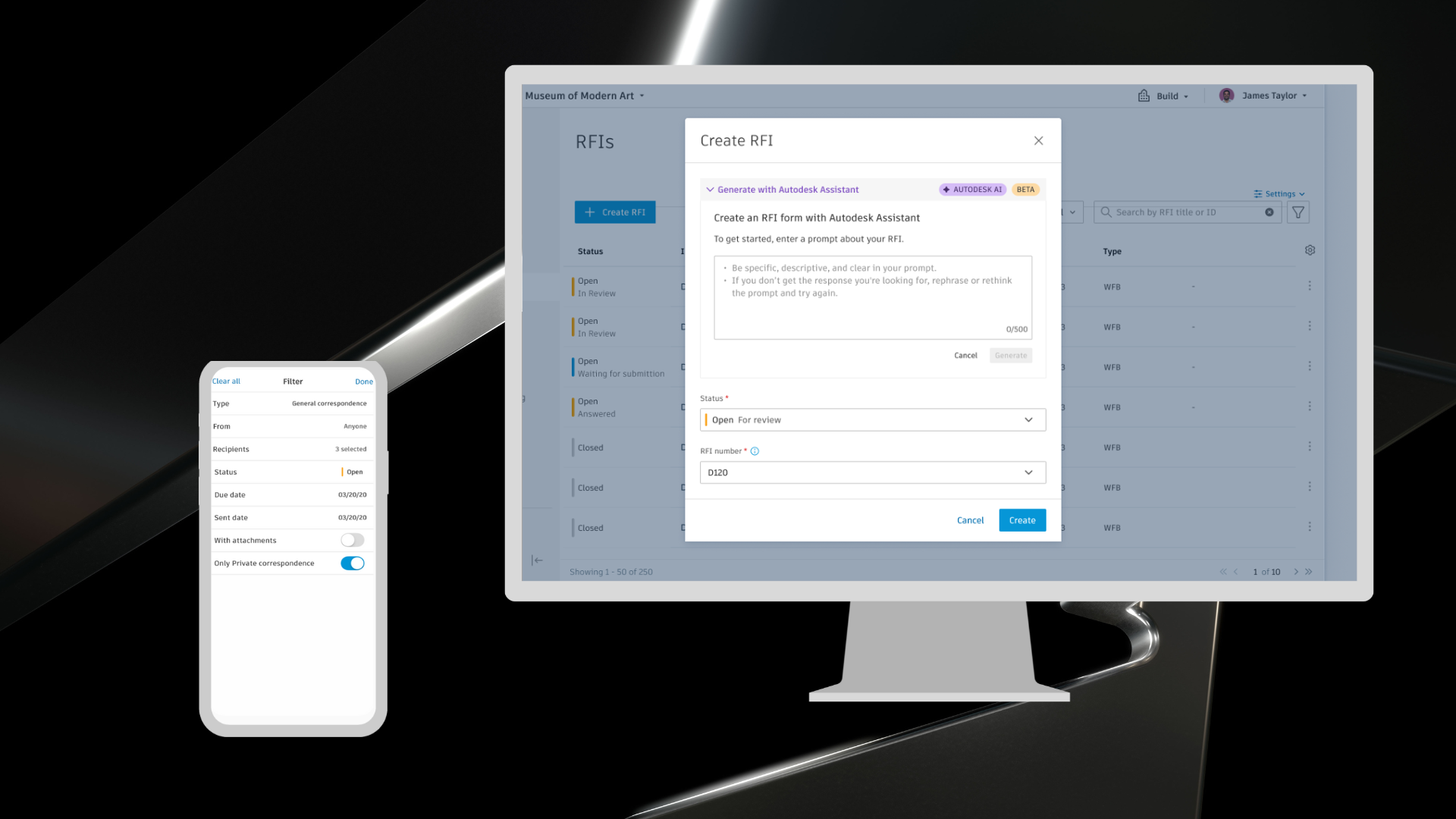
Quickly find the right correspondence on mobile with new filter options for type, status, dates, participants, attachments, and privacy. Filters apply instantly, work with search, and stay active when switching between tools. This makes it easier to stay organized on the go.
Cost Management | Budget/Revenue Forecast
Building upon the Date Range Based Forecasting functionality, users now have the ability to use the same calculations and forecast adjustments to forecast budget/revenue as well as cost. This is typically used in GMP/Cost Plus/Reimbursable/T&M projects.
Forms | Attachments/Reference Download Options
Mobile users can select to sync a subset of Forms to have available on the Cloud.
Handover | Sheet Collections in Handover****
When Sheet Collections are enabled, the Handover Package Tree now displays your collection structure. This matches the exported handover package structure and provides a more consistent Handover experience.
RFIs | Bridge Closed RFIs Natively
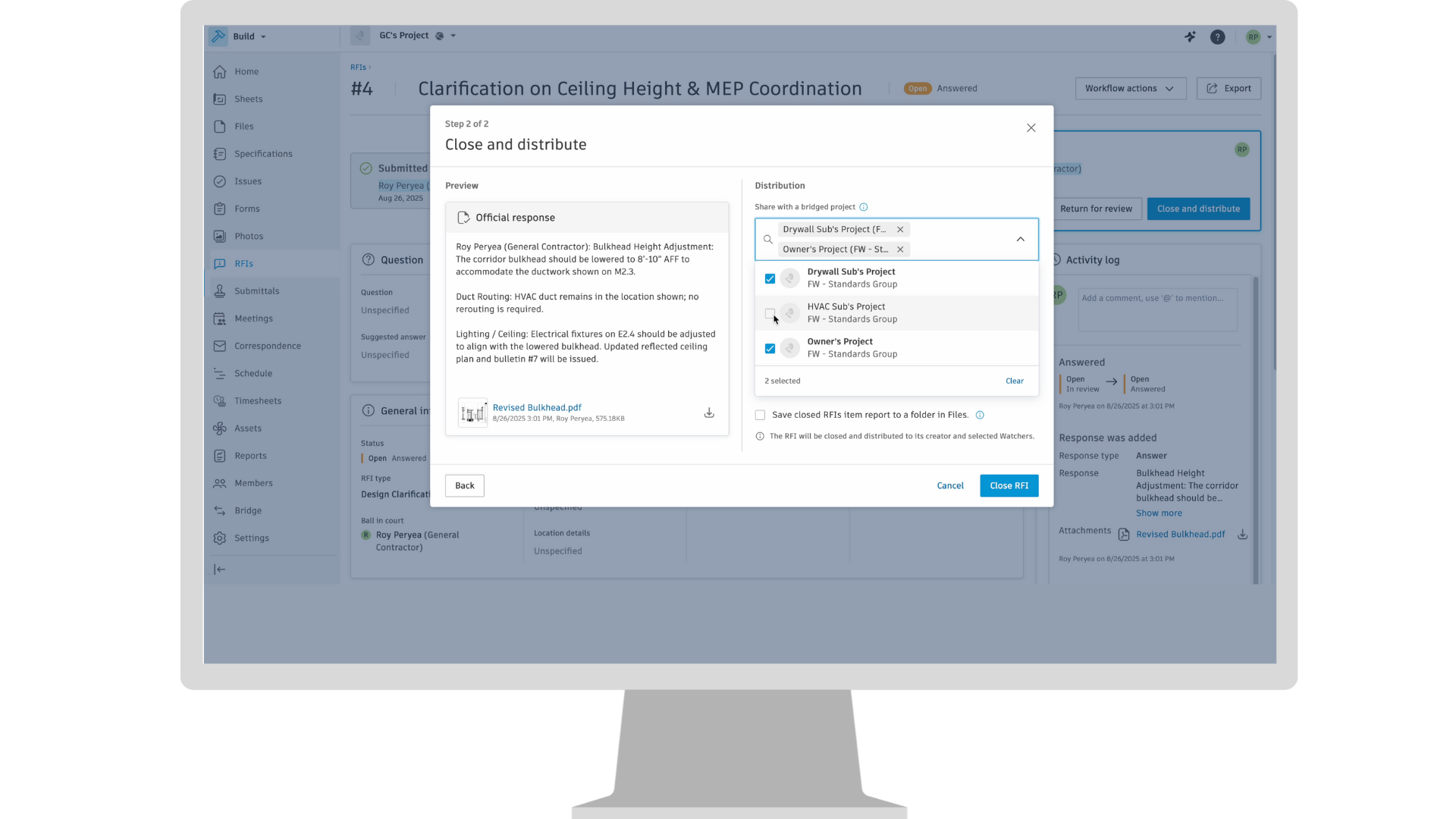
Project teams can now share closed RFIs across ACC accounts, whether between different company accounts or internal hubs. This enhanced Bridge functionality provides easy access to RFI data for all stakeholders, reducing manual record recreation, minimizing errors, and saving time.