Reminder: Autodesk Construction Cloud has joined the Autodesk Forma industry cloud and has taken on the Forma brand. As part of this evolution, additional Autodesk Construction Cloud product names have also been updated to align with the Forma brand. You will see these updates reflected throughout this blog.
This month, Autodesk Forma introduces over 70 construction product updates to support more efficient, connected project delivery. These releases strengthen how teams manage access, information, and change across projects.
Dig in by Topics:
Bridge | Repeat Sharing Across Projects | Sheets Tool
Repeat sharing will become available in the Sheets tool, extending the share again workflow previously released in Bridge. After sharing to one project, users can choose to share again and select another target project and folder while keeping the same selected sheets, title, and message—helping share project information across multiple projects with fewer repeated steps.
Dashboards | Bookmarks Card on Project Home
Keep project links in one place with Bookmarks Card on Project Home. Project members can save external website URLs and open project data and applications from the project dashboard. Coming to Build
Dashboards | "Assigned to me" on Project Home
Prioritize assigned action items by due date with "Assigned to me" on Project Home. Project members can review upcoming work from the project dashboard instead of relying on status counts. Coming to Build
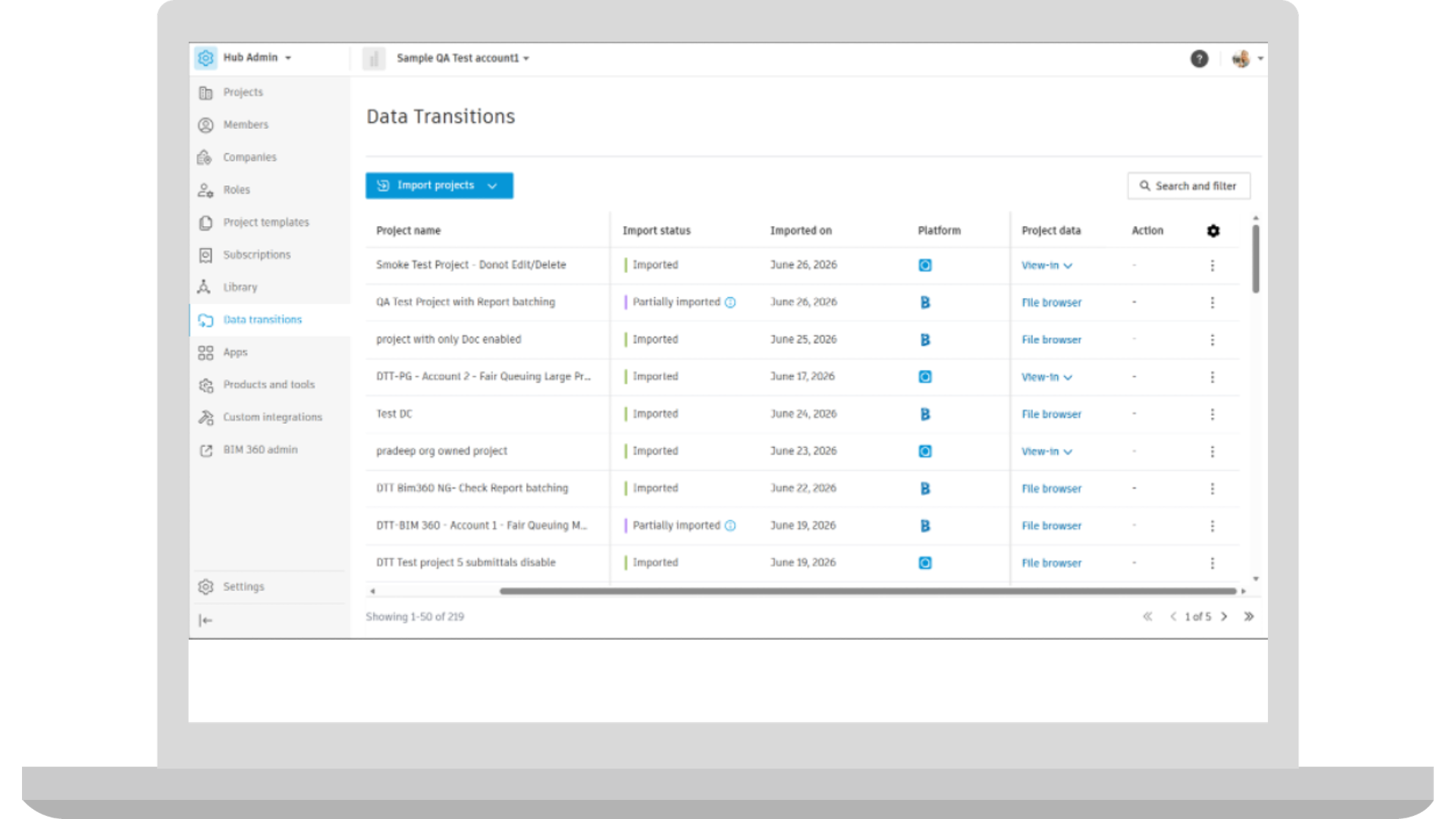
Data Transitions | BIM 360 Data Transitions [BETA]
BIM 360 Data Transitions is now available in public beta, with support for both BIM 360 Field and BIM 360 Next Gen. Hub Admins can import supported project information from closed, completed, inactive, and archived projects into read-only storage in Autodesk Forma, review the results, and transition the imported information into a Forma Data Management project when needed, while leaving the source project unchanged.
Data Transitions | PlanGrid Data Transitions
PlanGrid Data Transitions is now generally available through Hub Admin in Autodesk Forma. Hub Admins can import supported information from completed, closed, inactive, and archived PlanGrid projects into read-only storage, review and download the results, and create a Forma Data Management project from the stored copy when needed. This provides an in-product way to bring historical PlanGrid project information into Autodesk Forma, where teams can preserve, review, and access it when needed.
Handover | Photos Supported in Handover
Handover packages now include project photos. Photos are exported alongside other project records such as forms, sheets, RFIs, submittals, files, and more, helping teams deliver more complete handover packages for owners and operations teams.
Handover | Multi-ZIP Handover Exports
Large exports will be broken into multiple zip files when appropriate. Additional ZIP files can be downloaded individually or together and include instructions for combining the exported files into a complete handover package, making large exports more reliable.
Handover | Handover Export History
Handover now gives project administrators a centralized history of exports for each project. Admins can review package contents and status, then download completed or partially completed packages directly in Handover—making the documentation needed for project closeout or stakeholder sharing easier to find and access.
Issues | Visibility by Type
Limit issue access by audience with Visibility by Type. Project administrators can control which issue types are visible to specific project members, roles, or companies, reducing clutter and protecting sensitive information.
Location | Rooms and Area Detection Powered by Autodesk AI [Public BETA]
Set up location areas without drawing every polygon using Locations' Rooms and area detection powered by Autodesk AI. Project administrators can review polygons identified in AI Mode and assign them to corresponding Location Breakdown Structure nodes.
Templates | Share Project Templates Across Hubs
Hub Admins can now share an active project template with another hub they manage in the same data center. A new template is created in the destination hub with the same supported product and tool configurations and settings, reducing repetitive setup and making established standards easier to apply across divisions, subsidiaries, or client hubs.
User Administration | Remove Yourself from a Project
Project members and Project Admins can now leave projects they did not create directly from the Projects list. From the More menu, users can select Leave project, making it easier to keep project access current without asking another administrator to remove them.
User Administration | Project Image and Hub Logo
Hub Admins can now upload an image, such as a company logo, that appears in the hub picker. Admins can also add a client logo, site photo, or other project image next to the project name in the project list, making hubs and projects easier for everyone with access to identify at a glance.
User Administration | Hub Activity Log
Hub Admin now includes an Activity Log for selected hub-level actions, such as project creation, adding or removing hub members, and assigning or removing Hub Admin permissions. Hub Admins can see who performed each action and when, giving them a clearer record of activity across the hub.
User Administration | Discover and Manage Betas in Forma
Hub Admin Settings now includes a Betas tab where Hub Admins can discover beta features available to their hub, review details and terms, and opt their hub in or out. Opt-ins apply across the hub, and feedback can be submitted directly in Forma, creating a direct path for teams to try new functionality and share input before broader release.
User Administration | Bulk License Assignment Management
Hub Admins can now manage subscription assignments for multiple members at once. From the Subscriptions tool, admins can see current assignments and assign or remove subscriptions for hub members, making it easier to update access across larger teams.
User Administration | Buy and Assign Desktop Licenses
Hub Admins can now purchase and assign eligible Autodesk desktop subscriptions through Forma, including AutoCAD, Civil 3D, and Revit. Managing these subscriptions within a Forma hub makes it easier to provide teams with the Autodesk products they need as access requirements change.
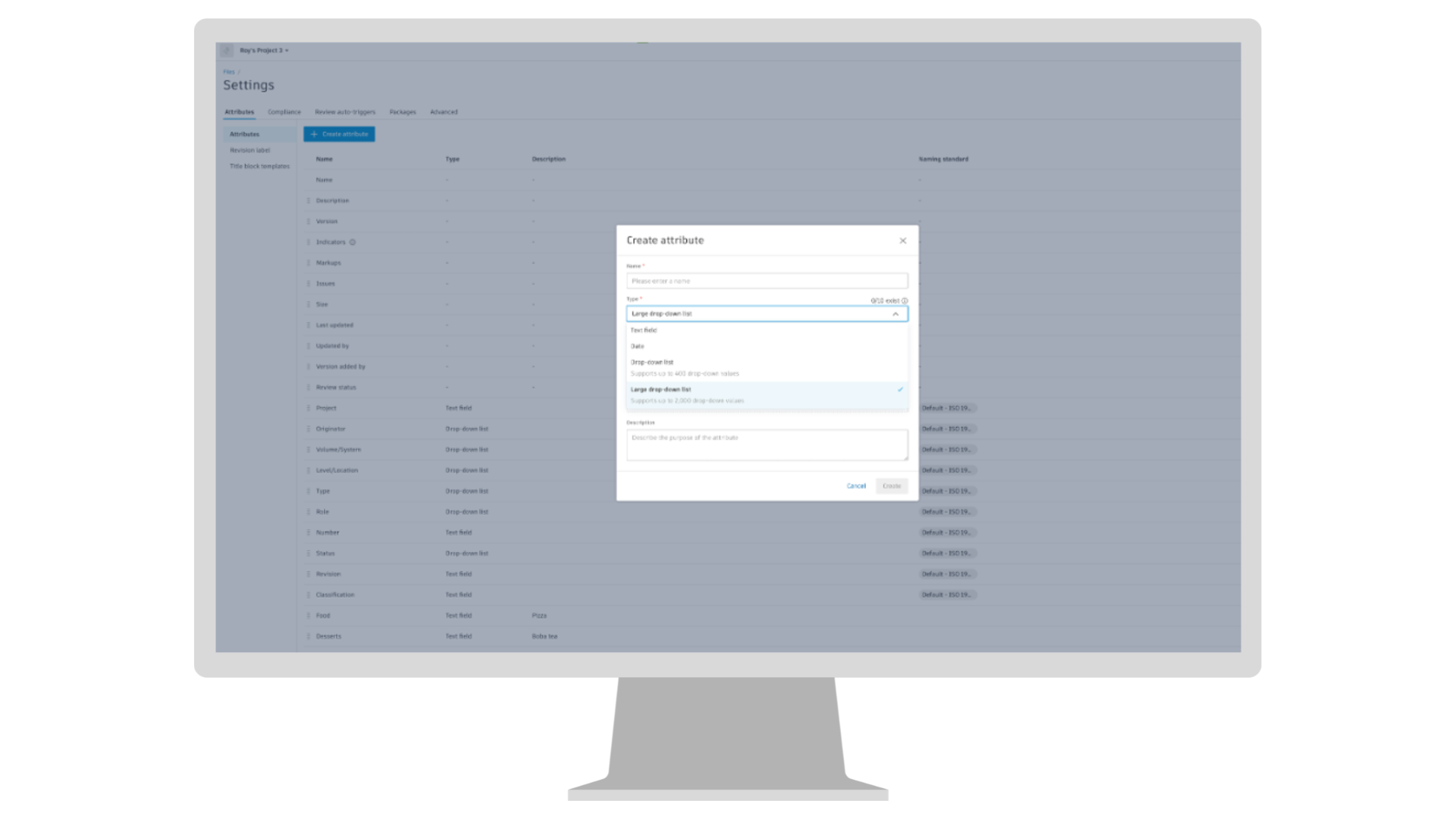
Files | Large Dropdown List Custom Attribute Type
Files now includes a new drop-down list custom attribute type that supports up to 2,000 values, compared with the 400-value limit for standard drop-down lists. Teams can import longer option lists and search for the right value when editing file attributes, making complex naming standards, classification codes, and other structured information easier to apply at scale. Coming to Data Management
Files | Add Folder Bread Crumb to Files on Mobile
Files on mobile now displays a breadcrumb for the folder currently being viewed in the Files list and new file picker. The visible folder path stays in view as users browse, making it easier to stay oriented and find information within complex project folder structures. Coming to Data Management
Reviews | Workflow Setting Flexibility
Project Admins can now configure workflows to allow approvers to update approver candidates and prevent review creators from claiming tasks associated with their own submissions. These controls give teams more flexibility to adjust approver participation while supporting review processes that require separation between submission and approval. Coming to Data Management
Reviews | "Approved by" in the Reviews List and Summary Report
End users can see the actually approved by user name directly in the review list view, as well as the report. Coming to Data Management
Reviews | Archive Reviews Affected by the Workflow Service Transition
Following the previously communicated Reviews workflow service transition, Project Admins can now find and batch archive affected reviews that can no longer progress. A banner and filter surface these records, making it easier to keep the Reviews list and active review reporting focused on current work. Coming to Data Management
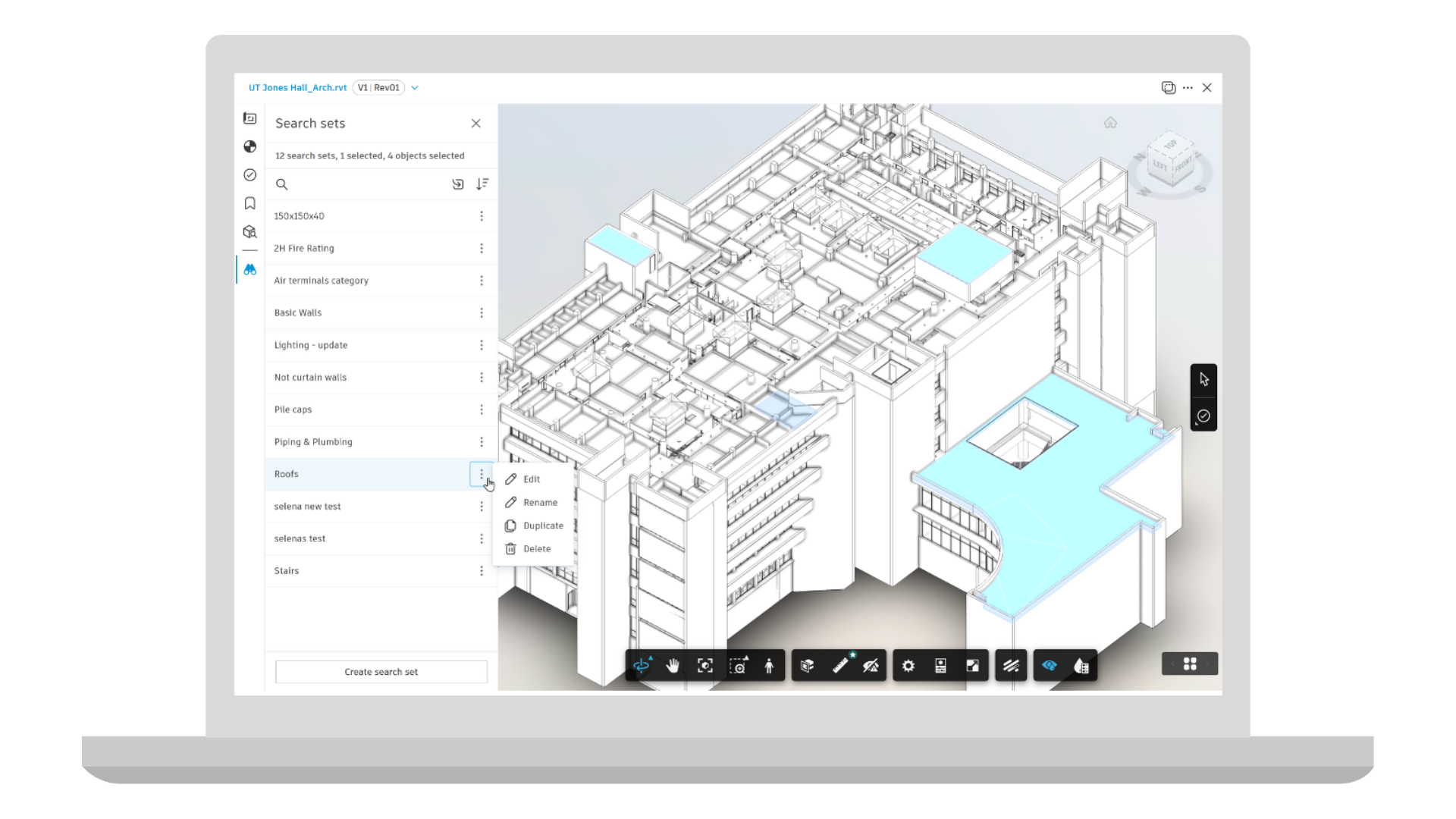
Coordination | Search Sets in Forma Data Management
Search Sets are now available in Forma Data Management, extending reusable, property-based queries beyond Model Coordination. Search Sets created in either experience is available across the project, helping teams consistently find, organize, and manage model objects without recreating queries for different workflows. Coming to Data Management Forma Data Management
Coordination | Clash Display Settings
Customize how clashes are displayed to create a more consistent review experience. Saved display preferences help teams reach the right clash context more quickly, reduce navigation, and streamline coordination and issue review workflows. Coming to Model Coordination
Coordination, Viewing | Civil Tools - Select Alignment from Canvas
Civil Tools now includes a dedicated selection mode that lets you select your desired alignment geometry directly from the 3D view. When selection mode is enabled, relevant geometries are highlighted while other tools are temporarily disabled, making it easier to start the review workflow. Selecting geometries from the panel dropdown remains fully supported and works as before. Coming to Data Management and Model Coordination
Correspondence | Permissions by Correspondence Type
Admins can control Correspondence permissions at an even more granular level, with the ability to grant permissions for individual correspondence types. Type-level permissions can be granted by member, role, or company, and determine who can see, create and archive correspondence based on type. Coming to Build, Design Collaboration, and Model Coordination
Cost Management | Auto-Setup Date Range Resource Dates from Cost & Time
Optional AI-powered feature that reduces the number of clicks required to set up Date Range Resources while also keeping resource timing aligned with your cost and schedule data. Coming to Build and BIM 360 Cost
Cost Management | Customizable System Budget Columns
System budget columns will be customizable to allow teams to tailor the standard columns rather than having to copy them then edit the formula. And retaining the audit trail for COs and Actual Costs. Coming to Build and BIM 360 Cost
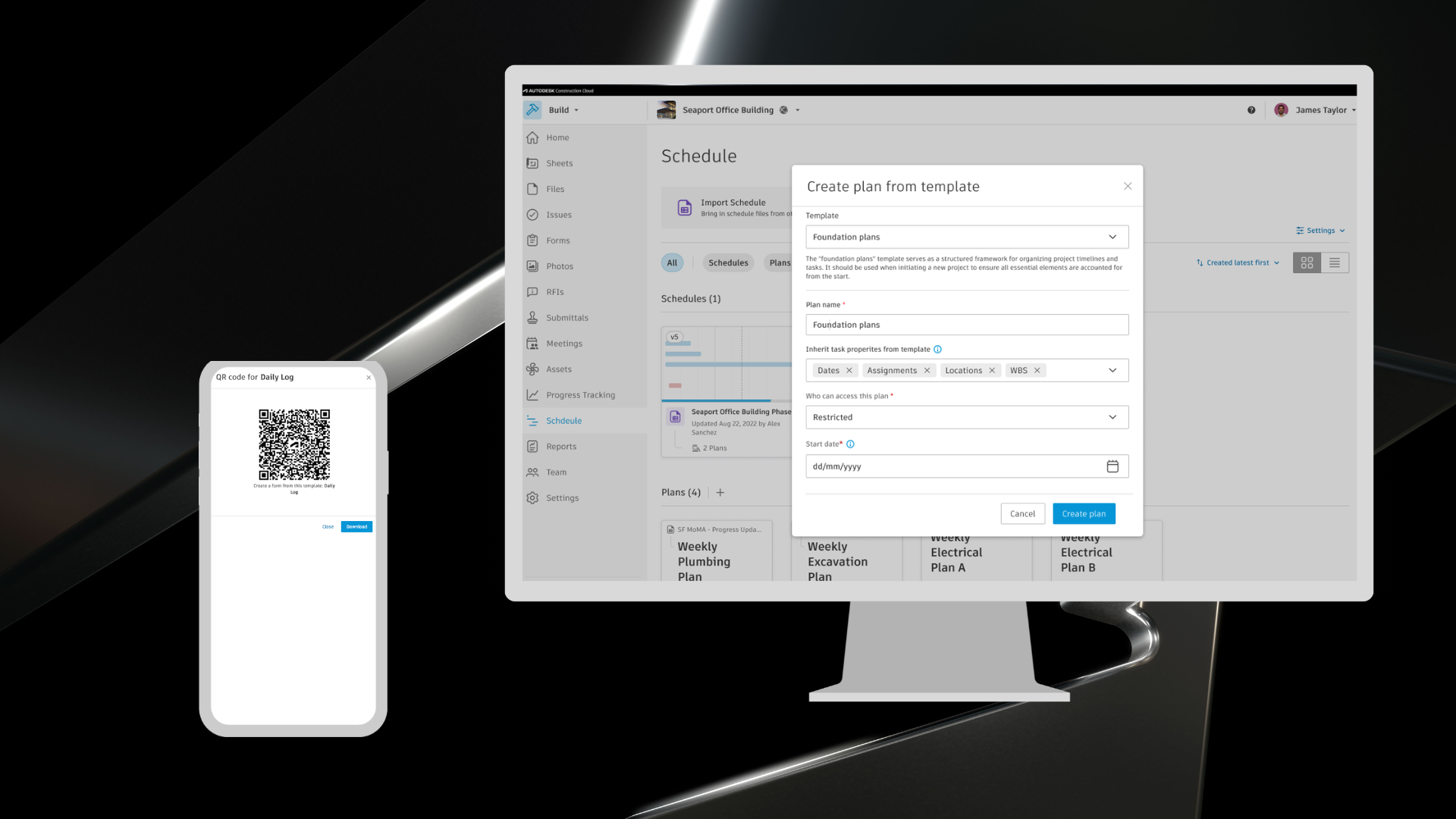
Forms | Start Forms from a Job-site QR Code
Begin field forms from a linked template with Start forms from a job-site QR code. Crews can scan a physical QR code on mobile to create the form. Coming to Build and Build Essentials
Forms | Saved Filters
Return to common form views with Saved Filters. Project members can save filter criteria on web and reuse them when managing forms. Coming to Build and Build Essentials
Meeting Minutes | Calendar View
Meetings Calendar View gives teams a new way to visualize and manage project meetings. Users can view all meetings in a calendar layout, complete with meeting series colors, status, and meeting IDs, making it easier to see what's happening across the project at a glance. From the calendar, users can also create new meetings or schedule follow-up meetings directly from any day without manually selecting a date. Coming to Build, Design Collaboration, and Model Coordination
Photos | Bulk Edit Photo Details Including Bulk Tagging
Multiple photos can be selected and photo details can be edited for all of them. This includes adding tags to a selection of photos. This feature will be available on the web and mobile app, and applies to both the upload flow and to photos that are already uploaded. Coming to Forma Build and Forma Build Essentials
Photos | Photos in the Project Template
Update details across multiple photos with Bulk Edit Tags and Bulk Tagging. Project members can select several photos to edit shared details or add tags during upload or after the photos are stored. Coming to Build and Build Essentials
Photos | Inherit Location in Photos Referenced by Other Tools
Keep referenced photos aligned with their source context through Inherit Location in Photos Referenced by other tools. Project members can add a photo as a reference or sheet photo markup and retain the location assigned in the related tool. Coming to Build and Build Essentials
RFIs | Saved Filters
RFIs now support saving filtered views in the list view, helping teams work faster by saving and reusing commonly used filters and search criteria. Instead of repeatedly configuring the same views, users can quickly return to the RFIs that they need to see, whether they’re tracking pending actions, reviews, or responsibilities. Coming to Build
RFIs | Optional Reviewers
RFIs now support Optional Reviewers, letting RFI managers add roles or companies as non-blocking reviewers in the RFI workflow. Each optional reviewer appears as a separate review line in the reviewers table and can submit a formal response without delaying workflow progression. As part of this update, the existing Co-Reviewer field is renamed Optional Reviewer and enhanced to support full responses. Coming to Build
Sheets | Project-Wide Automatic Hyperlinks
Sheets now includes an optional setting that allows automatic callouts to link related sheets across collections. Members with Create + Upload permission can enable it for projects organized by work package, building, or phase, making it easier for teams to navigate related drawings without reorganizing collections or relying on manual workarounds. Automatic callouts continue to resolve within the same collection by default.. Coming to Build and Build Essentials
Specifications | Assign Pages When Publishing
Unassigned spec pages can now be quickly assigned during the specifications publishing workflows. This helps streamline the process, saving time and ensuring that all pages are correctly allocated for review and approval. Coming to Build, Data Management, and Takeoff.
Submittals | Review Templates in Project Templates
Submittal review templates allow teams to standardize review workflows across new projects. Configure review steps once in a template at the account level and automatically apply them when creating projects, reducing setup time and ensuring consistency. Coming to Build
Submittals | Review Responses & Comments on Mobile
Keep Submittal reviews moving while on the go, with the ability to set review responses and add comments to Submittals on your mobile device. Designers and field team can complete reviews without going onto the web, keeping Submittal workflows moving without delays. Coming to Build
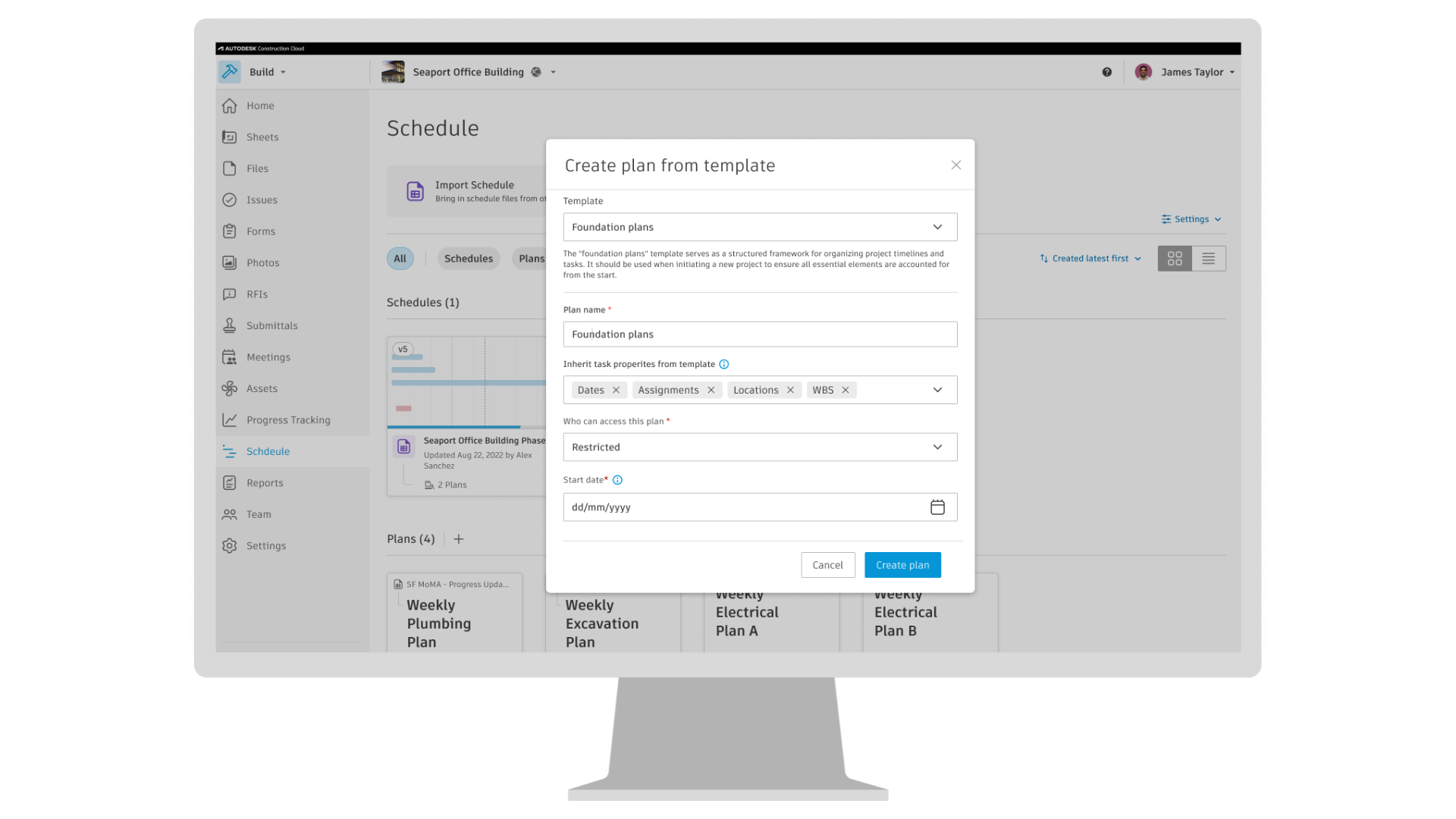
Workplan | Plan Templates
Plan Templates help teams standardize and reuse short-term planning workflows, reducing setup time, and improving consistency. Create reusable plan templates that include tasks, metadata, and task handoffs, and can be applied when creating a new plan to populate the plan tasks setup and structure. Centralized template management makes it easier to maintain standards, scale best practices, and streamline project planning across your organization. Coming to Build
Workplan | Ease of Use Improvements
Workplan users are getting new functionality to make their day-to-day use of the tool easier. Tasks can be bulk selected by using either the Shift+Click or Alt+Click keyboard shortcut, depending on their device. In the item list, you can right click on an item to open the quick action menu. Additionally, you can add Assets as a reference to a task. Coming to Build
Workplan | Compact Layout and Gantt Chart in Reports
When exporting plan tasks, select the new Compact layout to export only the most important planning details into Excel: Title, Dates, Company, Location, and Work Breakdown Structure (WBS). Turn on the new Gantt Chart toggle to include a visual of tasks in the export, with each task displayed as a Gantt bar for easy schedule review. Coming to Build
Takeoff | Quick Fill for Areas (Beta)
Use existing linework in your PDFs as boundaries to simplify quantifying irregular or complex areas. Instead of manually tracing shapes point by point, fill the area, adjust sensitivity, and let Forma Takeoff infer the boundaries from the drawing for faster, more accurate results. Coming to Takeoff
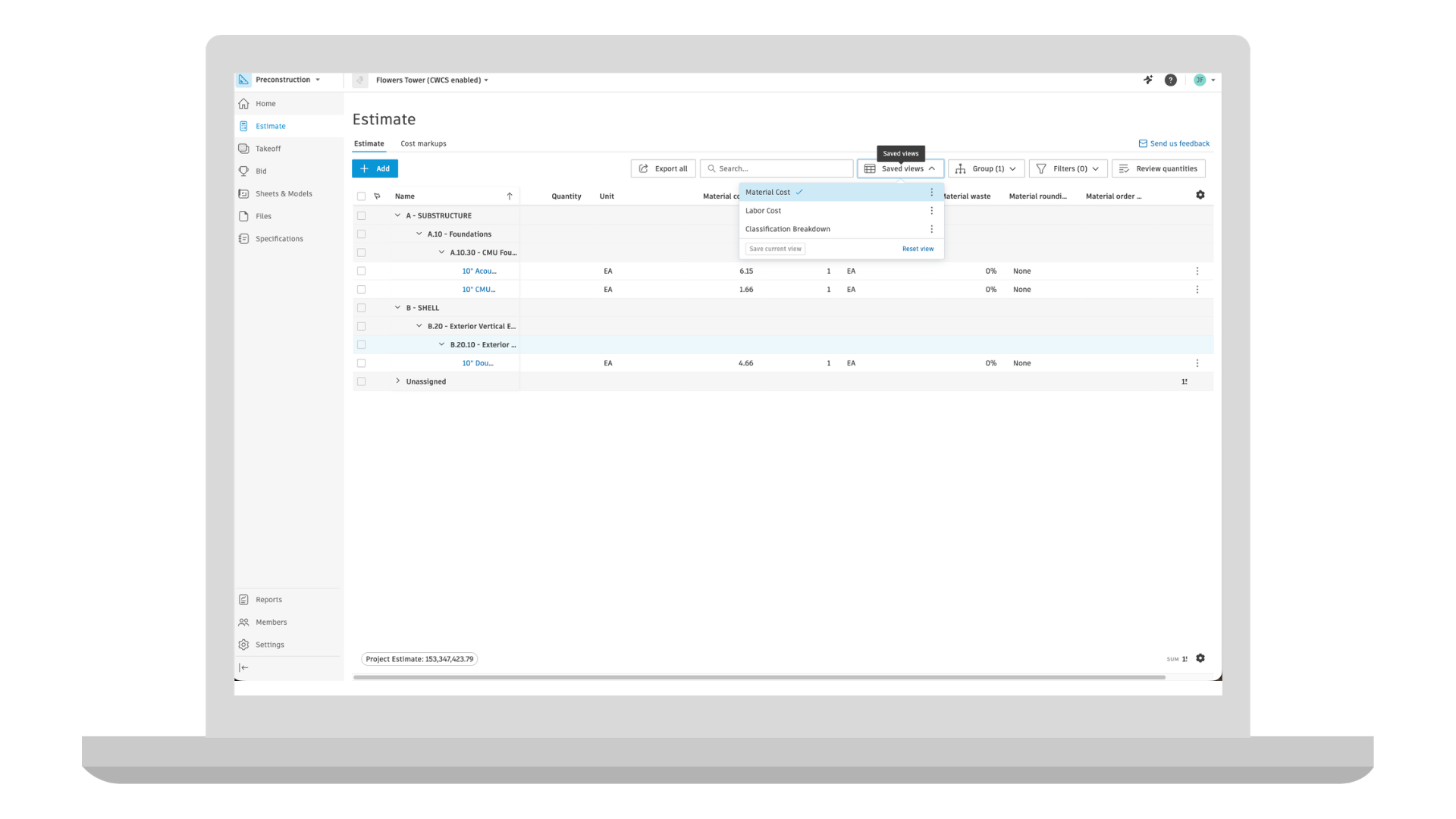
Estimating | Saved Views
Project administrators can create, save, and manage custom estimate table views at a project level using filters, grouping, and column configurations. These views are accessible to project members, reducing setup time when working with large datasets and making it easier to tailor estimate data for different stakeholders and workflows. Coming to Estimate
Builders Network | Suggested Edits in Bid Tool (Beta)
The Bid tool in Forma (Beta) will now surface suggested edits results across key bidding workflows. Some of the areas where suggested edits will be visible include invitees window, bidders list and company and user profiles, this helps teams maintain more accurate bidder information and make more informed decisions throughout the bidding process.
Builders Network | Network Welcome Flow in Bid Tool (Beta)
Get started faster with a seamless onboarding experience directly within the Bid tool. Users can create and manage their Builders Network user profile, connect with their company, and complete employment verification without leaving Forma, simplifying setup and accelerating access to network-powered workflows.
Qualification | Contact Management
Managing Qualification contacts is now easier and more reliable. Contacts will be automatically synchronized from Builders Network when managing users and do not require manual entry; listed contacts can access qualifications without manual intervention, and administrators can resend invitations directly from TradeTapp when needed. Coming to TradeTapp
Qualification | Bidder List Template Filters
TradeTapp now supports filtering qualifications by bidder list templates, providing deeper integration between bidding and qualification. Teams can more easily identify and manage frequently used subcontractors while improving qualification workflow efficiency. Coming to TradeTapp