Reminder: Autodesk Construction Cloud has joined the Autodesk Forma industry cloud and has taken on the Forma brand. As part of this evolution, additional Autodesk Construction Cloud product names have also been updated to align with the Forma brand. You will see these updates reflected throughout this blog.
This month, Autodesk Forma introduces over 55 construction product updates to support more efficient, connected project delivery. These releases strengthen how teams manage access, information, and change across projects.
Dig in by Topics:
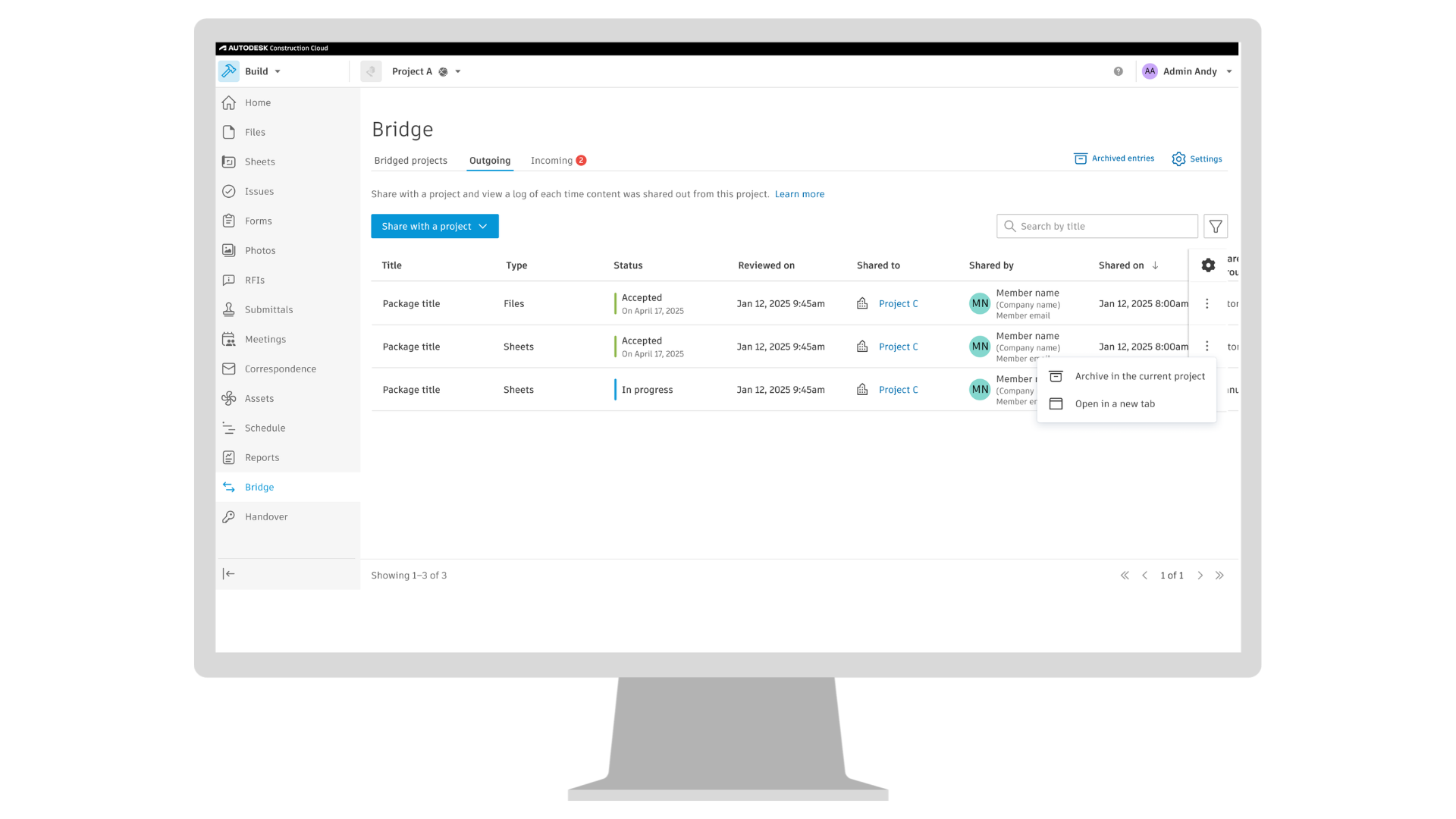
Bridge | Archive Entries in the 'Incoming' and 'Outgoing' tabs
Bridge now lets teams archive and unarchive individual entries in the Incoming and Outgoing logs. This gives users more control over which entries remain visible in the main logs, helping make Bridge activity easier to review when testing workflows or correcting sharing errors.
Bridge | Repeat Sharing Across Projects | Files Tool
Repeat sharing is now available in the Files tool, extending the share again workflow previously released in Bridge. After sharing to one project, users can choose to share again and select another target project and folder while keeping the same selected items, title, and message—helping share project information across multiple projects with fewer repeated steps.
Bridge | Improved Automation Management
Bridge now makes folder automations easier to understand and manage. Added context—such as creation date, creator, and source or target location—helps teams see where project information is coming from, where it is being shared, and which files or folders are connected to each automation. Permission-based actions also help reduce confusion by showing users only the actions available to them.
Dashboards | "Assigned to me" card supports project filter and assigned forms
"Assigned to me" card enhancements on My Home help project teams stay organized and proactive.
Data Connector | Addition of Project-related Filters on Account-level Data Connector
Teams can extract more targeted account data with Addition of Project-related filters on Account-level Data Connector. Project members can filter exports by selected projects or project status, such as active projects only.
Issues | Issues Log In-Line Edit
Efficiently edit and modify issue details without needing to enter detail views. Project teams can now edit issue details directly from the issue list.
Issues | Photo Grid
In Issues, Project members can switch from list to a visual issue view with Photo Grid, where each issue is shown using its first attached photo to help teams scan project issues.
Location | Improved QR Code Based Flows
Mobile team members will be able to quickly scan a QR and interact with items at their location.
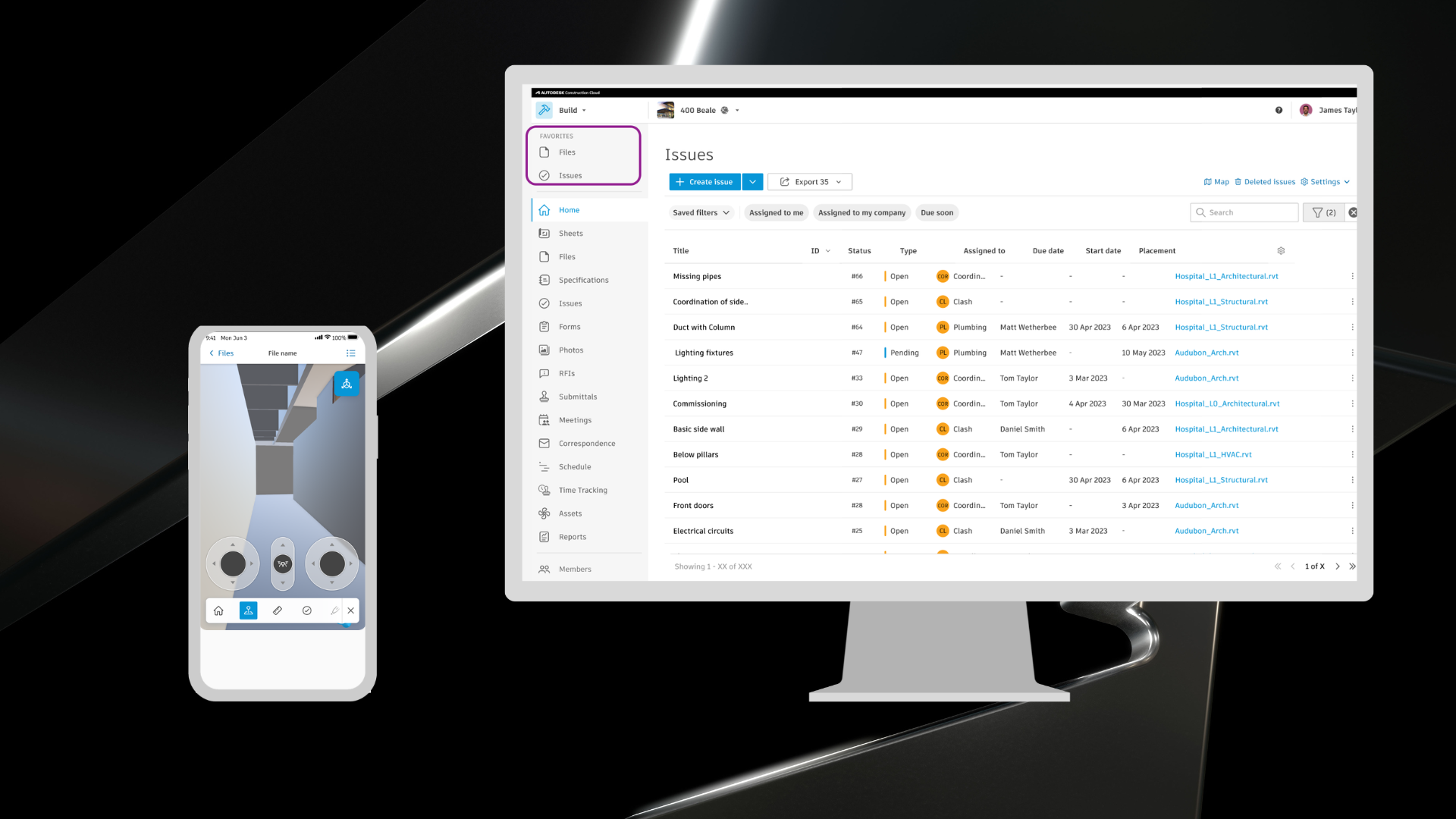
Mobile App | Joystick in 3D Model Viewer
Project members can navigate 3D models on mobile using on-screen controls with Joystick in 3D model viewer, improving movement and positioning while reviewing models on iOS and Android.
Notification | Daily Digest Due Date Reminders
Daily Digest email notifications will now include a summary of assigned item due dates. Project members can now receive digests that highlight upcoming and overdue items for Issues, Forms, RFIs & Meetings.
Product Experience | Administrative Tools Nav Update
Administrative Tools Nav Update separates core workflow tools from administrative tools like Reports, Members, Bridge, and Settings. Administrative tools now appear in a footer section, reducing scanning in the main navigation.
Product Experience | Favorite Tools on Web
Project members can mark frequently used tools as favorites in Favorite Tools in Left Navigation, adding them to a Favorites section at the top of the left nav. Favorites stay synced across projects and devices and remain visible only when access is available.
Templates | Companies in Project Templates
Company permissions can now be added in Project Templates, helping teams standardize project setup before new projects are created. Companies associated with a Project Template are copied into new projects created from that template, reducing repetitive setup and supporting more consistent company-based permissions across project workflows.
User Administration | Members Inline Editing
Admins can now edit supported member information directly in the Members tool. Fields such as company, role, and access level can be updated from the members list without opening each member profile. Hub Admins can also edit project access directly from the member details page, helping manage users and project access with fewer clicks.
Viewing | Sheets - Snap to Line
Project members can snap measurements to drawing lines on mobile with Sheets - Snap to Line. Teams can now place and align measurements more precisely in Sheets on iOS and Android.
Viewing | First-person Navigation
Project members can move through 3D models using drone-style joystick controls and a minimap overlay with First-person Navigation, supporting spatial review workflows on iOS and Android.
Viewing | Performance Improvement - Occlusion Culling
Project members can navigate interior 3D spaces more smoothly on mobile with Performance Improvement - Occlusion Culling, which reduces rendering for model elements outside the current view.
Viewing | PlaceMe in Mobile (Revit Only)
Project members can place themselves within a 3D model from a published Revit 2D view with PlaceMe in Mobile (Revit Only). This workflow is now available on iOS and Android for mobile model navigation.
Viewing | Enhanced Sectioning in the Viewer
A new sectioning experience is rolling out to the Viewer in Autodesk Forma. Teams can create clearer cross-sectional views of 3D models, work with up to six section planes, and use improved plane and box controls to inspect model geometry. Sections can also be captured in issues and restored in viewpoints, helping teams coordinate and communicate model context more clearly during review.
Workspaces | In-Product Hub Provisioning
Users can now create a hub directly from within Autodesk Forma through My Home, without needing to go to manage.autodesk.com. This allows customers to start using Autodesk Forma as soon as they get access, reducing setup steps and improving the onboarding experience.
API | Enhanced Sheets API Exports
The Sheets API has been improved to let teams export up to 1,000 published sheets from Forma Build as a downloadable PDF. Exports can include standard markups, Issues, Photos, Assets, and related markup links, helping tailor each export to the information they need. Coming to Build
Files | Manage AutoCAD Support Files in Forma Data Management on Web
Project administrators can now manage AutoCAD support settings directly in Forma Data Management on web. They can edit and save the autocad.support.config.json file without opening AutoCAD desktop software or AutoCAD web, helping keep project-level AutoCAD support settings easier to update.Coming to Data Management and Data Management Essentials
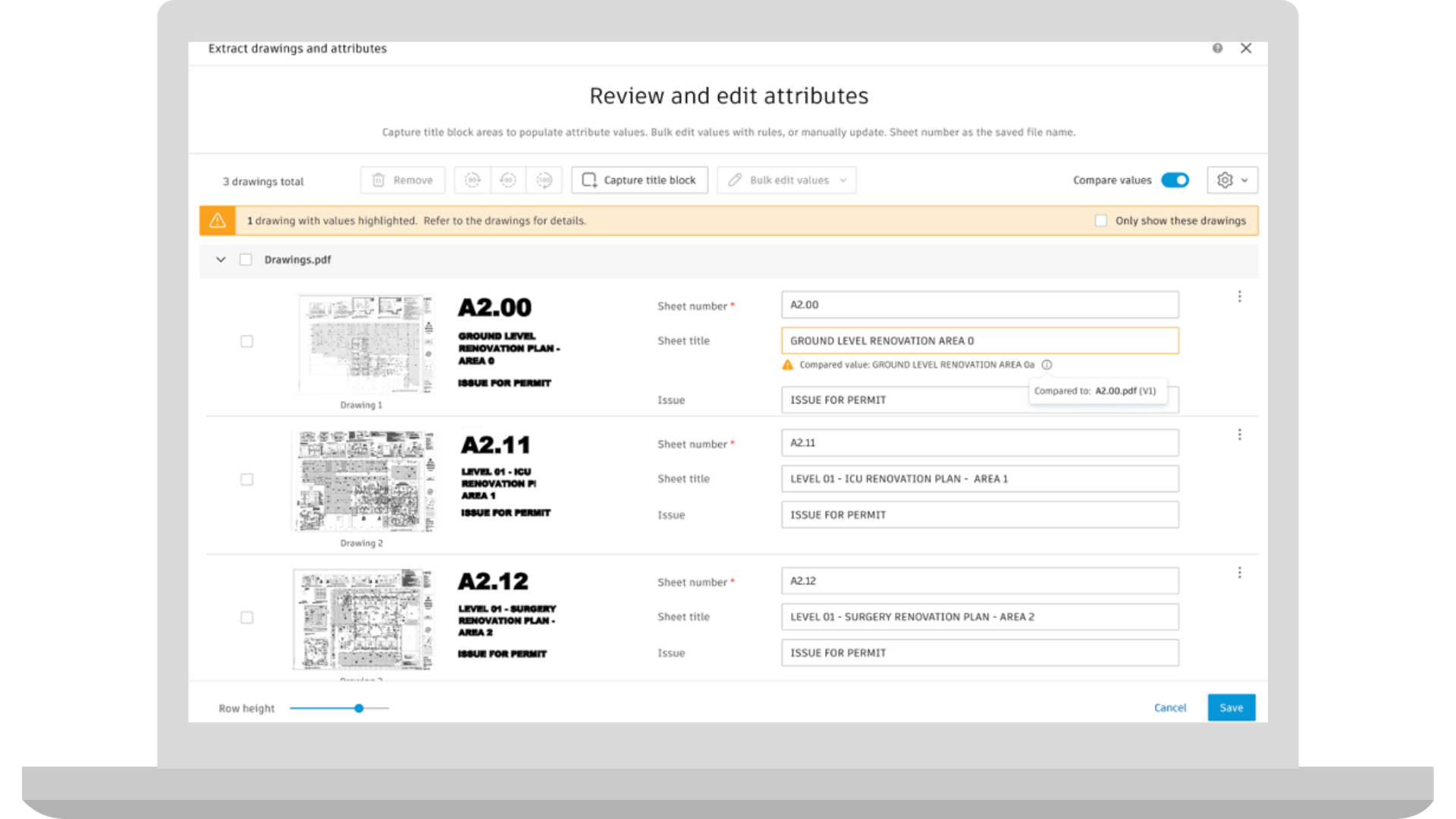
Files | Compare Extracted Attributes
Automated Drawing Extraction now lets teams compare newly extracted drawing attributes with values from the previous saved version during review. Differences in information such as sheet number, title, dates, and other extracted attributes are highlighted before saving or publishing, helping teams review revised drawing sets with less manual cross-checking. Coming to Data Management
Mobile App | Mobile File Search Enhancement
The Forma mobile app now includes enhanced search in Files, helping users find project files faster from mobile. Search supports more flexible matching, including partial keyword matches, multiple keywords, phrase search, and more precise searches using search logic such as AND, OR, and NOT. This gives field teams more ways to narrow results when they know part of a file name, description, or supported attribute but do not have the exact text. Coming to Data Management, Data Management Essentials, Build, and Build Essentials
Mobile App | New Mobile File Picker
An updated file picker in the Forma mobile app makes it easier to find the right file. Users can search, choose from recently viewed files, and browse through the project folder structure instead of selecting from a flattened file list. Coming to Data Management, Data Management Essentials, Build, and Build Essentials
Mobile App | Open DWG files with the AutoCAD mobile app
Users can now open DWG files from the Forma mobile app in the AutoCAD mobile app. From the Files tool, users can open a DWG file in AutoCAD mobile to view or edit it and save changes back to Forma Data Management. AutoCAD mobile checks user access before opening the file, helping keep permissions consistent across the workflow. Coming to Data Management, Data Management Essentials, Build, and Build Essentials
Packages | Package Watcher
Packages now lets users be added as watchers so they can keep track of relevant package activity. Project members can add themselves as watchers, and permissioned users can add others to bring attention to a package that needs review or follow-up. A new filter helps users quickly find the packages they are watching. Coming to Data Management
Reviews | Review Detail Reports Include Review Step Candidates
Review Detail reports now include review step candidates for closed steps and closed reviews. In addition to showing users who submitted, reviewed, or approved the report now shows who was eligible to participate in each step, helping project teams review participation and follow up without opening the review in the product. Coming to Data Management
Reviews | Search and Filter Files in a Review
Reviewers can now search and filter files directly from the review detail page. Search by file name and filters such as file type, current version, review status, comments, issues, and markups help users quickly narrow large review packages and find the files they are responsible for reviewing. Coming to Data Management
Reviews | Numeric and Date Type Attributes Supported as Conditions in Review Auto-triggers
Admins can now use numeric and date-type attributes as conditions when creating review auto-triggers. This gives teams more flexibility to define when reviews should start based on file attribute information, helping automate review workflows with more precise criteria. Coming to Data Management
Reviews | The number of Review Auto-triggers Enlarged to 100 per Folder
Admins can now create up to 100 review auto-triggers in a single folder. This gives teams more room to automate review routing for folders that support multiple disciplines, file types, or review requirements. Coming to Data Management
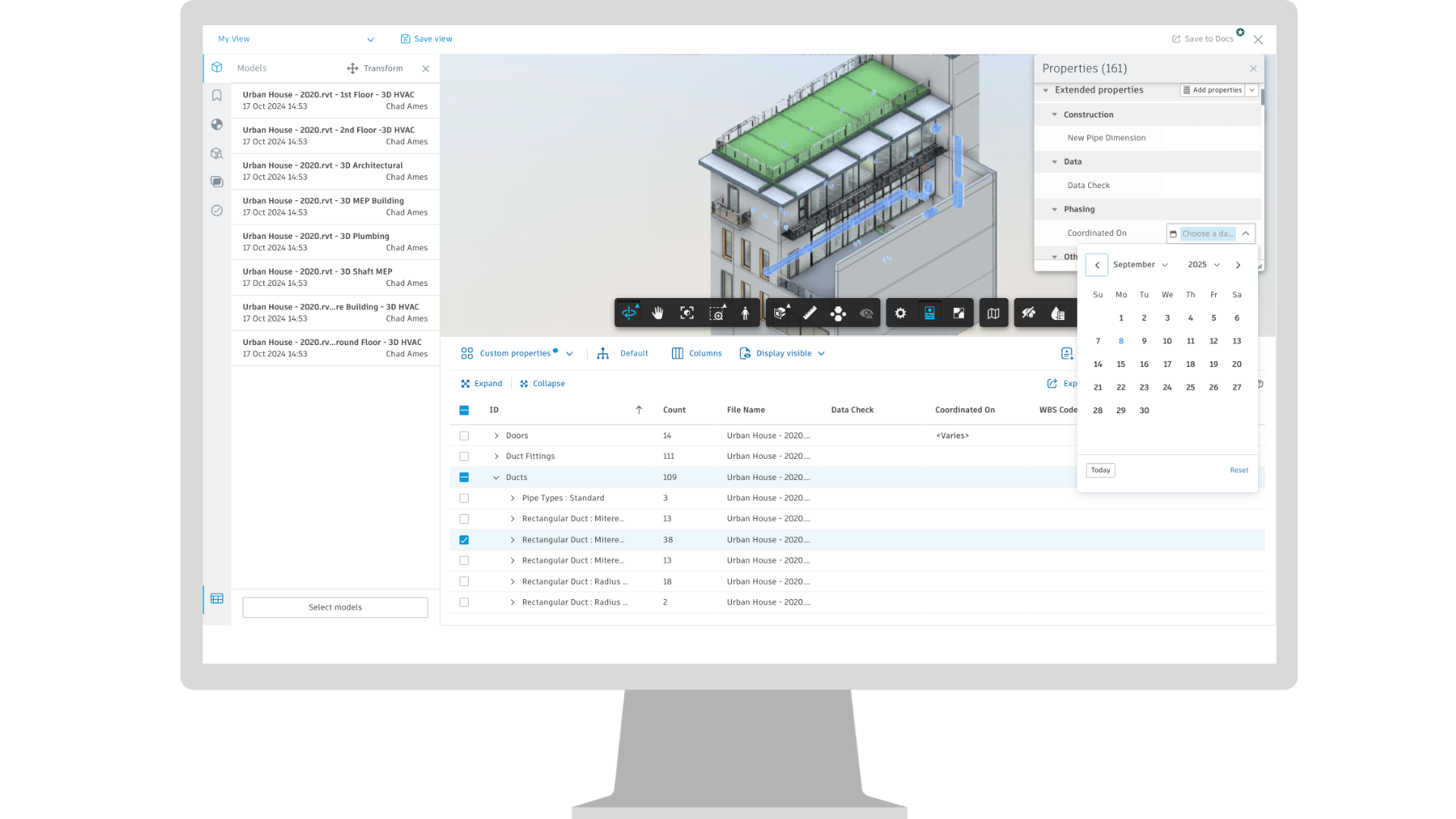
Coordination | Extended Properties
Provide downstream teams with the information they need to execute, such as phase, sign-off status, and safety requirements, by attaching important object data to models in Model Coordination. Object data is linked back to Revit for review, helping teams track fabrication, plan installation sequencing, and review bills of materials while improving continuity from coordination to downstream project work. Coming to Model Coordination
Coordination | Filtering by Search Sets
Model Coordination in Autodesk Forma now supports filtering by Search Sets, giving teams a reusable way to find and select model objects that share common properties. Teams can apply one or more saved Search Sets to filter model content and import Search Sets from other Forma projects to support more consistent coordination workflows. Coming to Model Coordination
Coordination | Civil Tools for IFC 4.3 - Public Beta
Civil Tools in Autodesk Forma now supports IFC 4x3 in beta, making it easier to review civil alignment information from open infrastructure models. Teams can upload IFC4.3 files with IfcAlignment information to Forma Data Management or use them in Model Coordination to support alignment-based review workflows without relying on DWG files. Coming to Build, Design Collaboration, and Model Coordination
Coordination, Viewing | Civil Tools - Critical station review data
Civil Tools in Autodesk Forma now enhances alignment review with critical station labels and improved navigation. When an alignment is selected, labels identify key transition points along the alignment, with prefixes indicating transition types and station values revealed as you zoom in. Teams can show or hide labels, navigate between critical stations using panel controls, and interact with any label to move the station tracker or zoom to that location. The Civil Tools panel also displays vertical geometry information for the current station to support more detailed review. Coming to Data Management, Build, Design Collaboration, and Model Coordination
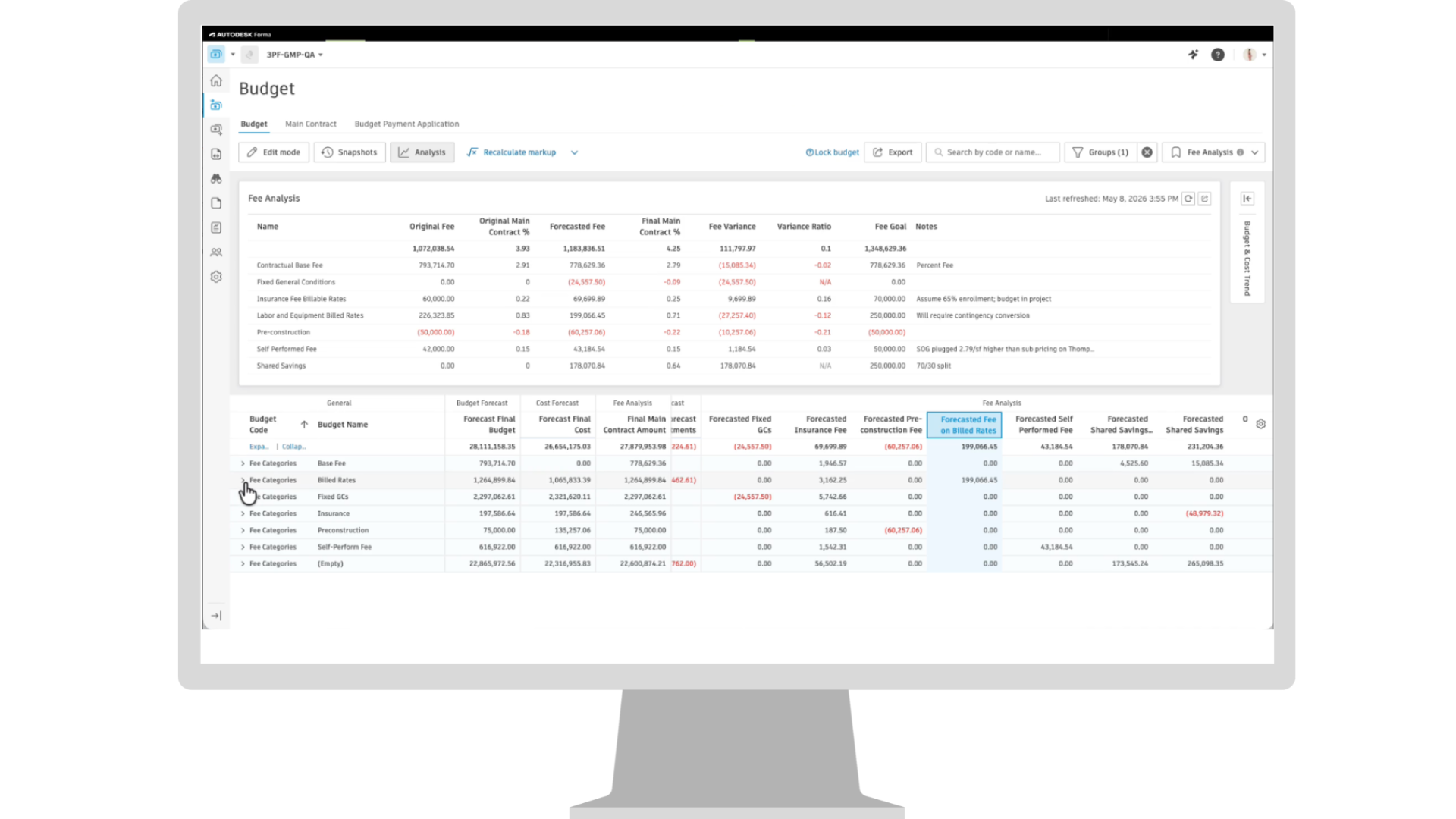
Cost Management | 3-Point Fee Analysis
Adding 3-Point Fee Analysis to the existing Budget/Revenue Forecast capabilities. This feature combines a new fee analysis chart driven by admin defined budget columns that calculate additional fee opportunities, a new markup calculator in the budget view to recalculate markups based on current forecasted Main Contract amount, and available for comparison in budget snapshots, will provide teams with a clearer view of original plan, current forecast, and fee goal making it easier to project the final contract value and fee with greater confidence. Coming to Build
Cost Management | GCPay Integration [GA]
The GCPay and Forma Build integration is exiting beta which means Build now supports two integration methods:
The Cost Management in the Middle option provides a streamlined connection when there is no direct ERP integration with GCPay, but there is with Cost Management, allowing teams to synchronize data across upstream and downstream workflows with ease. This integration enhances visibility, reduces manual effort, and improves collaboration between field and finance teams. Coming to Build
Cost Management | TradeTapp Integration (phase 2)
With this release, project admins can configure compliance conditions to allow or block actions based on supplier TradeTapp risk status, insurance compliance such as missing or expired insurance documents, or pre-qualification status. By embedding supplier risk validation directly into workflows, teams can enforce compliance requirements earlier, reduce manual reviews, and help ensure only qualified suppliers move forward. Coming to Build
Cost Management | Approval Workflows for Collaborator Submissions Enhancement (& RFQs)
For users utilizing the ‘Use Potential Change Order to request quotations’ to facilitate suppliers directly entering change requests we will be adding an approval workflow to route requests through multiple reviewers. This serves a dual purpose as it also enables an approval workflow on regular RFQs if required. Coming to Build
Cost Management | Reviews Status Card – My Home
To help give users a centralized view of in-review items across all cost projects, a Cost Management Reviews status card is now available in My Home. Users can filter reviews by assignee or view all reviews, then click directly into a project to act faster. Coming to Build
Forms | Mobile Forms List Redesign
The mobile Forms experience will be updated with a layout focused on helping field teams quickly find and act on the right forms. The design will dedicate more space to your forms list (replacing the template carousel on that screen) and will add fast, customizable saved filters so you can jump to the views you use most often. When you create a new form, the app will also surface your three most recently used templates to make it easier to start repeat workflows. Coming to Build and Build Essentials
Issues | Quick Create Issues powered by Autodesk AI
Accelerate issue creation and cut down on repetitive data entry through Quick Issue Create powered by Autodesk AI. Project teams on the jobsite can also improve issue detail information within the mobile application. Point, tap, and move forward: the AI will work in the background to help complete the issue detail fields, such as:
Mobile App | Online-enabled Meetings, RFIs, and Submittals
Project members can now access consistent updates without manual syncs in meetings, RFIs, and Submittals. Coming to Build
RFIs | Revision Numbering Improvements
When a revision is made to an RFI and a .1 is added to the RFI number, the original RFI whole number will no longer be used for another RFI. Instead, the whole number will be retired, preventing confusion and helping to maintain a clean RFI register. Coming to Build
RFIs | Support for Additional Default Values
When setting up an RFI type, default values can now be set for co-reviewers and any custom field. When creating an RFI, the predefined values will automatically appear. Coming to Build
RFIs | Assign Everyone Permissions
When assigning permissions in RFI settings, a new "Everyone" option lets admins assign a permission to everyone in the project in one step, instead of individually. Coming to Build
Specifications | Update All Spec Sections on Mobile
Under download options on mobile, users can now enable syncing to update all spec sections at one time, instead of having to perform many one-off updates for individual spec sections. This helps to ensure that users have a full and up to date set of specs when working offline. Coming to Data Management, Build, and Takeoff
Specifications | Improved Submittal Register Sorting
Supports customers in organizing their submittal logs’ displayed attributes while preserving existing search and filters metadata. Coming to Data Management, Build, and Takeoff
Submittals | Calculate Dates by Schedule Work Days
In project settings, admins can control if the Submittals tool will calculate due dates using calendar days or pull the business days from Schedule tool. The Schedule tool’s project calendar integrates with Submittals, using its definitions for workdays, weekends, and holidays. When auto-calculating review step due dates, Submittals tool will take into account the dates setting in the project. Coming to Build
Submittals | Saved Filters
Submittals now supports saving filter views in the items list, helping teams work faster by saving and reusing commonly used filters and search criteria. Instead of repeatedly configuring the same views, users can quickly return to the submittals that they need to see, whether they’re tracking pending actions, reviews, or responsibilities. Coming to Build
Submittals | Create Submittal Item Permission
Submittals now supports permission controls for creating submittal items. Admins can control who can create new submittal items, either allowing all users to create or restricting creation to submittal managers and project admins only. More control over submittal creation helps reduce duplicate entries, improve data integrity. and maintain a clean submittal registers. Coming to Build
Submittals | Custom Fields
Submittals will support custom fields that can be created for tailored data collection specific to a project, as well as shared across projects in the same account for cross-project data analysis. Submittals Custom Fields are created by using the Parameters Service, which serves as a central place to create and manage custom fields. Coming to Build
Workplan | Task Activity Log
Each plan task now includes an activity log, documenting all user actions taken on that task. The activity log gives project teams visibility into who made changes and when, to help maintain a clear audit trail and improve accountability. Coming to Build
Bid Management | Creating Contracts in Cost Management (Beta)
The Bid tool in Forma [Beta] now integrates directly with Cost Management in Forma Build, enabling a seamless transition from preconstruction to execution. Winning bids can be converted into contracts with a single click, simplifying the handoff to the field. Schedule of values (SOV) line items flow from bid submissions into Forma Build, with support for associating contracts to multiple budget codes. Leverage Autodesk AI to assist with budget code mapping to improve efficiency. To use this functionality, you must have a Forma Build subscription with Cost Management activated on the same project used for bidding, along with Full Control permission level for Contracts in Cost Management.
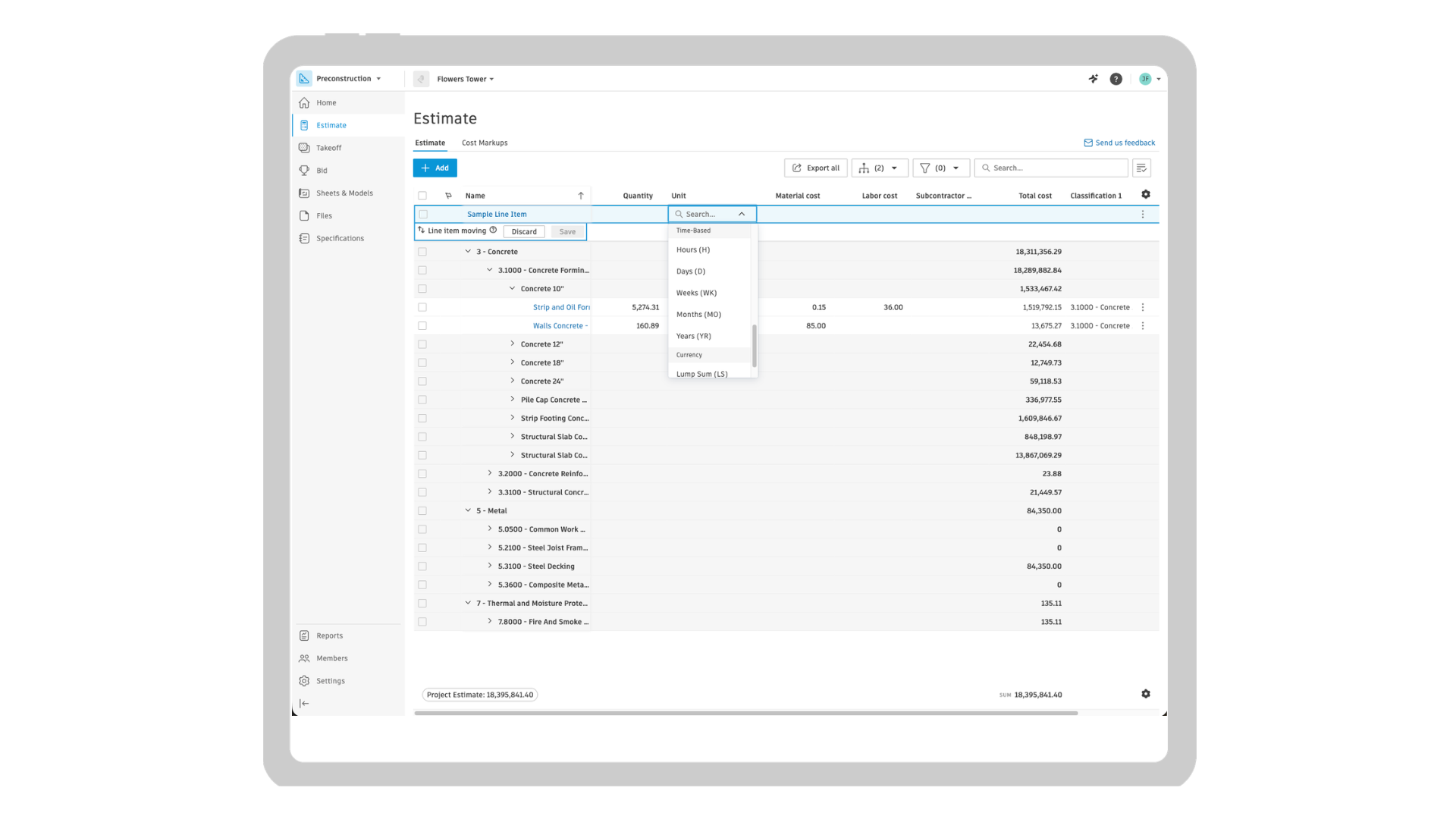
Estimating | Additional Units of Measure
Support for additional currency units of measure including lump sum, allowances, and time‑based units so estimates more accurately reflect cost drivers. This will help reduce reliance on workarounds that can distort reporting and productivity calculations. Coming to Estimate
Estimating | Line Item Flagging
Flag estimate line items that require attention so key review targets stand out in large, complex estimates. Line item flagging makes important items easy to spot at a glance without requiring users to open every row.Coming to Estimate
Estimating | Preconstruction Library Line Items Grouping
Forma Estimate users can organize preconstruction library line items in Hub Admin using classification‑based grouping, aligned with the grouping experience in the project‑level estimate table. Coming to Estimate
Takeoff | Rectangular Count Markers
Users will have a new rectangle shape, allowing users to better align placed items with PDF drawing elements for improved visual accuracy. Coming to Takeoff