This month, Autodesk Forma (formerly Autodesk Construction Cloud) introduces over 40 updates designed to keep your projects moving efficiently and your teams connected. From enhanced civil coordination upgrades and simplified file sharing to mobile-first improvements and the launch of Forma Estimate, these releases help you work seamlessly today, improve data connectivity across workflows, and prepare for what’s next.
Dig in by product:
* Forma Industry Cloud
** Forma Design Collaboration, Navisworks Manage
*** Forma Design Collaboration, Forma Build
**** Forma Build, Forma Data Management
Bridge | Bridge Custom Attributes
Bridge now supports custom attributes when sharing files and folders across Forma projects. This enhancement improves cross-project collaboration by helping to reduce manual metadata re-entry, preserving file-level context, and reinforcing compliance with standards like ISO 19650.
Bridge | Forwarding for Bridge Folder Automations
Project teams can now configure both incoming and outgoing automations on the same folder in Bridge, enabling seamless file forwarding across Forma projects. This update streamlines multi-party collaboration for contractors and project managers who act as intermediaries between owners, subs, and consultants, and need to maintain control over how information flows across teams.
Data Connector | Estimate Data (Public Beta)
This beta release enables project teams to extract Forma Estimate data using the Data Connector, support better reporting capabilities across estimating workflows. The new schema includes structured tables for cost markup formulas, equipment cost, labor cost, and material cost calculations—giving users the flexibility to connect estimate data to their BI tools and drive more informed decisions.
Data Connector | Takeoff - Power BI Template
A new Power BI dashboard template is now available for Forma Takeoff, giving teams a fast start to building custom analytics. The template includes visuals like total takeoff packages, item creation trends, and quantity breakdowns by package — helping teams unlock insights and track performance over time.
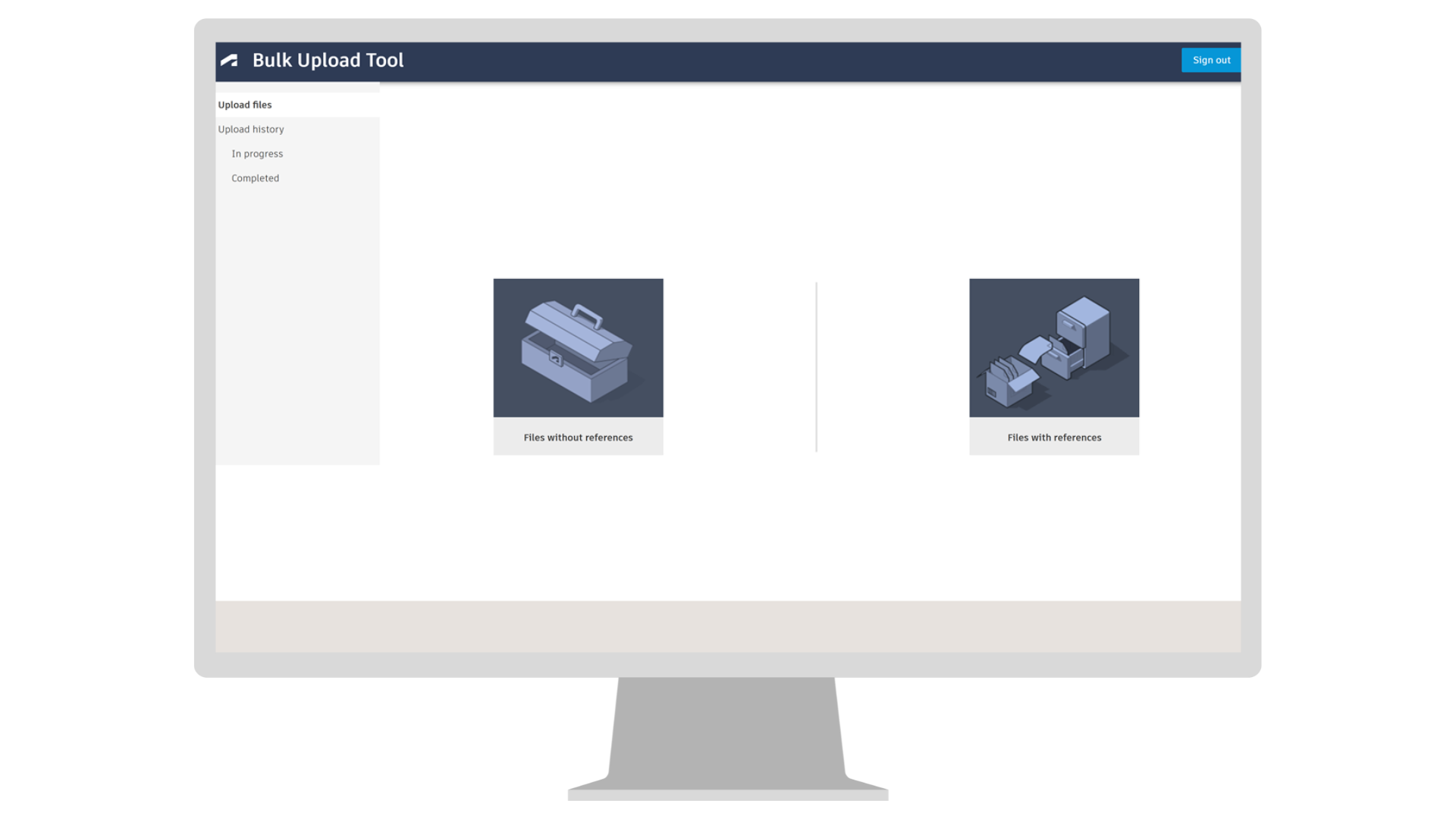
Files | Bulk Upload Tool
The Bulk Upload Tool streamlines the process of moving large local project folders—including AutoCAD and Civil 3D files—into Forma Data Management. It preserves folder structure, maintains DWG references, and monitors upload progress with detailed status tracking. Whether you're uploading files with or without references, this tool supports scalable, efficient bulk uploads that reduce manual effort and improve data integrity. Click here to learn more.
Issues | Reference Issues to Issues on Mobile
Teams can now reference one issue to another directly from their mobile devices. Previously available only on web, this update makes it easier for crews to connect related issues while on the jobsite.
Issues | Issue Details - Collapse/Expand Empty Fields
By default, empty fields are now collapsed, improving review efficiency for field teams. Users can toggle to view all fields—including empty ones—and the system will remember your preference. This update supports custom fields and dynamically reorders the layout based on field content, helping teams focus on what’s relevant.
Issues | Closed Issues Download/Sync Behavior Change
Closed Issues will no longer sync to mobile devices by default. This change helps improve loading times, enhances 2D/3D navigation, and helps field teams focus on active issues.
Issues | Forma Issues API – Issue Placements BETA
Project teams and developers can now use public APIs to create, read, update, and delete issue pins on 2D files and 3D models. This beta release gives teams full control over issue placement and visualization within custom viewers, while staying connected to Forma’s core issue data.
Library | Classification in Library
Account admins can now create and manage classification structures directly in Library. Whether you're using MasterFormat, UniFormat, Uniclass, or custom company codes, this feature helps teams organize project data with consistent codes and hierarchies.
By centralizing classifications at the account level, teams can streamline project setup, improve data clarity, and drive better reporting across workflows.
Library | Preconstruction Library
Administrators can use the Preconstruction Library in Account Administration to set up standardized cost and line item data for estimating workflows within the Forma Estimate tool. The library is accessible via the Preconstruction card in Library and is only available with the Preconstruction Bundle subscription.
Packages | Add Files to Multiple Packages
Package Managers can now select multiple packages as targets when adding file—directly from the file list, viewer, or version history. This update cuts down repetitive work and helps simplify file distribution across packages.
Reviews | Auto-trigger Reviews
The Auto-trigger feature is now generally available. Project Admins can automate review workflows by setting rules on folders in the Files tool. Upload, copy, or move a file—if it matches the rule, a review kicks off automatically.
Admins can apply triggers to multiple folders and use file names or attributes to control when reviews start. Once a review is complete, updated attributes can trigger the next step, keeping document workflows connected while reducing manual effort.
Reports | Insight Builder – Meetings Data
Meetings datasets are now available in Insight Builder, along with a dashboard template to help teams create custom reports. Track meeting frequency, participation, and follow-up trends to improve accountability and better support project communication.
Reports | Insight Builder – Sheets Data
Insight Builder now supports Sheets datasets and includes a dashboard template to jumpstart custom reporting. Quickly turn your Sheets data into visual insights that better support reporting needs for project controllers.
Reports | Takeoff Type Inventory
The new Takeoff Type Inventory Report in Forma Takeoff gives preconstruction teams a cleaner, more consolidated view of quantity data. Instead of breaking outputs into separate rows, this report rolls everything into a single line per Takeoff Type—making it easier to validate scope and move faster from takeoff to confident decisions.
Templates | Report Templates in Project Templates (Public Beta)
Admins can now set up report templates directly in Project Templates, starting every project with consistent reporting practices already in place. When a new project is created from a template, the same report templates are automatically copied over—no need to recreate them from scratch, helping to save time and supports company-wide standards.
Transmittals | Transmit with File Metadata
Transmittals now support file metadata, making it easier to send documents with the context your team depends on. When selecting files, senders can view key file attributes to help confirm the right files are included. These attributes also appear in the transmittal detail view and reports, giving recipients better visibility into what’s being shared.
To reduce manual steps and keep information consistent, Project Admins can create attribute groups that define which metadata gets added to each transmittal. Senders can then select the appropriate group during setup.
Coordination | Civil Tools for Model Coordination**
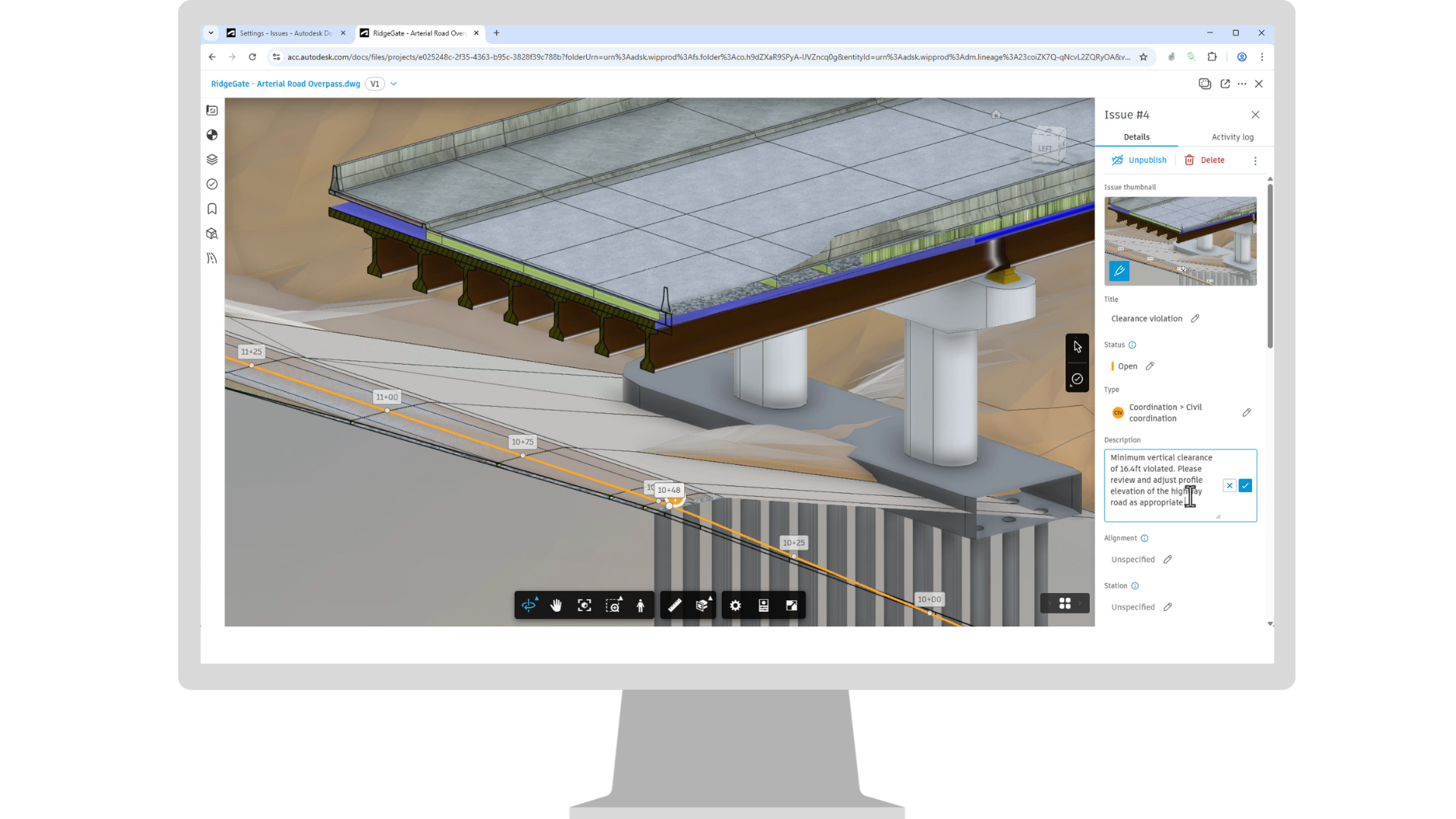
Bring Civil Tools capabilities directly into the Model Coordination Viewer. Navigate Civil 3D alignments with stationing, explore perpendicular cross sections, and use inquiry tools such as station offset measurement to add precision to your multidisciplinary reviews. Combine these features with existing Model Coordination workflows, including Clash detection, Issues, Object Table, Colors, and Advanced Filters for a streamlined experience in an aggregated model environment.
Coordination | Issues in Civil Tools**
When creating an issue, Civil Tools details such as alignment and profile selection, station values, cut planes, and visuals can now be captured in the snapshot. This gives teams clear insight into the Civil 3D design context behind the issue, making it easier to understand, track, and collaborate across the project.
Viewing | Civil Tools Updates**
Civil Tools now display key properties from the Civil 3D alignment at the current station in the Civil Tools panel. View critical information like geometry type, start and end stations, radius of curves and spirals, and lengths of curves, spirals, and tangents. Get the context you need for faster, more accurate reviews and better decisions without leaving the cloud.
Collaboration for Civil 3D | Connected Sheet Set Manager
With AutoCAD 2026.1.1 and Civil 3D 2026.2, users gain access to a more complete and familiar workflow, the Classic Sheet Set Manager, replacing the previous web-based experience and supporting essential civil functionality—including model views, sheet views, sheet indexes, and callout blocks.
This update delivers the same concurrent editing experience as Web SSM, while improving performance, reducing locking issues, and preserving consistency for experienced users working in Forma Data Management or locally. It also gives lighter-touch users the flexibility to use Web SSM or AutoCAD Web for publishing and eTransmit tasks.
Coordination | Batch Issue**
Batch Issue creation allows BIM professionals to batch generate multiple issues from numerous clashes, helping to streamline and standardize Issue creation.
Coordination | Clash Checks**
Simplify clash workflows with the ability to set and save the clash side panel configuration for reusing later. Configure which clashes to review, tolerance and how to group, and save the configuration for future use. Make it easier for different disciplines to get to the right information and focus on clashes relevant to them.
Coordination | Multi-property Clash Groupings**
Group clashes by multiple different model properties simultaneously, such as system type, category, and discipline, providing better organizing and facilitating more efficient issue and non-issue management. Understand clash patterns across multiple dimensions and make it easier to manage large volumes of clashes in complex models.
Cost Management | TradeTapp Integration (Phase 1)
Teams can now connect their TradeTapp account with Forma Build to unlock smarter contract management. This integration automatically syncs supplier company and qualification data into Cost Management—eliminating tedious manual entry, accelerating contract creation, and ensuring every detail is accurate.
Cost Management | GCPay Integration (Beta)
To provide greater flexibility and extend support for additional customer ERP systems, Forma Build now supports two methods of integration:
The new Cost Management in the middle integration is a streamlined connection allowing teams to synchronize data across upstream and downstream workflows with ease. Setup is simple through the project settings in Cost Management. Once connected, contracts created in Cost Management flow into GCPay, where subcontractors submit their schedule of values and payment applications. After processing in GCPay, actual costs are synced back into Cost Management, updating the budget and available to link directly to upstream budget payment applications for reference if required. This integration enhances visibility, reduces manual effort, and improves collaboration between field and finance teams.
Cost Management | Automatic Document Capture from Email Replies*
When replying to system-generated emails (e.g., RFQs, Contracts, SCOs, OCOs) with attachments, the files are automatically saved to the corresponding module’s Attachments section within the flyout. The email body is stored as a comment, and relevant stakeholders are notified via integrated alerts.
Cost Management | Create Potential Change Order Without Mandatory Cost Items*
A Potential Change Order (PCO) can be initiated without linking it to budget or cost items. This enables early stakeholder review and budget impact estimation without affecting the budget. Note, Cost items are required to progress the PCO to the next stage.
Cost Management | Compliance Enhancements*
New functionality will allow users to apply different compliance requirements based on the type of payment application—specifically for first, intermediate, and final payment applications. In addition, adding the ability to prevent contract sending based on budget code segment type.
Dashboards | Quality KPI Dashboard
Project teams can now monitor field quality performance in real time with a centralized Quality KPI dashboard in Project Home. This new dashboard gives project managers, superintendents, and QA/QC improved visibility into issue trends, with interactive filters and drill-downs that help drive faster decision-making and better outcomes.
Forms | Custom Tables
Forms now supports flexible data capture with the ability to create custom tables in form builder. When creating a form, you can now define column headers, specify data types required, and customize the options for selection.
Forms | Copy Form Templates to Projects
Save a copy of a Library Form template to a project, creating an unlinked copy that can be edited without changing the original. Maintain standard Form templates across projects with the flexibility to add fields based on specific projects' needs.
Forms | Mobile Sync Active Forms Only
Mobile app users can reduce the sync time and storage used for large projects, with the ability to choose to download only active forms, instead of all forms, when syncing the app.
Handover | Assets in Handover****
Admin can now add Assets to their Handover packages, with options to filter by category and status. This enhancement enables construction teams to incorporate detailed asset data alongside Sheets, RFIs, Submittals, Files, and Issues. By expanding the supported data types, teams can deliver more robust documentation that reflects the installed equipment, systems, and materials at turnover.
Handover | Enable Automatic Hyperlinks for Sheets in Handover****
Handover now retains automatic hyperlinks between Sheets in handover packages. This enhancement brings intelligent sheet navigation into offline PDFs, helping owners and facilities teams move through drawing sets with ease—no manual linking required.
RFIs | Reference to Workplan
Add a plan task as a reference from within the RFI reference picker. Easily create a direct link from an RFI to relevant plan tasks, making supporting information between tools easier to find.
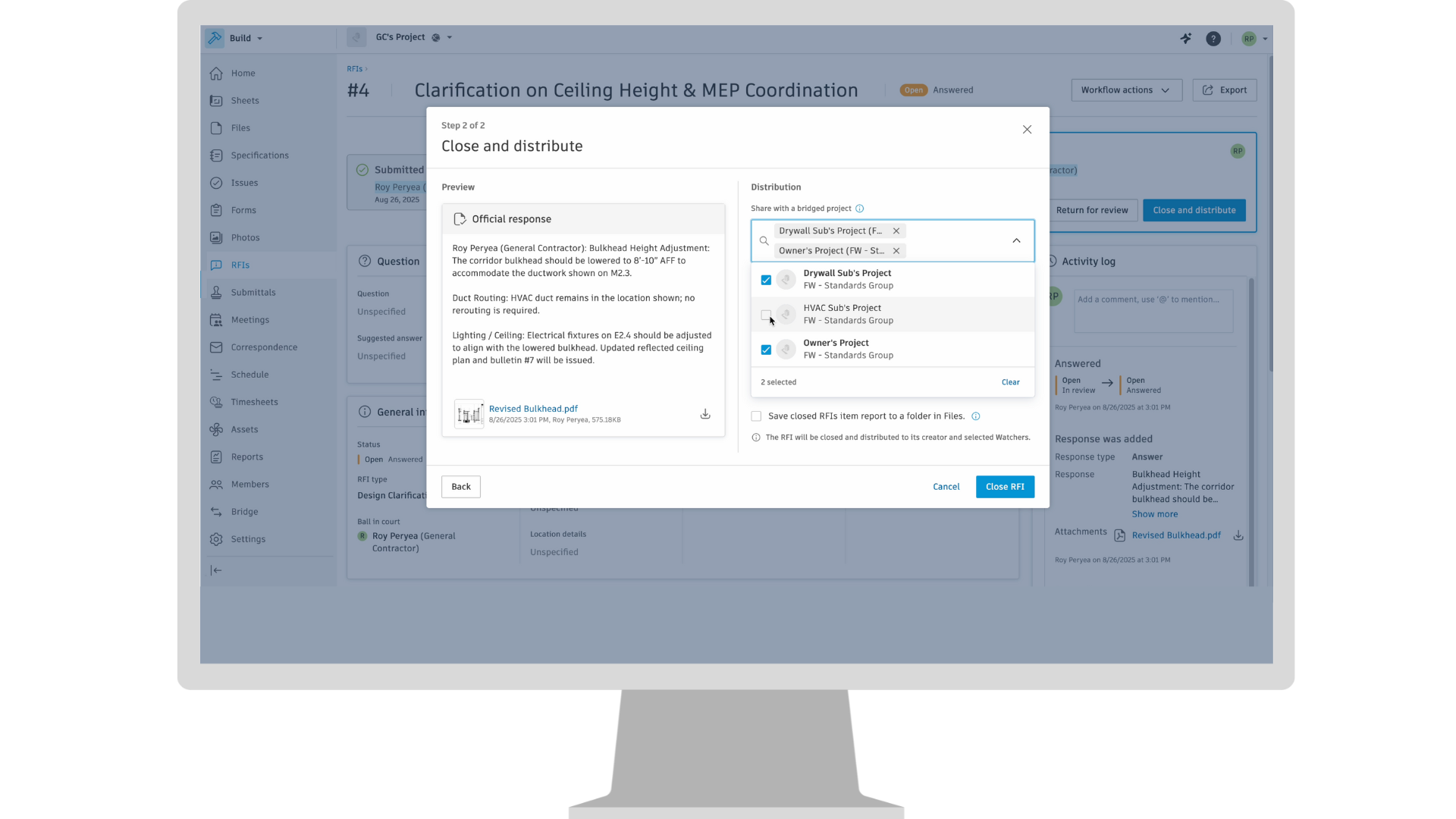
RFIs | Support Sheets References in Bridged RFIs
Bridged RFIs now include Sheets references. When an RFI is Bridged, any Sheets references will be copied over to the bridged project.
Submittals | Add References on Mobile
Stay active and up to date with the ability to add references to Submittals, now while on mobile! Improve traceability of information, encourage field user adoption, and ensure related data is easily linked and findable.
Workplan | Task Commitments
A new Commit option allows assignees to commit to tasks they are responsible for, confirming ownership and locking the assignee and date fields. Committed task dates can only be edited by Managers through Replanning, which requires the selection of a root cause and documents the change.
Workplan | Task Metrics
In a new Metrics dashboard, committed task data is used to generate charts to track task execution and measure plan performance, including Plan Percent Complete and Root Cause Analysis charts.
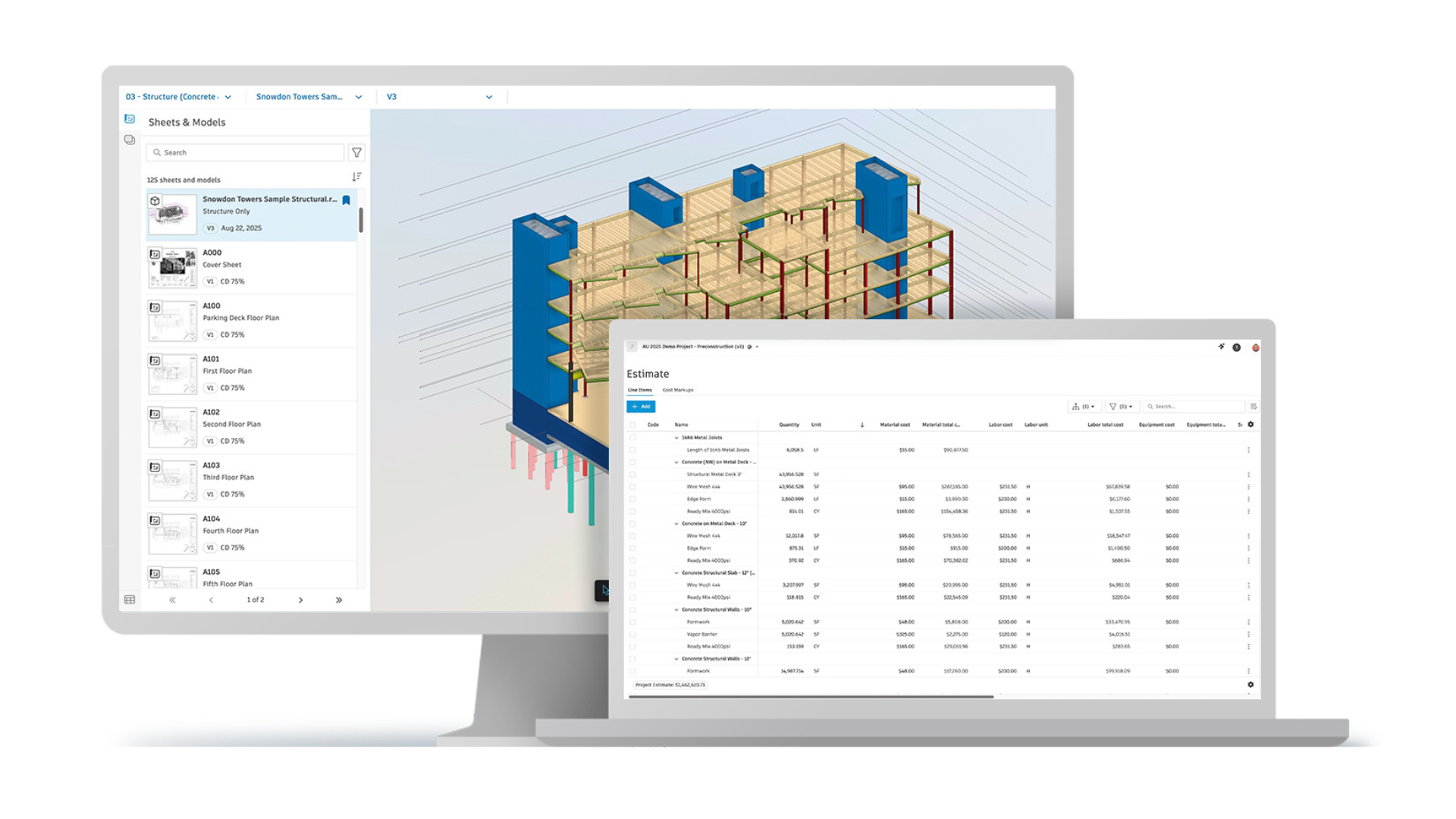
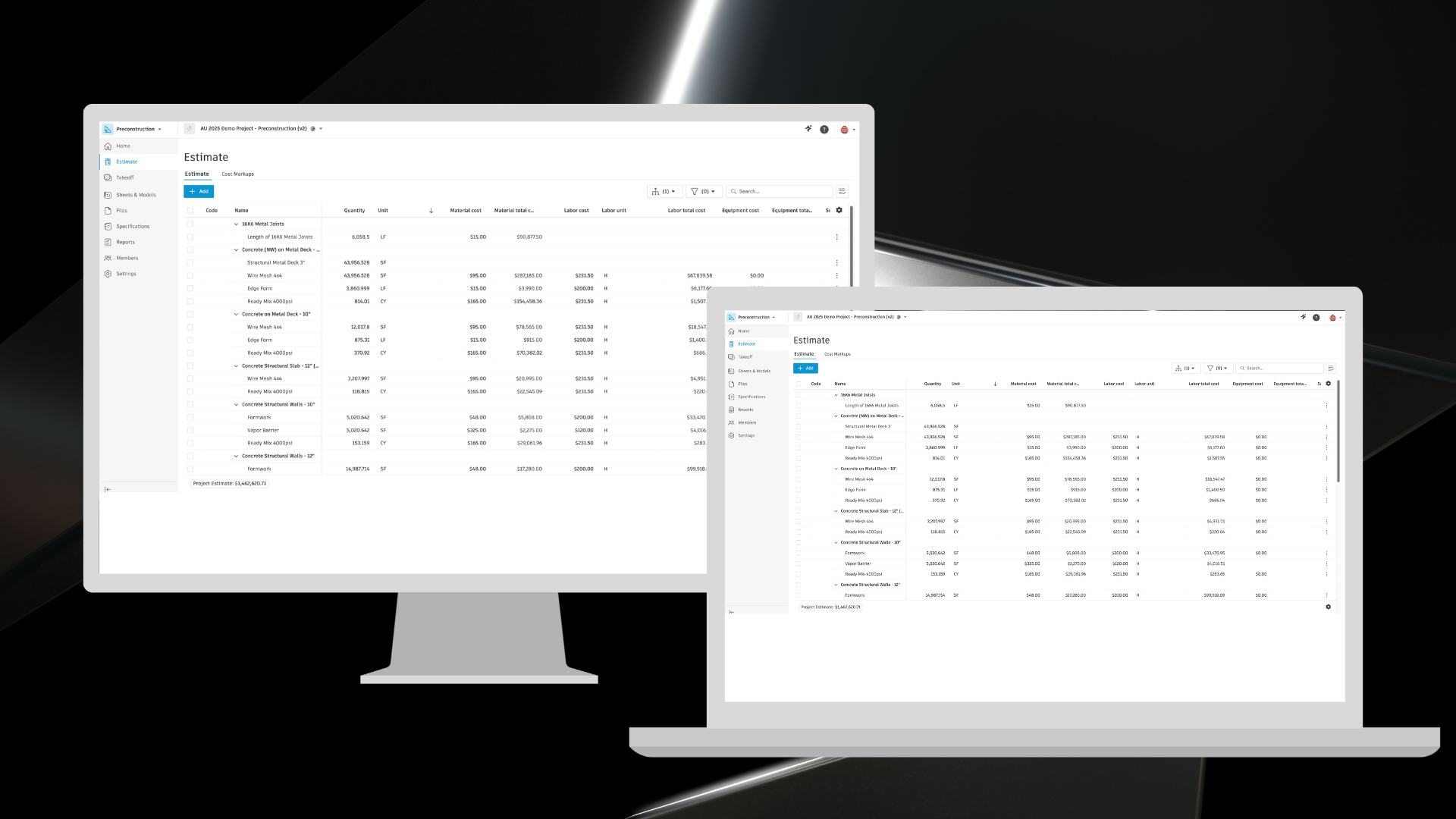
Estimating | Forma Estimate
A cloud-based estimating solution within Autodesk Forma that streamlines preconstruction workflows. Forma Estimate links 2D and 3D takeoffs from Forma Takeoff to cost, material, and labor calculations—enabling more accurate estimates in a single, powerful platform. Note: Forma for Preconstruction subscription required.
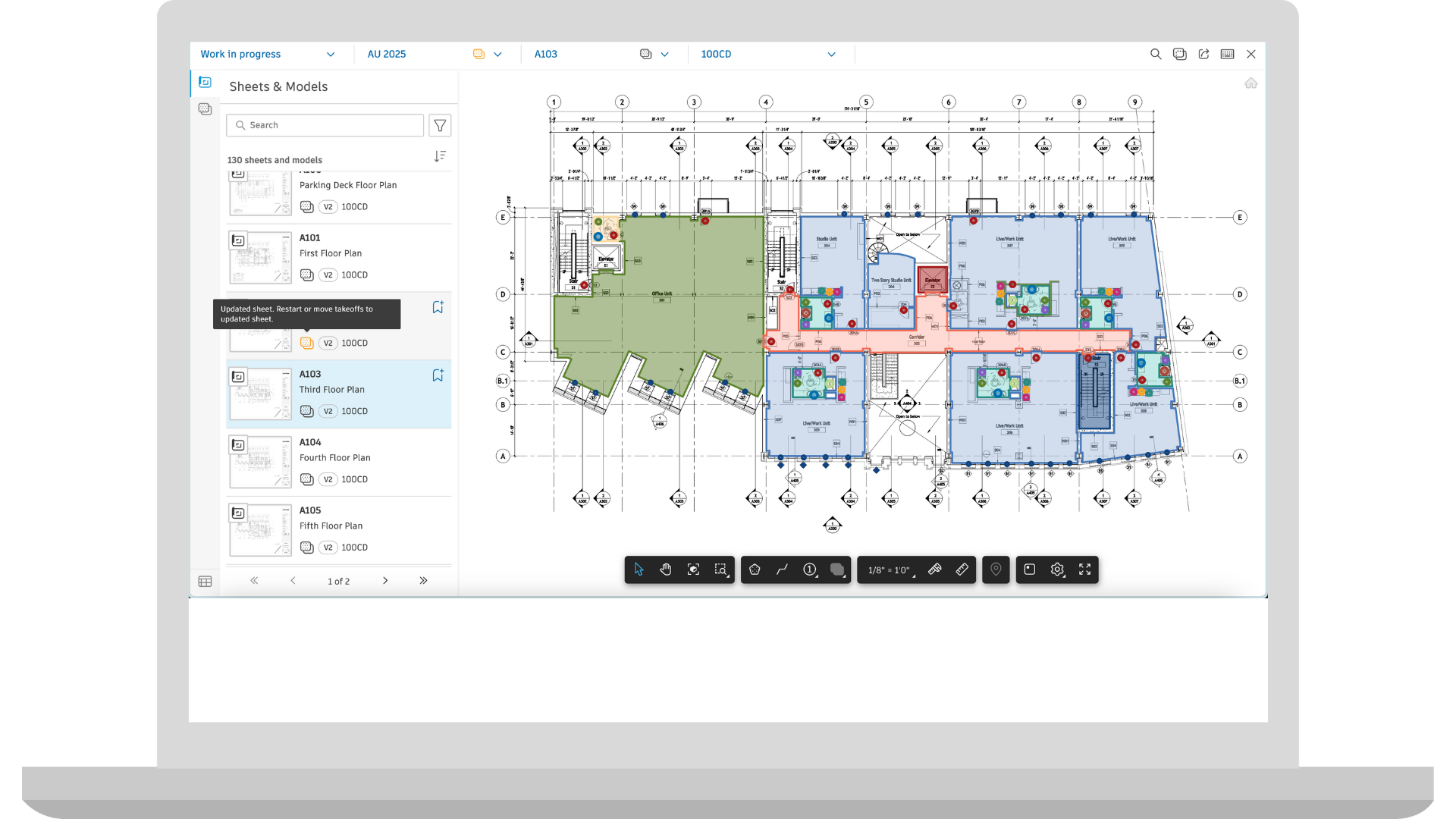
Takeoff | Count Marker Enhancements
Forma Takeoff users now have the ability to rotate count markers and a new rectangle shape, allowing users to better align placed items with PDF drawing elements for improved legibility and visual accuracy.
Takeoff | Improved Takeoff Type Management
When Forma Takeoff users adjust an input value for a takeoff type, they are prompted to apply the change to all existing takeoff in the package, all takeoff on the current document, or only to future takeoffs, giving them precise control over how adjustments are applied. Additionally, when reassigning a takeoff object to a different type, a prompt appears if any required input values are missing. Members can choose to retain the values currently assigned to the selected takeoff or inherit default values from the target takeoff type. These enhancements help support accurate quantity calculations and simplify the management of formulas tied to the new takeoff type.
Takeoff | Visual Indicator for Improved Navigation
Forma Takeoff now includes a persistent visual indicator that helps users quickly identify which takeoff packages, sheets, and models contain takeoff data. This enhancement appears while working within the Packages tables and the Takeoff viewer, whether navigating through the Sheets & Models panel or using the document drop-down menu at the top of the viewer. The indicator highlights documents with takeoff and changes from grey to yellow when a new version of a taken-off document is uploaded to the project. Members can easily spot sheets or models that include takeoff, streamlining navigation, and reducing reliance on filters.
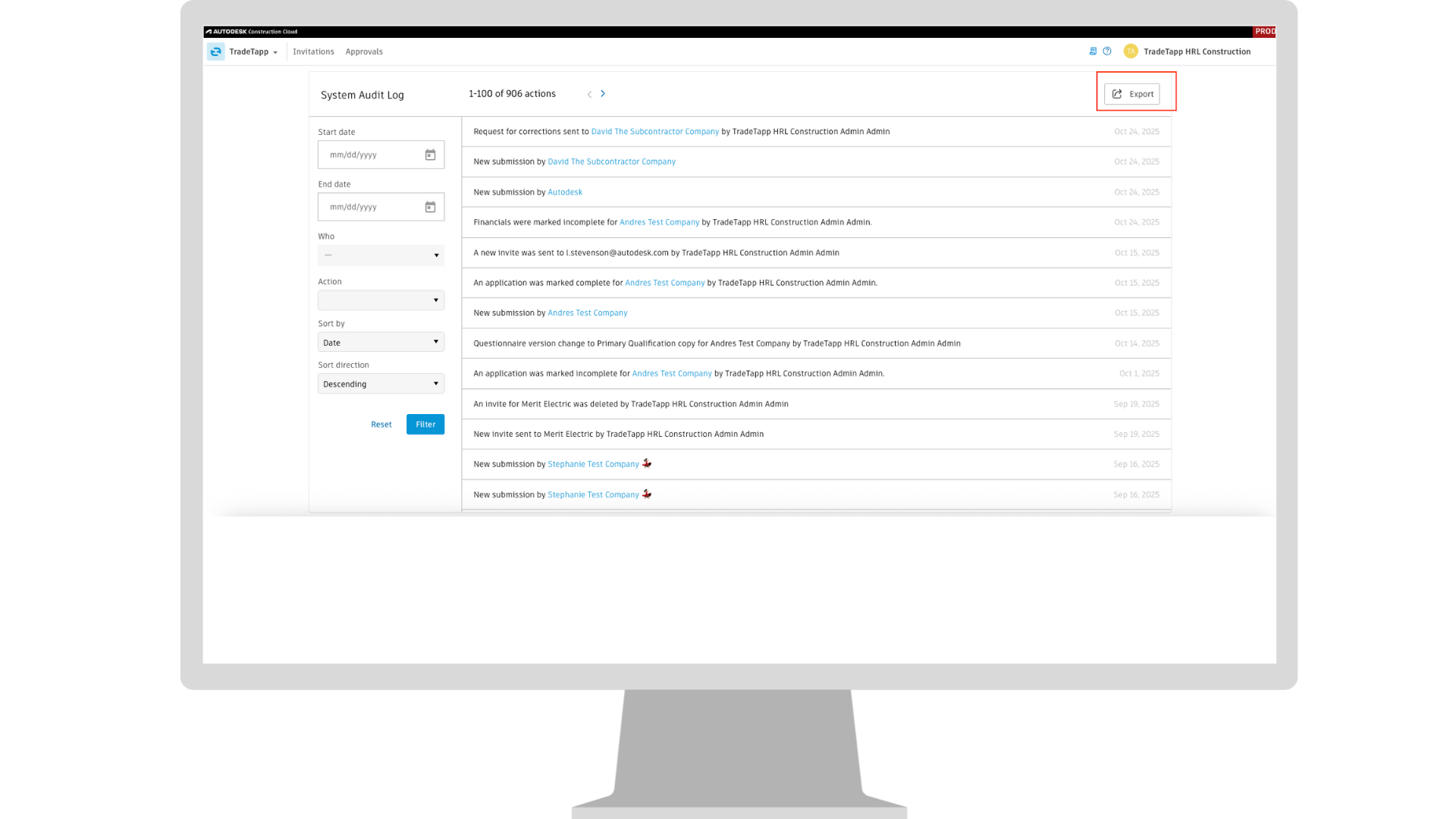
Qualification | Usability Enhancements
TradeTapp introduced several enhancements to improve usability and data management. Admins now have exclusive control over approval deletions, reinforcing oversight. A new export feature allows teams to download the audit log for easier tracking and compliance. The vendor grid gains additional columns to surface application analytics, offering deeper insights into vendor activity. Plus, right-click support enables opening items in new tabs for faster navigation and multitasking.
TradeTapp | Master Service Agreement (MSA) Support
You can now upload and manage Master Service Agreements (MSAs) directly in TradeTapp. Once uploaded, these agreements are accessible in TradeTapp, and in the near future will be surfaced in other integrated tools such as Cost Management in Forma Build.