When it comes to designing and building smarter, accuracy is everything. Whether you're an architect, engineer, or contractor, you need a solid understanding of the site's existing conditions to make confident decisions on and off the jobsite.
That's why more and more Autodesk Construction Cloud (ACC) customers are turning to reality capture tools and tech. These solutions can generate complete, high-quality point clouds of their jobsites, which helps ensure that designs align with real-world conditions.
With the right data, teams can reduce surprises, delays, and costly rework.
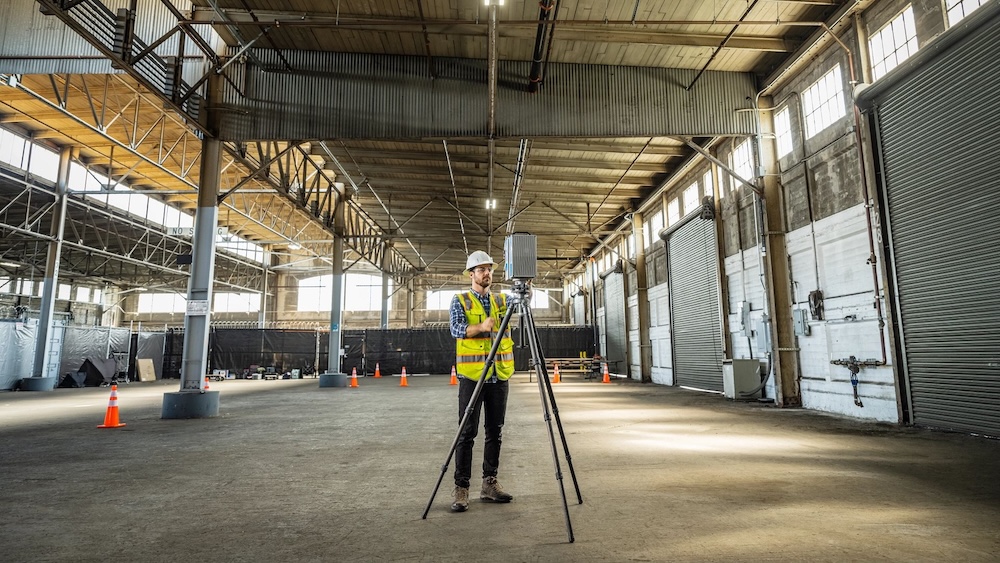
Laser scanning is the engine that drives modern reality capture. Also known as high-definition surveying (HDS), it maps out existing conditions by firing millions of laser points to create a detailed 3D "point cloud" of the site.
In construction, laser scanning can be used to capture data and provide teams with information on every nook and cranny on the jobsite.
Laser scanning is also useful for projects involving existing buildings. Laser scanners capture the current condition of a structure so teams have a highly accurate 3D point cloud of a region or the entire building.
Laser scanning can make a massive difference across the construction project lifecycle. Consider the following:
Laser scanning is quickly becoming the go-to starting point for site design, sometimes even before BIM. With scan-to-BIM workflows, teams can generate a 3D model of existing conditions, which reduces assumptions and guesswork from the start. It's a smarter, faster way to kick off design, and it helps you make better decisions early on.
During construction, laser scanning is a game-changer for coordination. It helps teams detect potential BIM clashes between systems like HVAC, plumbing, and electrical before they become costly rework. Plus, the data can be shared across teams to support remote collaboration and milestone documentation. Whether you're handing work off to another trade or double-checking a recent install, scanning keeps everyone aligned and reduces surprises on-site.
Laser scanning doesn't stop when construction ends. The detailed 3D data creates a digital as-built record that owners and facility managers can rely on. From retrofits to renovations and even future expansions, having an accurate model of your building's layout helps streamline construction planning, reduce downtime, and avoid costly errors. It's the ultimate long-term asset for smarter operations and maintenance.
While laser scanning offers massive benefits, it also comes with a few hurdles. Don't get us wrong—the payoff is worth it. But you may need to navigate a few bumps along the way. Here's what to look out for:
Laser scanning equipment isn't exactly budget-friendly. High-quality scanners and supporting software can be expensive, which may be a barrier for smaller teams or firms just getting started.
And even when the equipment is available, scheduling time to access it—especially on a busy jobsite—can be tricky. That's why planning ahead and evaluating ROI are key.
Point clouds and 3D scans aren't always easy to interpret, especially for teams outside of design. Without proper training, even the best scans can go underutilized. Building internal expertise takes time and resources, and not every company is prepared for that investment upfront.
Point clouds are data-heavy, and often exceed several gigabytes to terabytes. As such, those files can be tough to store, render, and share across platforms or with subcontractors.
To make the most of laser scanning, teams need a strategy for handling and distributing large files efficiently.
ACC offers a unified platform to seamlessly connect reality capture data with your project workflows. With ReCap Pro, you can transform laser scans and drone images into accurate, actionable 3D models, so real-world insights are available to your entire team in the cloud.
Autodesk ReCap Pro lets you create highly accurate 3D models from photographs or laser scans to transform real-world objects and environments into digital assets.
Here are some examples of the solution in action:
ReCap Pro and ACC enable you to search, access, and share reality capture data easily—anytime, anywhere, and at any point in the project. Not only that, but Autodesk ReCap Pro is the only reality capture software that provides visualization, data sharing, point cloud management, and interactive extraction of information, all in the cloud.
All of that enables you and your team to:
Let's take a closer look at the benefits of ReCap Pro + ACC:
Laser scanning produces massive datasets that can be challenging to share and review. This pain point is particularly evident when team members are working from different locations or across large-scale projects.
Take, for example, a dataset containing 128 scans covering 750,000 square feet of a factory. Traditionally, sharing this much data would require physically copying and sending files—a time-consuming and inefficient process.
That's where ReCap Pro and ACC come in. Together, they remove barriers to collaboration by allowing you to:
Not everyone on your project team is a designer—and they shouldn't have to be to engage with laser scan data. ReCap Pro and ACC make it simpler for non-design stakeholders to access, understand, and act on reality capture insights.
With features like automatic surface classification and intelligent decimation, you can:
Tired of jumping between tools and files? With Model Coordination, you can bring all your project data together—no more siloed workflows or missing context.
Model Coordination integrates:
Design is only as strong as the data behind it. ReCap Pro and ACC make it easier to verify and enhance your designs with point cloud insights.
With ReCap Pro + ACC, you can:
From roads and railways to utilities and water features, ReCap Pro simplifies the path from scan to design. That way, your team can work faster and smarter.
Bringing your reality capture data into ACC doesn't have to be complicated. Here's how to streamline the process in just a few key steps.
Start with the right tools. Whether that's drones, laser scanners, or mobile mapping systems, ensure your team is equipped with the solutions that effectively capture site conditions. For best results, follow these best practices:
Once captured, use ReCap Pro to turn raw scans into detailed 3D models. Autodesk's powerful processing tools help you clean, classify, and manage your data effectively, transforming it into usable assets for design, construction, and beyond.
Publish your processed ReCap projects directly to Autodesk Docs, part of the unified ACC platform. Organize your data with folders, naming conventions, and permissions to keep teams aligned and workflows smooth. Once uploaded, your team can access and collaborate on the data from anywhere.
Leverage the ReCap Viewer in ACC to navigate, measure, and mark up your point cloud data directly in the browser. Use built-in tools to extract features like curbs, gutters, or ramps so you can spot issues early and ensure design accuracy.
And remember that reality capture isn't just for documentation. It's a powerful tool to drive better decisions at every phase of the project.
Whether you're designing, building, or managing a facility, having accurate site data gives you the clarity and confidence to do your best work.
Thanks to ReCap Pro with Autodesk Construction Cloud, you have the ability to not just collect data, but turn it into insights that lead to better collaboration and outcomes at every stage.
Want to get the most out of reality capture? Explore Autodesk's reality capture solutions and start building with precision, speed, and smarter workflows.