At Autodesk, our commitment to our customers remains unwavering: to provide construction teams with the tools they need to work smarter and faster. In July, we are thrilled to share 30+ product releases that will be rolling out across the Autodesk Forma (formerly Autodesk Construction Cloud) platform to bring even more value to our users.
With updates across Autodesk Forma Industry Cloud Platform, Forma Design Collaboration, Forma Build, Forma Takeoff, and ProEst, let's dive in to discover how these enhancements can supercharge your construction processes.
* Autodesk Forma Industry Cloud Platform
** Forma Design Collaboration
*** Forma Design Collaboration, Forma Build
**** Forma Build, Forma Data Management
***** Forma Data Management, Forma Build, Forma Takeoff
Admin (Account) | BIM 360 Business Units in Autodesk Forma
Account Admins that have Business Units defined in BIM 360 will now find them visible in the Projects tool in Autodesk Forma.
Admin (Account) | View Account Role Members
The Account Admin tool will provide administrators enhanced visibility into role assignments. Account Admins will be able to view members assigned to various roles within their account and the specific projects they are involved in. These insights will empower administrators to make informed decisions and understand the impact of any changes to role access.
Admin (Account) | Project Filtering Options
Account Admins can now filter projects by status, type, project number, or platform. These new filtering options help streamline project administration, making it easier to stay organized and quickly find the projects that matter most.
Bridge | Progress Indicators in Bridge Detail Pages
Users can now monitor the progress of data being shared across projects with enhanced visibility. Bridge detail pages now display a live count of items successfully copied and those still pending, making it easier to track Bridge activity.
Files | Issues Indicator Column in Files, Packages, and Reviews
Project members now have access to the Issues Indicator column in Files, Packages, and Reviews. This feature provides visibility into the number of active Issues linked to each file, enabling more effective Issue tracking and resolution.
Files | Search in Selected Folders
Users can now run a single search across multiple selected folders, making it easier to quickly find the right information by keeping your search focused on only the folders that matter.
Files | Mobile Search and Filter by Custom Attribute
Field teams can now search and filter files by custom attributes in both list and table views on mobile devices. This feature helps to improve search results, enhancing on-productivity and bridging the gap between search capabilities on web and mobile.
Issues | Web UX Improvements
Several updates will help project teams to navigate issues more efficiently.
Mobile App | In-Project Sync
Mobile app users can now sync project data directly inside any tool page. Just one tap: the data downloads and the projects are up-to-date.
Packages | Packages Support in Project Templates
Project Admins can now assign package managers and create empty packages in template projects, making project setup quicker and easier.
Reports | Data Connector – Autodesk Forma Issues Attachment Table
Issue attachments have recently been introduced to Autodesk Forma, and with this update, the attachment metadata for issues will now be accessible through the Data Connector.
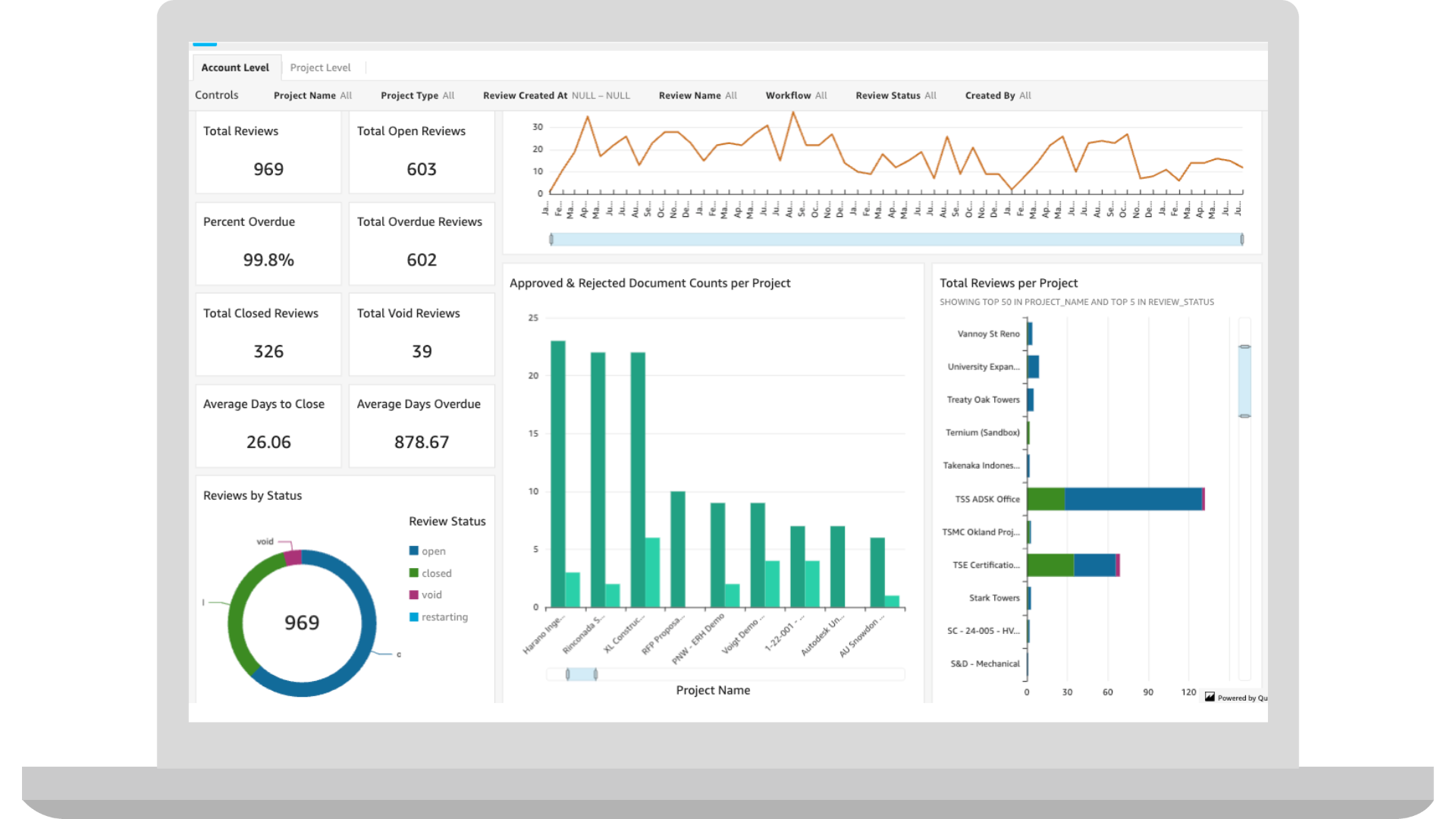
Reports | Insight Builder - Reviews Datasets and Dashboard Templates
"Reviews" data coming from Docs is now available in Insight Builder, along with a dashboard template which includes metrics such as Count of Open Reviews, Count of Overdue Reviews, Average Days to Close Reviews, Approved vs Rejected Document Counts Per project, etc. This means that Docs users can create custom reports and dashboards for the Reviews workflow, to better support the reporting needs for document controllers.
Reports | “Removed” User Display
Removed users will appear in the format of "User Name (Removed)" in reports. This ensures the actions performed by a former project member are recorded accurately in reports.
Reviews | Review Step One-Click Skip
Project admins now have the option to skip a review step with a single click, allowing for quick resolution of stalled reviews. This improves flexibility and control in the review process and helps keep projects on track.
Transmittals | Generate Summary Report for Selected Transmittals
Users can now generate a report for multiple selected transmitters.
Viewing | Model Viewer Update
The new 3D model viewer on mobile is now the standard viewer on the Autodesk Forma mobile app.
Viewing | PDF Multipage Viewer
The LMV Viewer experience is not optimized for multi-page consumption, causing users to rely on other software to view multi-page text-based pdfs. A new multipage PDF viewer will be delivered to Autodesk Forma replacing the existing browser option.
Coordination | Batch Issue Creation (Beta)
Batch Issue creation allows BIM professionals to generate multiple issues from numerous clashes at once, helping to streamline and standardize Issue creation.
Coordination | Moveable Pushpins (Beta)
Model Coordination users can now adjust the locations of Issue pushpins once they have been placed, without needing to delete them. The placement model will be updated accordingly to reflect these changes, ensuring accurate coordination context.
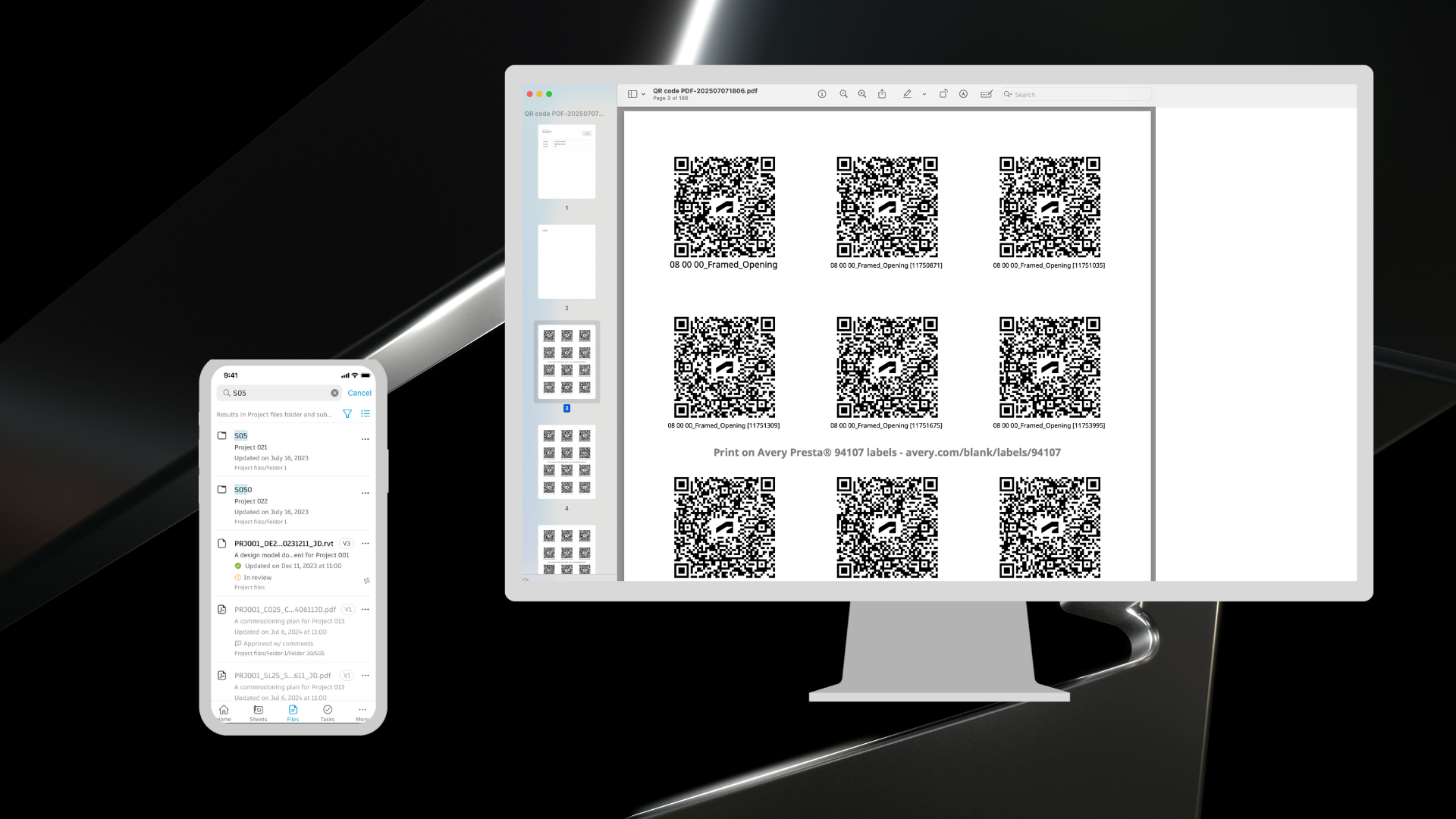
Assets | QR Generator
Project teams can download and print QR codes for assets, as well as generate a formatted report for multiple QR codes at a time. Tag assets in the field faster with the Assets QR generator.
Assets | Bulk Edit Assets on Mobile
Project teams can now select multiple assets from the asset list on their mobile devices to update asset statuses, attributes or references at a single time. Accelerate asset workflows in the field with bulk edit on mobile.
Assets | Model Review Page Revamp
The Review screen on the model mapping page has been reworked to give a better visual indicator of what will happen to assets on a model update.
Cost Management | Compliance Enhancements*
Several compliance enhancements have been added, including support for condition-based requirements for change orders and contracts. For example, the ability to set a condition where Supplier Change Orders (SCOs) can't be created unless the contract is in “Executed” status. Additionally, new functionality supports compliance for RFQs, which means a supplier responding to a request for a quotation will be required to add relevant compliance documentation to their submission.
Cost Management | E-Signature Adapter Enhancements
Several Enhancements are coming to the E-Signature Adapter:
Cost Management | Quantity Based View in Cash Flow and Connection to Date Range Resources*
For enhanced flexibility and more accurate forecasting, date range resources are now available for distribution in the cash flow view; with an option to view qtys per period as an alternative to $$ and the ability to add resources can be used bi-directionally.
Forms | Mobile Navigation Enhancements
Field teams can now jump to any form section easily and pick up where they left off with auto-scroll to last position. Accelerate data entry in quality and safety checklists and more with Mobile Navigation Enhancements.
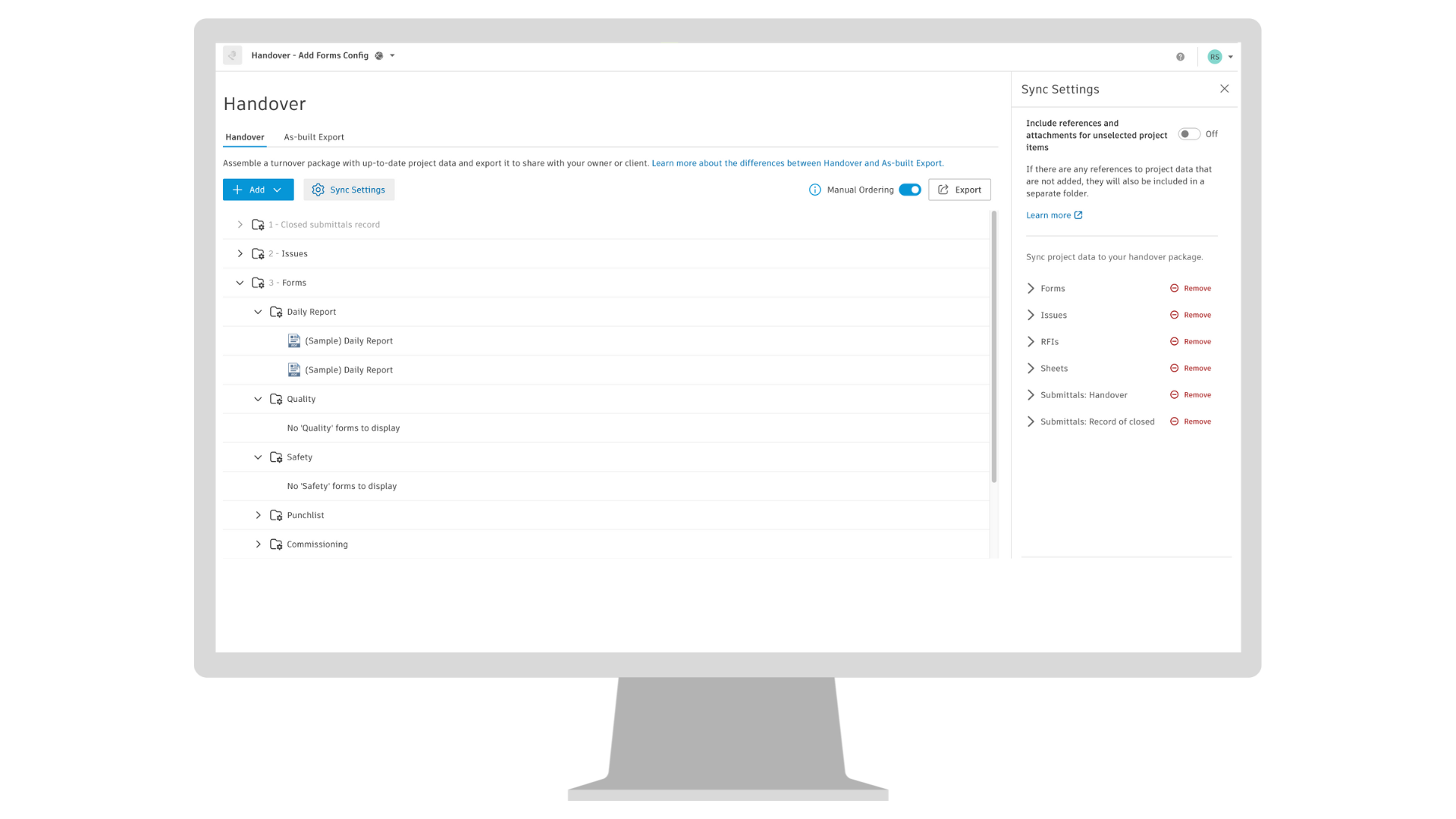
Handover | Forms in Handover****
Handover users will benefit from a more comprehensive Handover package with the addition of Forms as a supported data type in the Handover tool.
RFIs | Display Most Recent Review Attachment
RFI responses and actions will now be listed in chronological order on the RFI page. When reviewing an RFI response, it is now easier to identify all previous responses since they are at the top.
RFIs | List Responses in Chronological Order
RFI responses will now be listed in chronological order, making it easier to identify the most recent responses and up-to-date responses with attachments and comments.
RFIs | Public APIs
Developers will be able to use new RFI APIs to help establish a connection between Forma Build and certain outside software solutions.
Submittals | Cover Page for Package Detail Report
A cover page is now included in the beginning of a package detail report. This page provides a quick detailed view of the status of items in the package, allowing team members to understand risk, which items need attention, and track reviews easier.
Submittals | Cover Page for Package Detail Report
A cover page is now included in the beginning of a package detail report. This page provides a quick detailed view of the status of items in the package, allowing team members to understand risk, which items need attention, and track reviews easier.
Submittals | Increased Number of Items in Summary Report
The number of Submittal items that can be included in a summary report export has increased. In an Excel export, the limit has increased from 2k to 10k items. In a PDF export, the limit has increased from 1k to 5k items.
Submittals | List Responses in Chronological Order
Submittal responses will now be listed in chronological order, making it easier to identify the most recent responses and up-to-date responses with attachments and comments.
Takeoff, Data Connector | Takeoff Data (Beta)
Data Connector users can now extract takeoff data, including key data points such as classifications, takeoff types, takeoff items, quantities, unit costs, and carbon data.
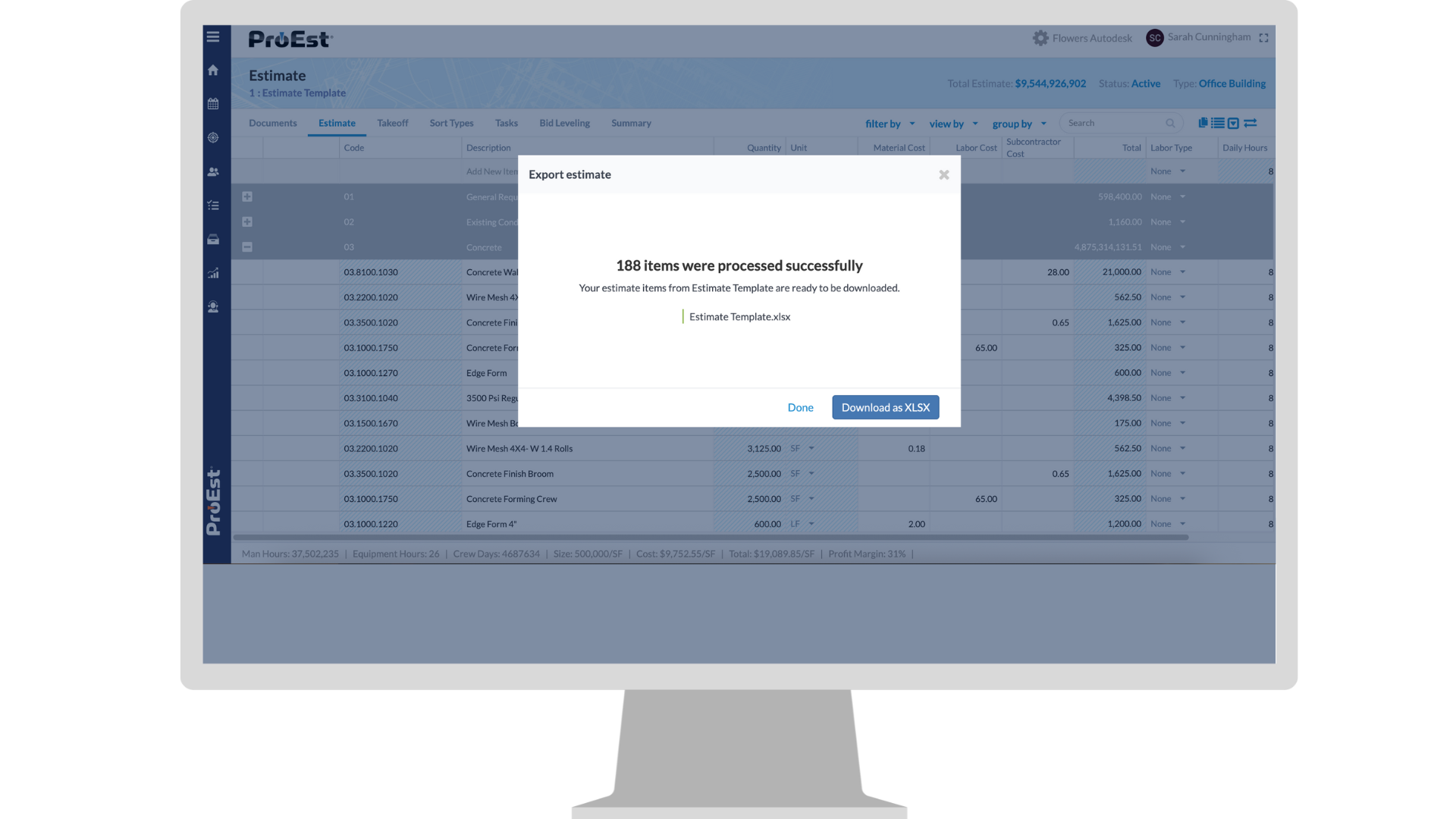
Estimating | Export Estimate Items
ProEst users will have the ability to export their estimate items, making it easier to share and leverage estimating data externally.